


The Finals is a new shooter that fans of the genre can dive into. Many want to play the game but do not know how to create a group to play with friends. We will show you how to do that.

Creating a group in The Finals, here’s how: To create a group in The Finals, you first need to press the white plus button next to your character on the left or right in the main menu. Ideally, it should say “Invite to group” above the plus.
Once that is done, you will find yourself in your interaction menu. In this menu, you can click the plus with the yellow background next to your friends to invite them to your group. They must be in their own game in the main menu and can confirm it once they receive the invitation.
Here’s how to add friends in The Finals: In the interaction menu, you can see two friends lists and your group. The middle friends list is platform-dependent and shows your friends on your platform who have played The Finals before. You can also see whether they are online.
On the right side, you will see your The Finals friends. These can be players playing The Finals on other platforms. To add new friends, you need their Embark ID. You can find this in the top left of the interaction menu.
If you have your friends’ Embark IDs (they should look like NAME#1234), you can add them by clicking the yellow button labeled “Add Friend”.
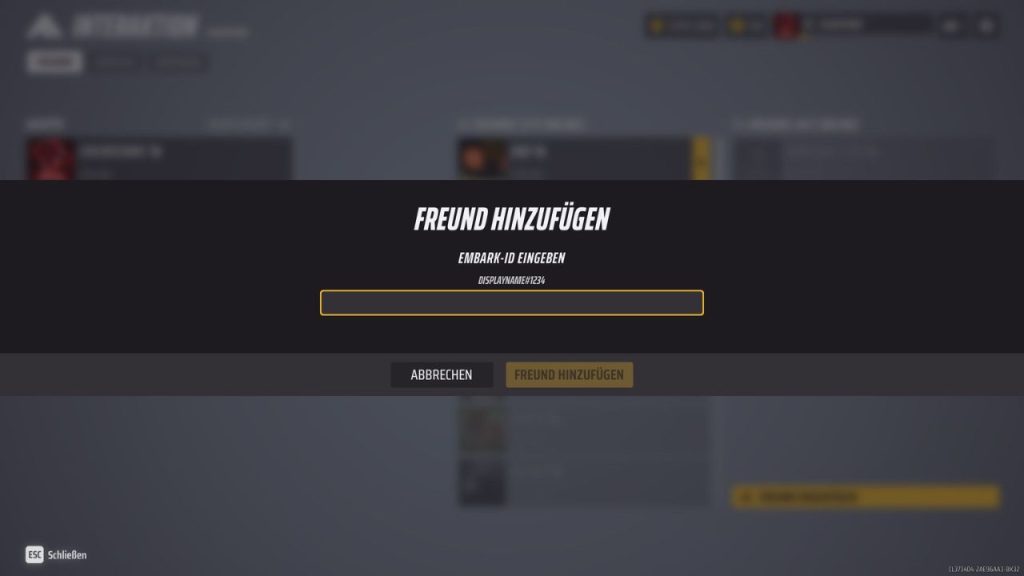
In this, you enter the Embark ID of your friends and add them by clicking the new “Add Friend” button. If the system displays “Searching…” or “Search failed”, you have entered the wrong Embark ID.
Once your friends have confirmed the friend request, you can invite them to a group as described above.
While you wait for your friends, you can take a look at the 10 best weapons in The Finals .

Your opinion is important to us!
Do you like the article? Then let us know!