


As a skilled controller player, MeinMMO author Maik Schneider occasionally has problems with keyboard and mouse controls. In the MMORPG Lost Ark, the controls are a real obstacle for him, but the controller support saves his gaming fun.
For a long time, the PC was just a machine for me, enabling strategy and building games. However, in recent years, the computer has increasingly come into my gaming focus – thanks, in part, to my work here at MeinMMO.
I have WASD down. I can also handle sliding, sprinting, and jumping. But what on earth is going on with the controls in the MMORPG Lost Ark?
I want to show you the problems I had with keyboard controls and give recommendations for your button mappings with the controller.
Keyboard leads to total failures when fighting and questing
As a budding artillery expert, I keep firing my rockets at the NPCs, confusedly using the wrong consumables when I panic and want to drink a potion, or I desperately search for the Y button for my ultimate.
Additionally, there’s movement by mouse click in combat. WASD is so deeply ingrained in my brain as a control scheme that it constantly leads to unpleasant mix-ups.
And then there’s the interact button on G … ON G!!! To be honest: The controls of Lost Ark with mouse and keyboard are terrible.
After several hours of finger stew and unnecessary deaths, I tried the controller controls. And what can I say: Lost Ark can be a lot of fun when the controls don’t get in the way.
Learn more about the success of Lost Ark in our video on the subject:
Controller controls are a blessing for confused brains
How does the controller control work in Lost Ark? The system is fully implemented and allows you to freely map the essential buttons.
If you want to tap around in the countless menus, the right stick functions like a mouse and lets you control the cursor.
Overall, the controller works 1A in Lost Ark. Plug it in, get started, done. Mouse and keyboard can still be operated alongside – the transition is fluid and you theoretically don’t have to adjust anything.
At first, I still had the mouse and keyboard nearby. After a few hours, I only use the mouse for inventory and reward management: There, the controller can’t keep up.
Especially in fights and quests, the controller is a real relief. If you’re struggling with the keyboard controls or come from consoles, you should definitely try the controller in Lost Ark.
Lost Ark: Recommendations for controller mapping
What should I set for the controller controls? After a few hours with the controller, I felt really comfortable in Lost Ark.
I also made some adjustments to make the ability and item slots better fit the buttons:
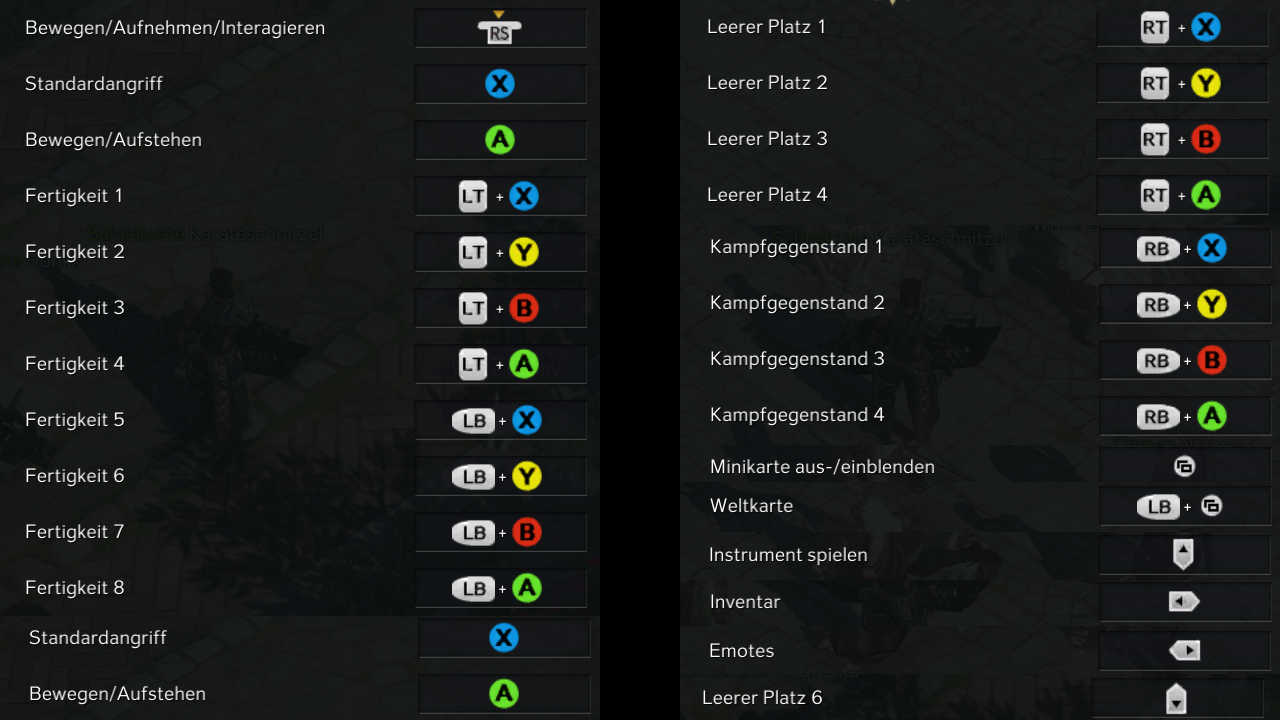
Maik’s controller control abilities
- Ability 1: LT + X
- Ability 5: LB + X
- Ability 2: LT + Y
- Ability 6: LB + Y
- Ability 3: LT + B
- Ability 7: LB + B
- Ability 4: LT + A
- Ability 8: LB + A
- Roll: A
- Standard attack: X
Map the top abilities row to the back trigger (LT) and the bottom row to the front (LB). I arranged the other side with item slots and combat items the same way.
Maik’s controller control items/combat items
- Empty Slot 1: RT + X
- Empty Slot 2: RT + Y
- Empty Slot 3: RT + B
- Empty Slot 4: RT + A
- Empty Slot 5: RT + RT + X
- Slot 6 (Mount): Digital cross down
- Combat item 1: RB + X
- Combat item 6: RB + Y
- Combat item 7: RB + B
- Combat item 8: RB + A
For the map, I also swapped the buttons so that I have the transparent overview map on the small “SELECT” button, and for the full map, I still use the front trigger [SELECT + LB].
Maik’s controller control other
- Interact: Press right stick
- Inventory: Digital cross left
- Instrument: Digital cross up
- Emotes: Digital cross right
- World map: SELECT + LB
- Map: SELECT
For a quick overview of all the important buttons for fighting and questing at the start, I’ve packed everything into an image for you:
However, the controller does reach its limits with certain mechanics: If you have a engraving that requires you to spam exclamation marks in the chat, unfortunately, mouse and keyboard are better suited.
Does the mouse and keyboard control also frustrate you? Have you tried the controller in Lost Ark? Or were you pros from the very first moment?
Feel free to leave us a comment and share your thoughts with us. I’m really glad that I’m not stirring up any finger stew in Lost Ark anymore.
Are you now looking for more guides to Lost Ark? Then check out our comprehensive overview: Lost Ark Guides: All tips, tricks, and builds in the overview

Your opinion is important to us!
Do you like the article? Then let us know!