
Steam shows you in the annual review how your gaming year looked on the popular gaming platform. On MeinMMO you can find out how to view the recap and what it contains.
The year 2022 is coming to an end – the perfect time to look back on the past 12 months and see how you spent your time. For many gamers, besides family, work, and other things, their hobby, gaming, was probably high on the list.
But what exactly did we play in 2022? The new CoD: Modern Warfare 2 or Elden Ring, the game of the year? The popular gaming platform Steam now helps you with an annual review to better categorize your year.
One of the most popular games of the year was certainly Elden Ring, which even received its first expansion in 2022, which you can see in the following trailer:
What does the Steam annual review tell you? The Steam recap reveals some numbers about the games you played on Steam in 2022. These include:
- How many games and how many new games you played in 2022
- your most played games
- How many days you played on Steam in a row (maximum and average)
- Which genres you played how much (shown in a radar chart)
- Which games you played how much in the individual months (shown in a bar chart)
Especially the charts for the genres and the games of the individual months are interesting if you want to categorize your year 2022 more precisely.
How do you see your annual review on Steam? If you want to view your Steam annual review, there are several ways to do so. For example, when you open the Steam app on your PC, you might get a pop-up window that informs you about the recap and from which you can open it directly.
If you do not see the window or close it and still want to take a look at your annual review later, you can do so through the app or the browser version of Steam.
Log in with your Steam account and click at the top of the Steam homepage on “New and Noteworthy” in the blue bar. A list will now open where you can also access special offers and similar items. At the very top of this list is now “Steam Recap 2022”. Click on it, and your annual review will open.
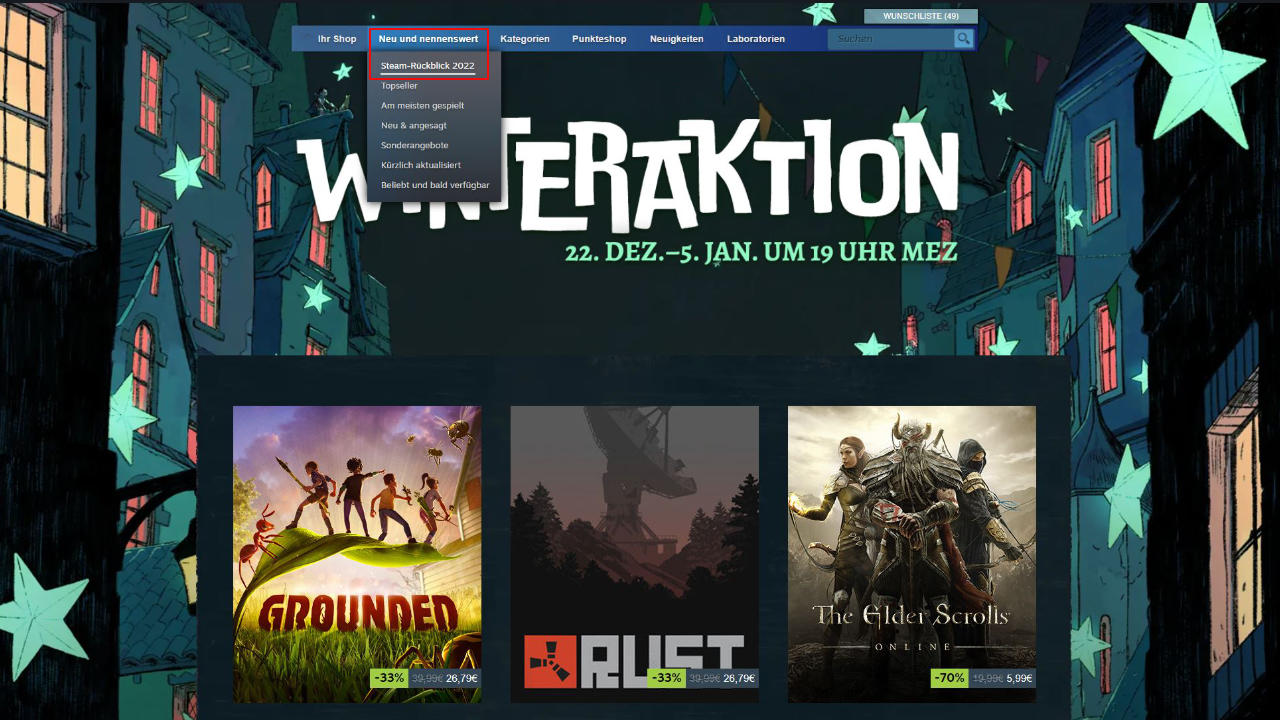
You can also open the recap through the mobile app on your smartphone – the necessary steps differ only slightly from the desktop app: After logging in with your account, you will find “Menu” at the top of the homepage. If you click on it, you can again select “New and Noteworthy” and then get to “Steam Recap 2022”.
If you want to know how to find your Steam ID in time for the annual recap, you can read about it here on MeinMMO.