


You purchased a game on Steam but want to return it? We provide you with a simple guide on how to get your money back or receive Steam credit. Additionally, you will find out here what requirements you need to meet for the return, the return duration, and what you can do if you encounter problems.
How to return a game on Steam
How do I return a game on Steam? If you decide that you no longer want a game, you can return it. You should proceed as follows:
- Step 1: Open Steam and click on “Help” at the top right of the homepage, then select “Steam Support”
- Step 2: You will now see your most recent products along with a tab labeled “Games, Software, etc.” If the game you want to return is listed under “New Products,” select it. If it is not under “New Products,” click on “Games, Software, etc.”
- Step 3: You can then enter the name of the game in the search bar and click on the corresponding title
- Step 4: You will receive options regarding the issues you have with the title; select the appropriate problem (for example: “It’s not what I expected”)
- Step 5: Click on “I want to request a refund”
- Step 6: Choose whether you want the refund as Steam credit or through the payment method of the purchase
- Optional Step 7: You can specify the reason for your return by clicking on a response under “Reason” or by writing your own text under “My issue is not listed”
- Step 8: Click on “Submit Request”
Here in the gallery, we have provided you with some screenshots to assist you:

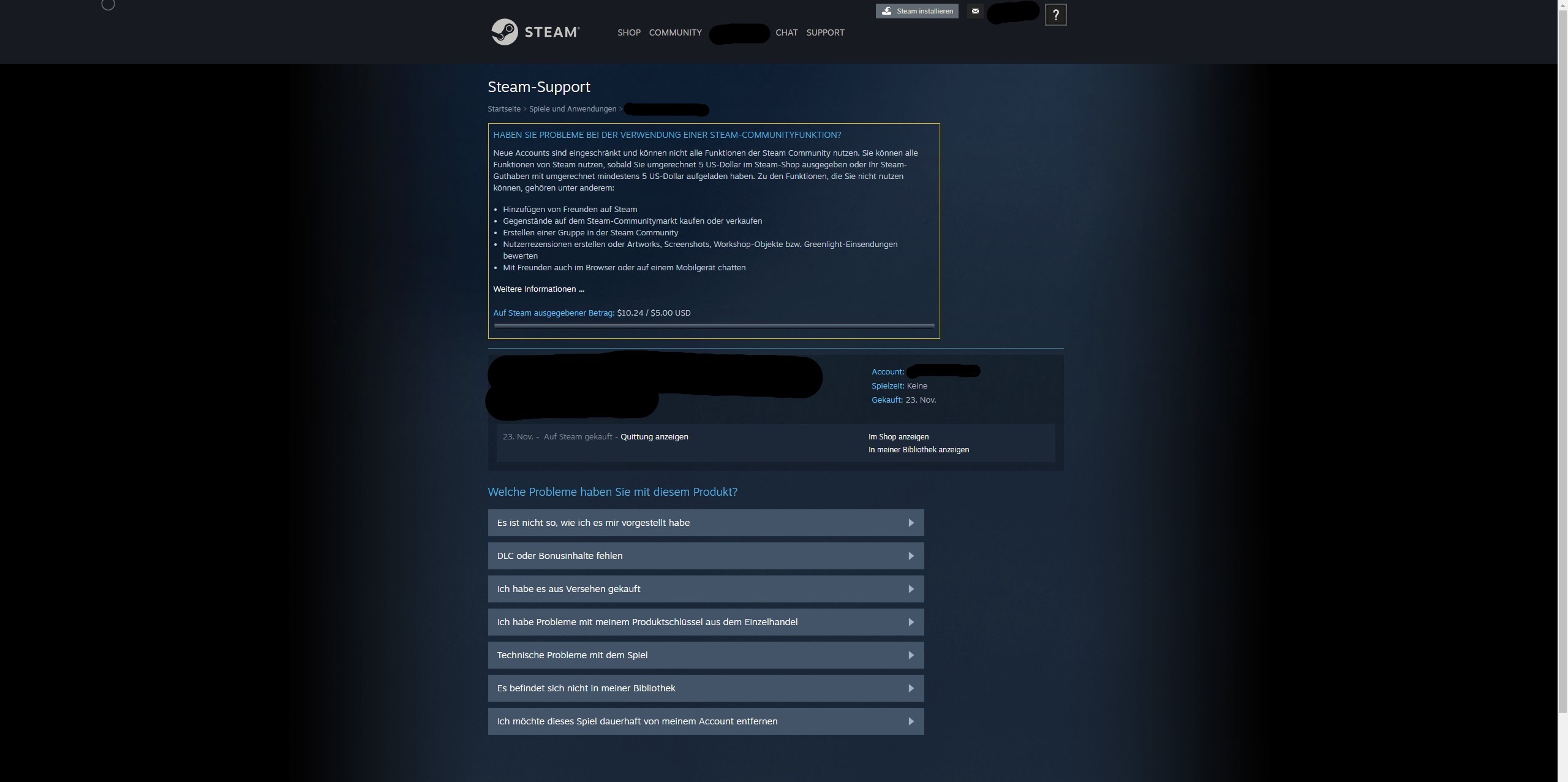
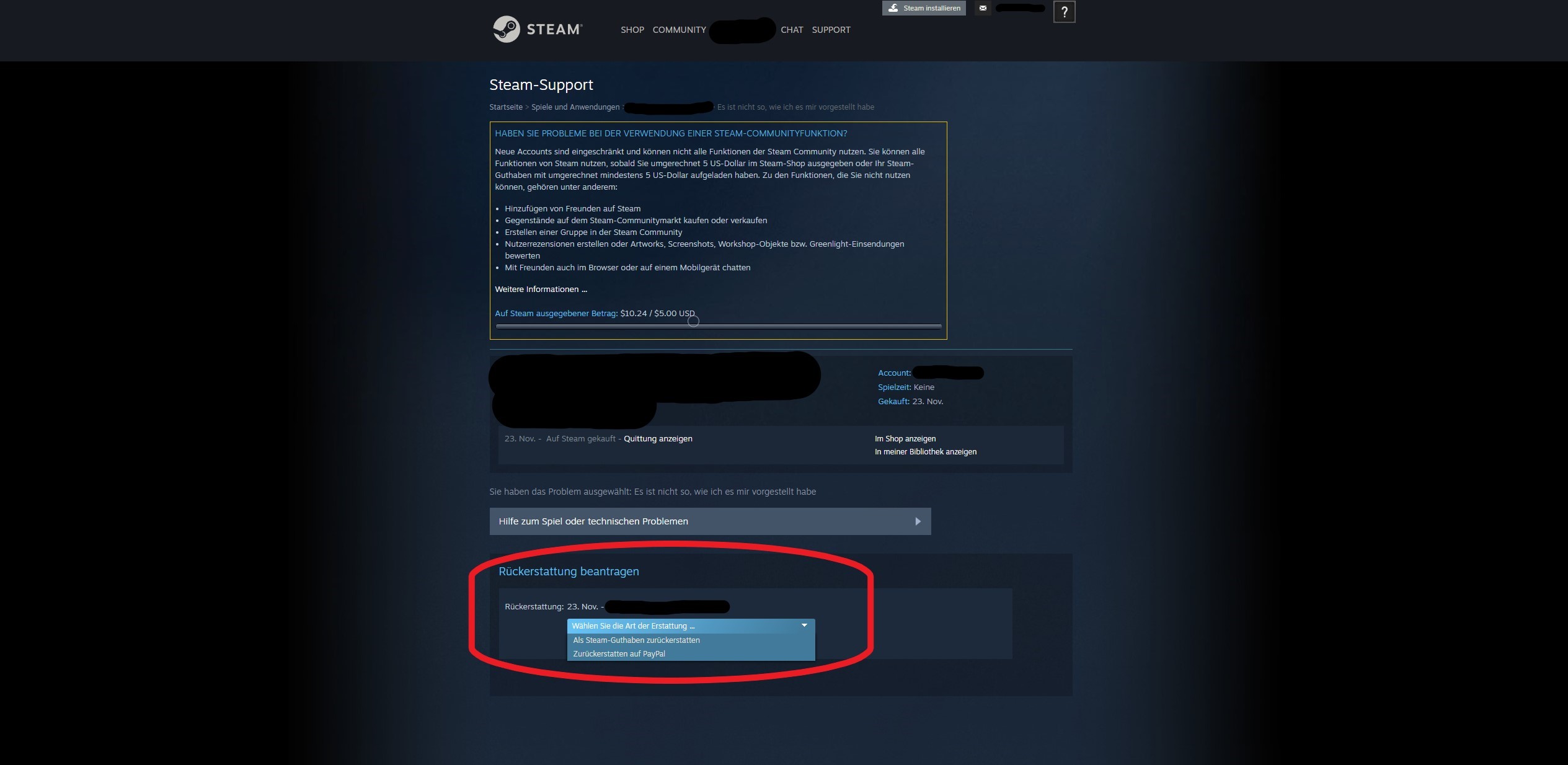
Subsequently, the Steam Support will process the request, and you will be notified via email once it has been declined or accepted.
Within a week after the approval of the request, you will receive the full refund.
If the gaming platform is unable to refund the money through the original payment method for any reason, you will receive it as Steam credit. This happens, for example, if the selected payment method at the time of purchase does not support a refund.
Alternatively, you can also go directly to “Support” and then “Purchases” in Step 1. There you select the game title and can choose a refund. The rest will work as described from Step 4 onwards.
If you are always looking for new games, here you can find inexpensive titles that cost less than 5 euros on Steam:
Things to Consider When Returning – Requirements, Duration, and Issues
What is the duration of the return period? From the day of purchase of a game, you can return the title within 2 weeks.
Important: To be able to return the game, you should not have played it for more than 2 hours.
Which games can I return on Steam? You can return almost any game on the platform. The reason does not matter: whether you accidentally purchased the game or do not like the game.
However, it is important that you return the game within the specified return period and have not exceeded a certain playtime.
For additional content, it is stated that these can be returned “provided the main game to which the additional content belongs has not been played for more than two hours since purchase and the additional content has not been consumed, modified, or transferred” (via Steam).
What can I do if the return period has expired? If you do not meet a requirement for returning the game, you can still submit a return request to Steam. This will be reviewed, and you still have a chance for a successful refund: even if it is less than what you would normally receive.
However, there has also been an exceptional case with Helldivers 2 in the context of the PSN obligation, where one could supposedly return the game even after the 2-hour mark had been exceeded.
What should I do if my return is denied? If your return request is denied, and you believe there was an error, you can submit a request again via Steam Support. It will then be reviewed by another staff member.



Information Regarding Steam Credit – Payout and PayPal
Can I cash out my Steam credit? No! On Steam, you cannot donate, transfer to another account, or cash out the received Steam credit. The credited amount is linked to the respective account.
Can I credit my balance via PayPal? When choosing how you want to receive the credit for the return, you can have the money refunded via PayPal if you purchased it that way.
However, the Steam credit itself cannot be cashed out via PayPal.
Here you can also find 5 games like Palworld that you can play on Steam today

Your opinion is important to us!
Do you like the article? Then let us know!