

The latest firmware update for the PS5 opens up completely new possibilities for finding players. It could be anyone via QR code.
What is this new feature? The firmware update 24.05-09.60.00 (via playstation.com) adds the feature Share Link
. With this, you can invite any other PlayStation 5 player to an ongoing open multiplayer game. For example, if you need help with a specific boss and the game supports co-op? No problem. We’ll explain how the new system works.
SOS via QR Code into the Vastness
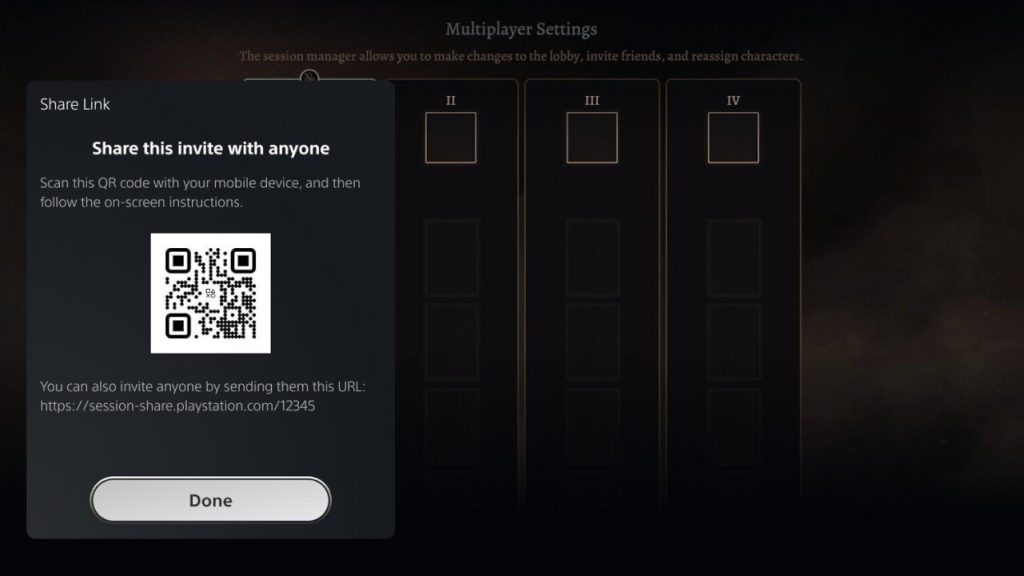
How do I invite strangers to my multiplayer games on the PS5? It’s easy: open the action card of the ongoing game session and select Share Link
. A QR code will be displayed. Scan this with your phone and follow the instructions or directly copy the displayed link.
What can I do with that? With this QR code, almost any PS5 player can join your game. You could post the link on X, Facebook, Instagram, TikTok, Discord, or any other forum and wait to see which random person joins your game.
Perhaps you will soon find numerous new PlayStation friends this way – or simply and easily new players for an evening or just a few minutes as helpers in need.
What else has the update added or changed? The performance and stability of the system software have been improved according to Sony, and the device software for some DualSense wireless controllers has been updated to ensure more stable functionality. Additionally, messages and usability on some screens have been enhanced.
How to install the update
In principle, the update should be installed automatically; you can check if you’ve allowed this as follows:
- Open the system settings of your PS5.
- Select the System option.
- Now go to the System Software menu.
- In the Update and Settings of System Software section, you will find the option
Automatically download update files / Automatically install update files


Would you like to have an R2D2 from Star Wars as your driver in the car? Military pilots from the USA could in the future have something very similar to the little astromech as a co-pilot on board. We present you the exciting concept that will soon undergo testing on real aircraft in the following article: If you were a fighter pilot, a virtual “R2D2” from Star Wars would soon accompany you.

Your opinion is important to us!
Do you like the article? Then let us know!