

In the test, both the cardioid and stereo modes convinced us. Our voice is clearly understandable, and the microphone reproduces the speaker’s voice neutrally and without distortion. We set the microphone up about 20 centimeters away, and it sounds clear and understandable.
In the whisper mode, the compression can be clearly heard, which is why we hardly used this mode. Additionally, we sound uneven in volume, and not everything is transmitted.
However, the Roccat Torch is susceptible to interference. The stand with the control elements picks up vibrations and transmits them into the microphone. If you make adjustments to the microphone, your listeners may hear that. If you sit in a larger room and the microphone is farther away, the sound quality also suffers.
For recordings, the Torch is not always practical since you cannot adjust sound and other properties through the software. We are hoping that Roccat will provide more comprehensive software in the future.
Yeti Nano Sound Test
The microphone offers two different recording modes. In addition to the cardioid mode, there is also an omnidirectional mode. While the first mode is especially suitable for podcasts and streaming where one person speaks, the omnidirectional mode is intended for instruments, multiple voices, and singing. The microphone does not offer a bidirectional mode for a conversation between two people.
In the test, both recording modes work very well, but we mainly use the cardioid pattern. The recording quality is high, and it is possible to position the microphone 20 centimeters away from the head without compromising quality. However, the click sound when pressing the mute button is audible in the recording. There is also a slight echo in the audio track.
However, we noticed that it takes some time for the microphone to sound really good. However, if you take the time to click through the software and adjust the microphone to your voice, you will get a really good microphone.
Conclusion on Audio Quality
Both devices offer high quality: With both, we are clearly and distinctly understood, and our voice sounds natural at a distance of 20 centimeters. In both cases, a gaming keyboard is positioned between us and the microphone. In larger rooms, you will hear some echo with both devices. The echo is somewhat more pronounced with the Yeti Nano.
The cardioid pattern impresses us with both the Roccat Torch and the Yeti Nano. We prefer the stereo mode of the Roccat Torch over the omnidirectional mode of the Yeti Nano, which sounds too muffled. The Yeti Nano does not have a whisper mode, but the exclusive Roccat mode does not convince us either.
Winner: Tie
Roccat Torch or Yeti Nano – Which is the better microphone?
Both microphones offer different strengths and weaknesses, but overall we prefer the Yeti Nano. The deciding factor in the end is primarily the more mature software with the Yeti Nano. Here you can make numerous adjustments, while with the Roccat Torch you currently have to rely on the basic settings being in order.
Thus, the purchase decision ultimately also depends on what you expect from your microphone. If you want good basic settings without having to adjust much, then the Roccat Torch is the better choice. Here you can also make necessary adjustments directly on the device. The Roccat Torch is a good microphone for beginners in the podcast or streaming field who do not want to waste much time on adjustments.
However, if you take the time to go through the numerous settings of the Yeti Nano, you will end up with a better microphone overall. With BlueVo!ce and the equalizer, you have significantly more options here.
Roccat Torch
Who should choose the Roccat Torch? If you are looking for a microphone with good base settings and stability on the desk, then the Roccat Torch is a good choice. The microphone looks nice and allows synchronization with other Roccat hardware. The new NEON software has great potential but currently offers too few functions. The price for recording quality and build is reasonably set.
Yeti Nano
Who should choose the Yeti Nano? If you are looking for a microphone with good build quality and many adjustment options for around 100 euros, then the Yeti Nano is a good option for you. The software is mature and offers numerous functions, and the microphone takes up little space on the desk. However, you will have to forgo colorful lighting like on the Roccat Torch.
Further recommendations: If you are looking for suitable headphones for the microphone or just a gaming headset, check out our buying guide here on MeinMMO: Here we present the best gaming headsets, headphones, and microphones that you can currently buy.
The best gaming headsets you can buy in 2021
With the Roccat Torch, the microphone is connected with the control elements. Then the plate with the elements is connected to the PC. If you want to hang the microphone, you have to keep it connected to the plate.
Yeti Nano
The Yeti Nano sits in a round holder and is mounted there. On the front, there is a round switch on the body of the microphone, which allows you to switch the volume of the connected headphones and mute the microphone. On the back, there is another switch to change the polar patterns. You can also connect a headset via the 3.5mm jack on the bottom of the microphone.
If you want to hang the microphone, you can connect it directly to the PC. The stand has only a supportive function with no additional features. The Yeti Nano is available in various color variations. The microphone completely dispenses with color play and RGB.
Conclusion on Design and Build
We prefer the design and build quality of the Roccat Torch in comparison to the Yeti Nano. In particular, the modern USB-C port on the Torch is more appealing than the micro-USB option on the Yeti Nano.
With the Torch, we can reach all important settings via the panel below the microphone, while the Yeti Nano offers significantly fewer adjustable options directly on the microphone. However, the downside is that the Torch requires a bit more space on the desk and must always be connected to the panel.
If you want to hang the microphone, you have to first connect the hung Torch with the button and then plug it into the PC. This step is unnecessary with the Yeti Nano.
Winner: Roccat Torch
Build Quality
In this section, we look at the build quality of both devices and compare them. We will then explain which of the two devices makes a better impression.
Roccat Torch
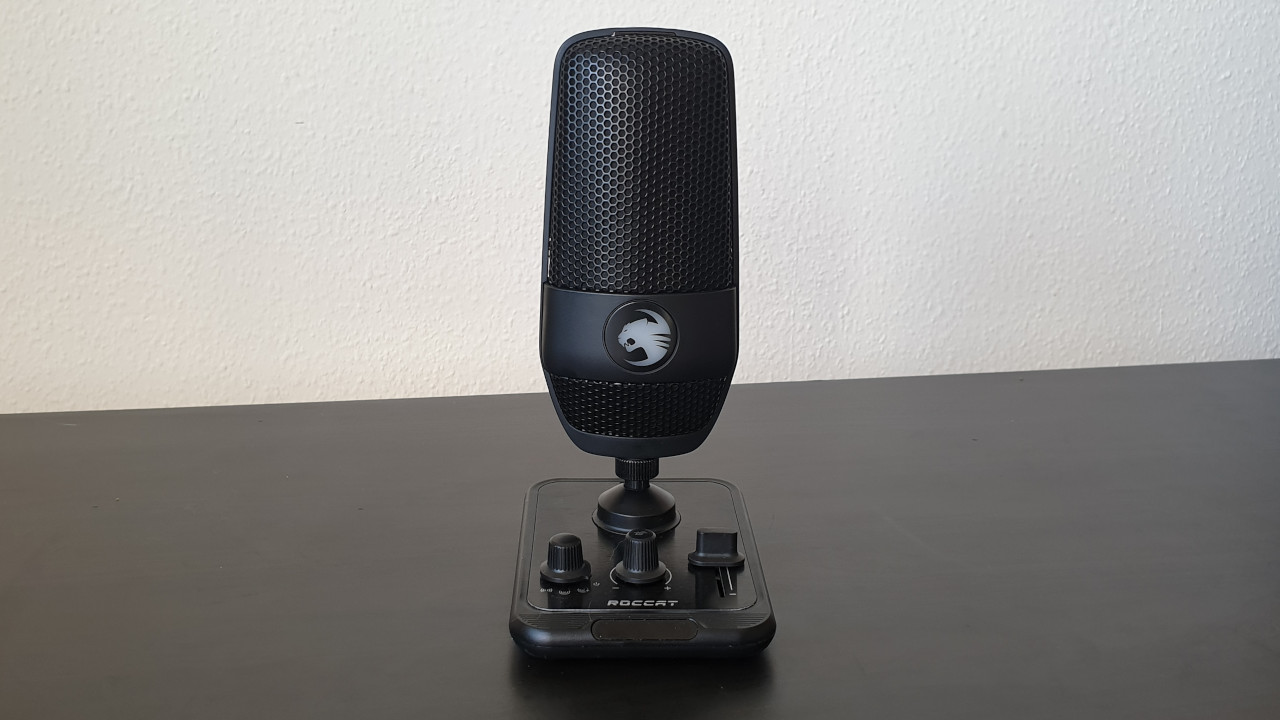
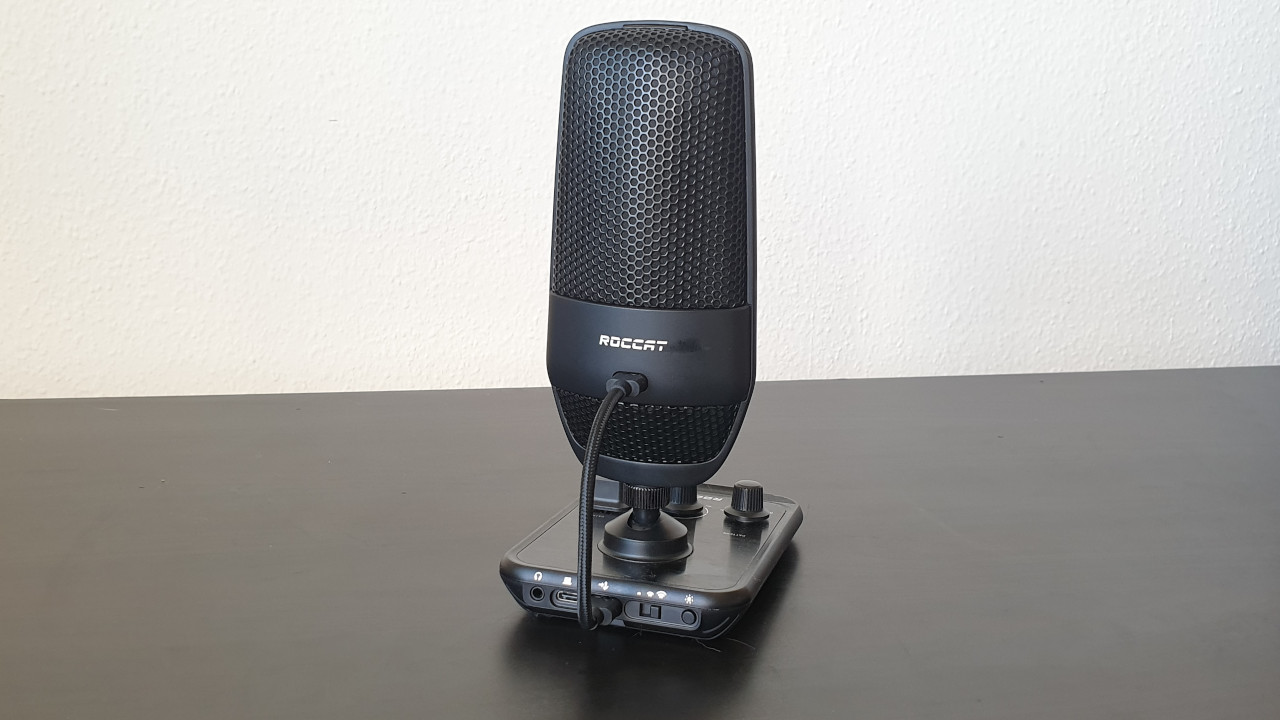
The plate with the control elements and the microphone itself are made entirely of plastic. However, the surface of the plate has a metallic look, giving it a valuable impression and reminiscent of the Roccat Pyro, where Roccat uses a similar design. The body of the microphone is mounted on the housing with a metal thread.
Yeti Nano
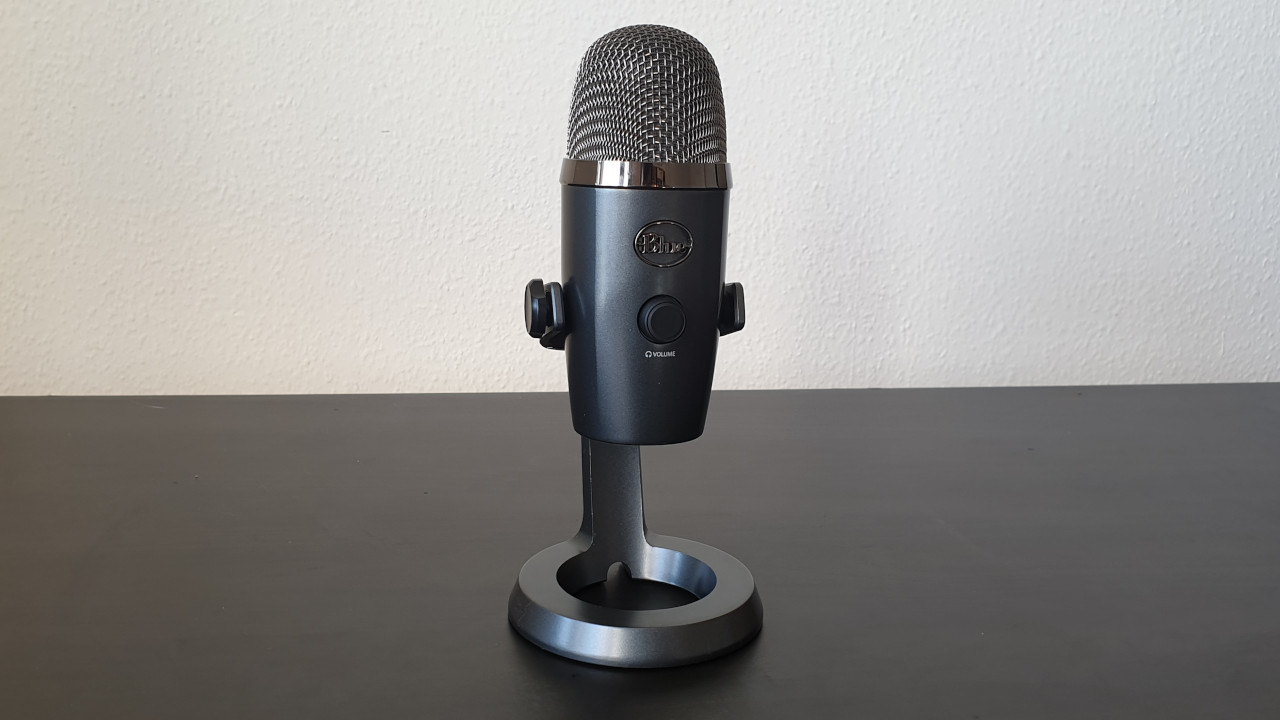
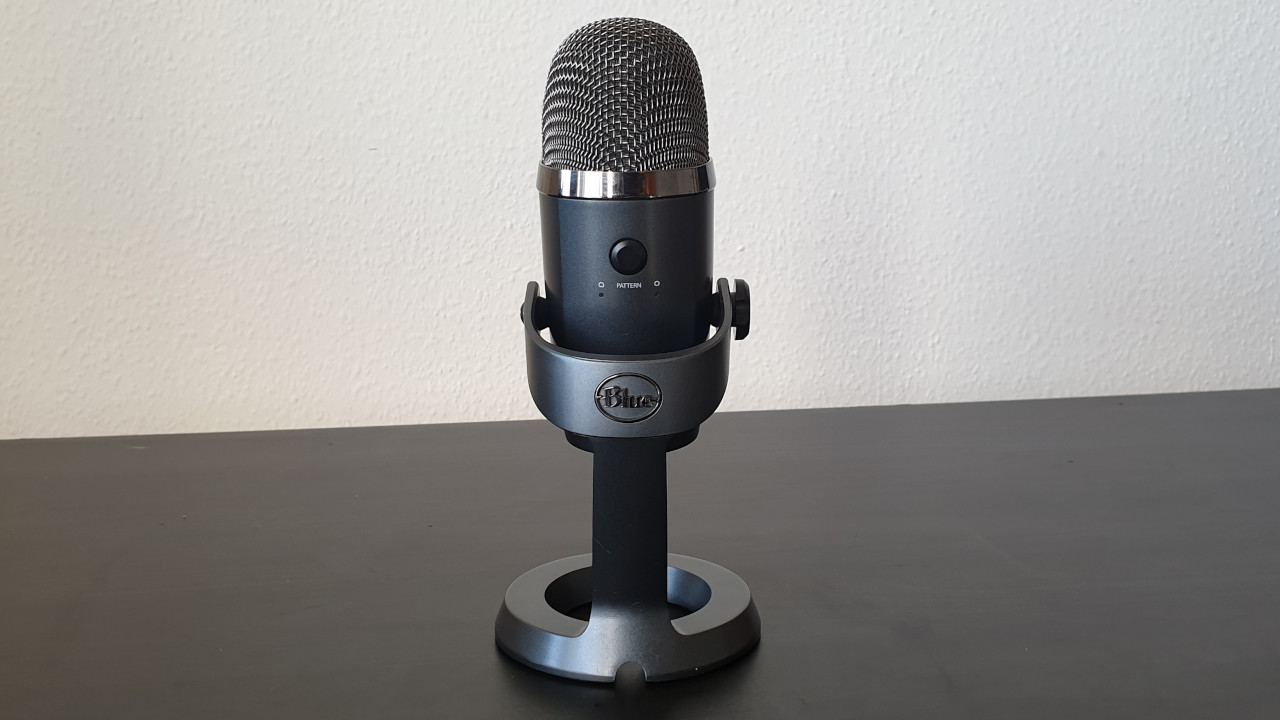
The Yeti Nano features a sturdy metal desktop stand, giving the microphone a high-quality impression. The buttons on the front and back are large enough to be easily and comfortably accessible.
The cable management on the underside is not very convincing once the microphone is on the table. Here the connection cable bends significantly, which will not be beneficial for the durability of the cable in the long run.
Conclusion on Build Quality
In terms of build quality, the Yeti Nano has the edge and overall impresses us more than the Roccat Torch. The Yeti Nano’s stand is made of metal, and the microphone itself appears to be more qualitatively manufactured than the predominantly plastic Torch. The only exception is the connection cable on the Yeti Nano.
Winner: Yeti Nano
Software
Here we look at what software the microphones offer. We discuss the functions of the software and how intuitive it is to use.
Roccat Torch
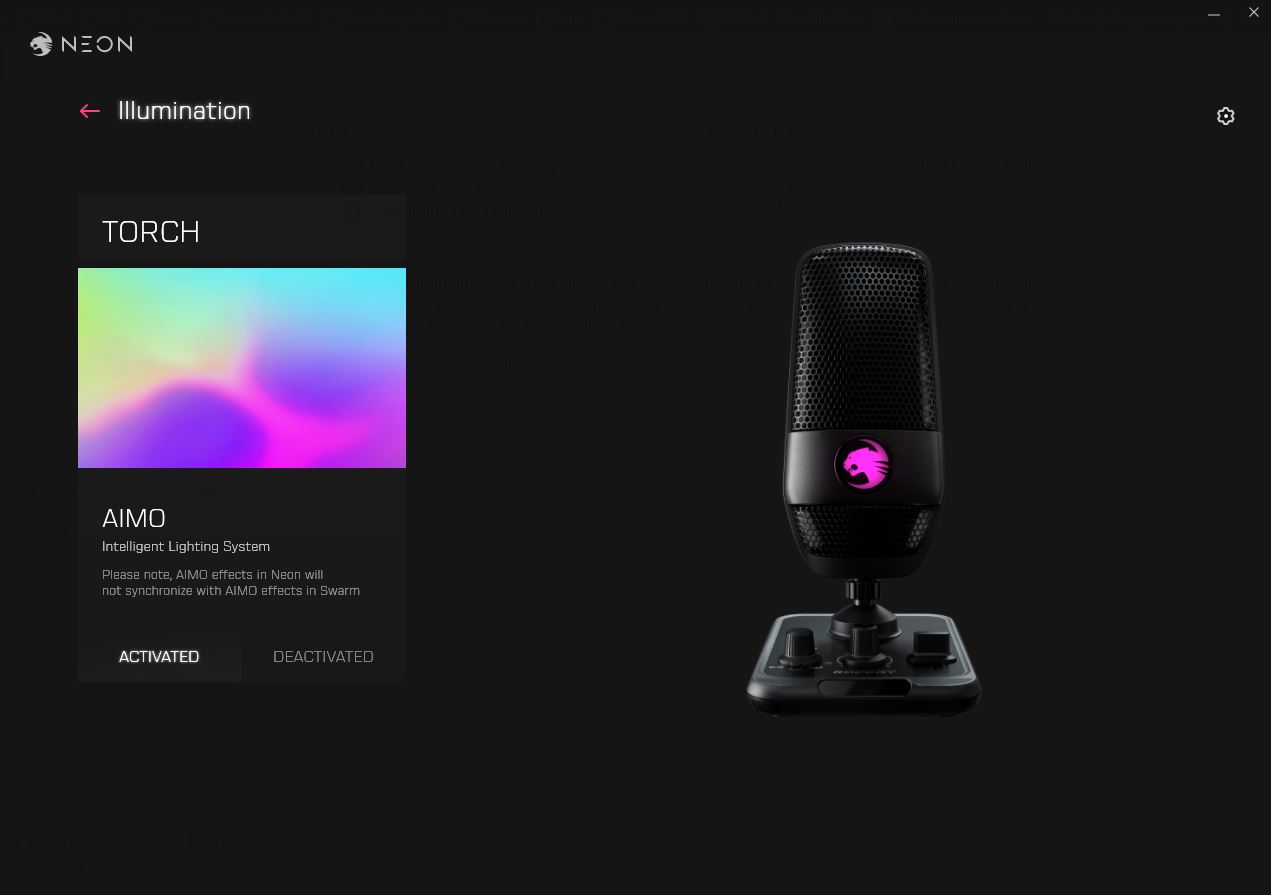
Roccat uses the new NEON software, as with the Syn Air Pro. We are using version 0.91.6-beta. At this moment (October 27, 2021), the software only offers one function. With the software, you can only turn the microphone’s lighting on and off for now. Microphone functions or an equalizer are not available to us.
Yeti Nano
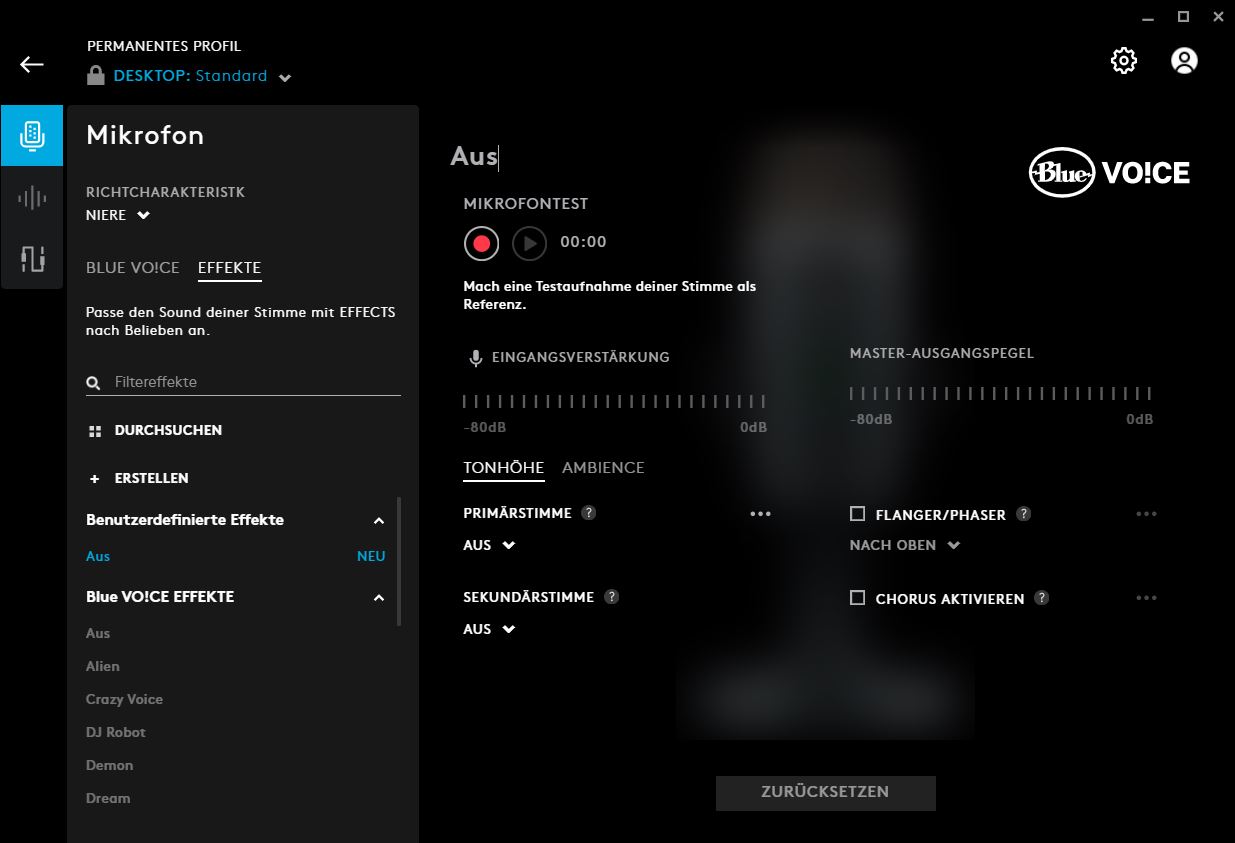
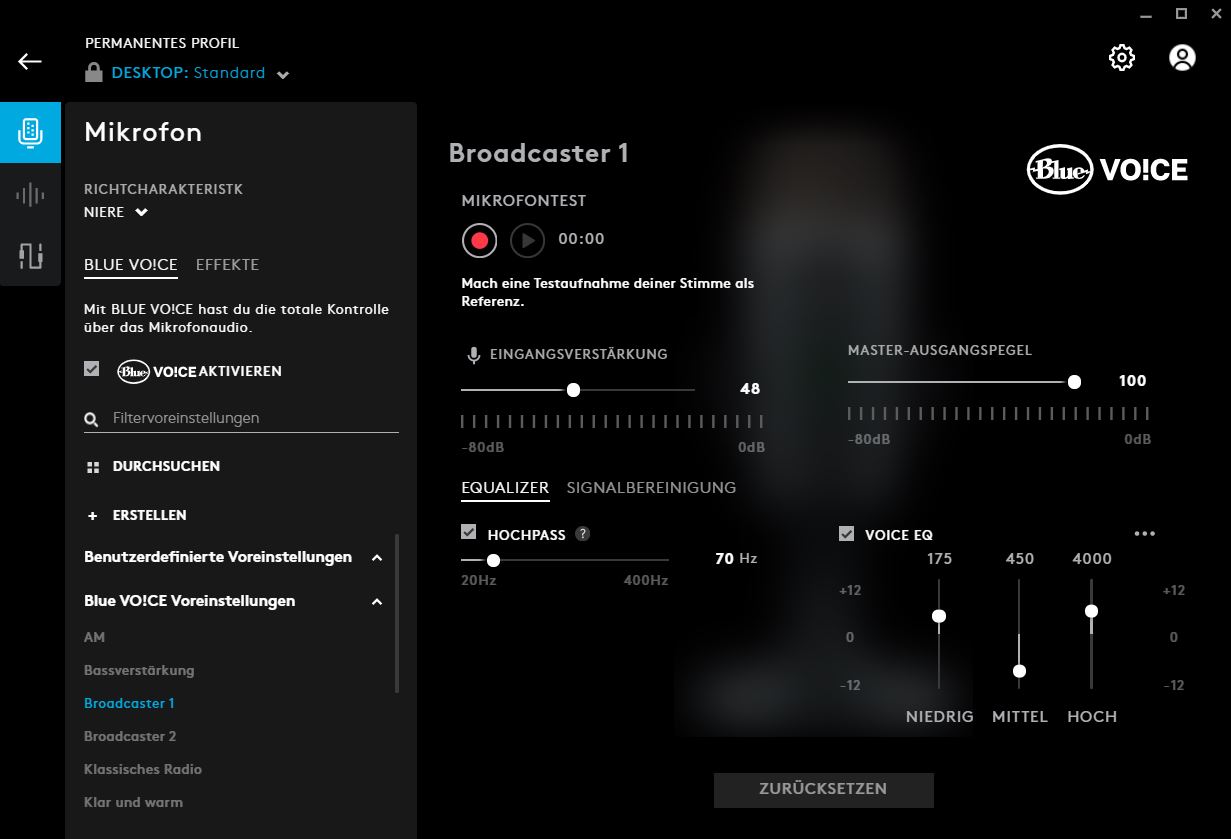
The Yeti Nano uses Logitech G-Hub software. We are using version 2021.10.8013. Currently, within the software, we can adjust numerous microphone functions. For example, we can adjust the input gain or use an equalizer for the voice. Alternatively, we can choose from several presets.
In another aspect, we can additionally adjust the microphone signal and set noise suppression or determine under which threshold the device should not pick up sounds. This is useful, for example, if you don’t want your listeners to hear the typing of your keyboard.
Conclusion on Software
With software, the Yeti Nano is the clear winner. You can make numerous adjustments to the microphone through the G-Hub software, which is extensive. The software for the Torch is very poor; you can only turn the lighting on and off.
Winner: Yeti Nano
Price
The suggested retail price (RRP) for the Roccat Torch is 99.99 euros, and you currently can’t get it cheaper.
The RRP for the Yeti Nano is 120 euros; however, you can currently get the microphone for around 90 euros on average. Over the past 6 months, the price has ranged from 90 to 110 euros.
There is no clear winner when it comes to price, as both are closely priced at the time of the review (as of October 27, 2021). You pay 99.99 euros for the Torch and about 9 euros less for the Yeti Nano.
Winner: Tie
Audio Quality
The recording quality is perhaps the most important criterion for evaluation. After all, a microphone should primarily produce recordings of acceptable quality. In this section, we want to explain whether the microphones can meet expectations.
Roccat Torch Sound Test
The Roccat Torch offers three different recording modes. In addition to the cardioid mode, the device provides a stereo mode and a whisper mode.
The stereo mode is especially helpful when spatial sound is important or when you want to conduct a conversation with multiple people. The whisper mode is said to enhance and compress the input signal simultaneously. This way, even with a quiet voice, good recordings should be possible.
In the test, both the cardioid and stereo modes convinced us. Our voice is clearly understandable, and the microphone reproduces the speaker’s voice neutrally and without distortion. We set the microphone up about 20 centimeters away, and it sounds clear and understandable.
In the whisper mode, the compression can be clearly heard, which is why we hardly used this mode. Additionally, we sound uneven in volume, and not everything is transmitted.
However, the Roccat Torch is susceptible to interference. The stand with the control elements picks up vibrations and transmits them into the microphone. If you make adjustments to the microphone, your listeners may hear that. If you sit in a larger room and the microphone is farther away, the sound quality also suffers.
For recordings, the Torch is not always practical since you cannot adjust sound and other properties through the software. We are hoping that Roccat will provide more comprehensive software in the future.
Yeti Nano Sound Test
The microphone offers two different recording modes. In addition to the cardioid mode, there is also an omnidirectional mode. While the first mode is especially suitable for podcasts and streaming where one person speaks, the omnidirectional mode is intended for instruments, multiple voices, and singing. The microphone does not offer a bidirectional mode for a conversation between two people.
In the test, both recording modes work very well, but we mainly use the cardioid pattern. The recording quality is high, and it is possible to position the microphone 20 centimeters away from the head without compromising quality. However, the click sound when pressing the mute button is audible in the recording. There is also a slight echo in the audio track.
However, we noticed that it takes some time for the microphone to sound really good. However, if you take the time to click through the software and adjust the microphone to your voice, you will get a really good microphone.
Conclusion on Audio Quality
Both devices offer high quality: With both, we are clearly and distinctly understood, and our voice sounds natural at a distance of 20 centimeters. In both cases, a gaming keyboard is positioned between us and the microphone. In larger rooms, you will hear some echo with both devices. The echo is somewhat more pronounced with the Yeti Nano.
The cardioid pattern impresses us with both the Roccat Torch and the Yeti Nano. We prefer the stereo mode of the Roccat Torch over the omnidirectional mode of the Yeti Nano, which sounds too muffled. The Yeti Nano does not have a whisper mode, but the exclusive Roccat mode does not convince us either.
Winner: Tie
Roccat Torch or Yeti Nano – Which is the better microphone?
Both microphones offer different strengths and weaknesses, but overall we prefer the Yeti Nano. The deciding factor in the end is primarily the more mature software with the Yeti Nano. Here you can make numerous adjustments, while with the Roccat Torch you currently have to rely on the basic settings being in order.
Thus, the purchase decision ultimately also depends on what you expect from your microphone. If you want good basic settings without having to adjust much, then the Roccat Torch is the better choice. Here you can also make necessary adjustments directly on the device. The Roccat Torch is a good microphone for beginners in the podcast or streaming field who do not want to waste much time on adjustments.
However, if you take the time to go through the numerous settings of the Yeti Nano, you will end up with a better microphone overall. With BlueVo!ce and the equalizer, you have significantly more options here.
Roccat Torch
Who should choose the Roccat Torch? If you are looking for a microphone with good base settings and stability on the desk, then the Roccat Torch is a good choice. The microphone looks nice and allows synchronization with other Roccat hardware. The new NEON software has great potential but currently offers too few functions. The price for recording quality and build is reasonably set.
Yeti Nano
Who should choose the Yeti Nano? If you are looking for a microphone with good build quality and many adjustment options for around 100 euros, then the Yeti Nano is a good option for you. The software is mature and offers numerous functions, and the microphone takes up little space on the desk. However, you will have to forgo colorful lighting like on the Roccat Torch.
Further recommendations: If you are looking for suitable headphones for the microphone or just a gaming headset, check out our buying guide here on MeinMMO: Here we present the best gaming headsets, headphones, and microphones that you can currently buy.
The best gaming headsets you can buy in 2021
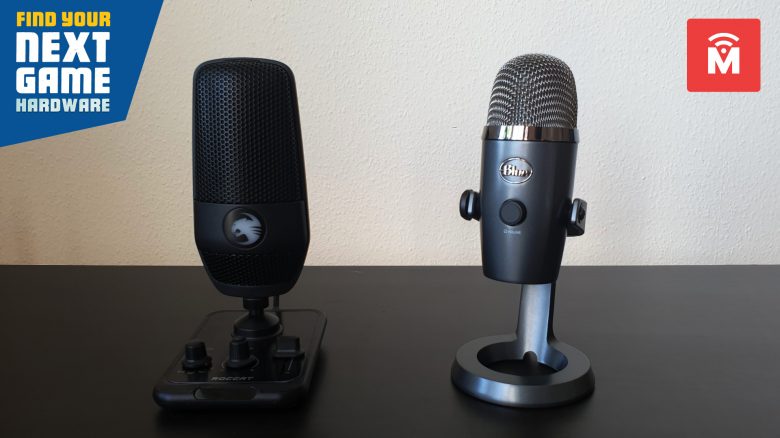
With the Torch, Roccat has released its first USB microphone. We compare the Roccat Torch with the Yeti Nano in this review and tell you which is the better device for 100 euros.
The most important points at a glance:
- The Roccat Torch and the Yeti Nano are both desktop microphones for under 100 euros. You connect the devices via USB to your desktop PC or laptop.
- The Yeti Nano appears better manufactured in our tests and comes with significantly more mature software. The Roccat Torch, on the other hand, offers lighting and better out-of-the-box sound settings.
What it’s about: With the Torch, Roccat released its first USB microphone. With a suggested retail price of 99.99 euros, the aim is to reach many potential buyers.
Similarly positioned is the Yeti Nano. The device is priced slightly above the 100-euro mark at 120 euros, targeting mainly beginners as well. By now, you can get the device for around 90 euros.
MeinMMO has looked at both devices and compares them in a comprehensive test. In the conclusion, we explain which microphone ultimately convinced us more.
Features and technical details:
| Roccat Torch | Blue Yeti Nano | |
| Sampling rate | 48 kHz | 48 kHz |
| Bit depth | 24-bit, optionally at 44.1 kHz | 24-bit |
| Capsules | 2 x 14×6.5mm condenser capsules | 2 x 14 mm condenser capsules |
| Polar pattern | Cardioid (unidirectional), Stereo, Whisper | Cardioid (unidirectional) and Omnidirectional |
| Frequency response | 20 Hz – 20 kHz | 20 Hz – 20 kHz |
| Sound pressure | 110 dB | 120 dB |
| Price (RRP) | 99.99 euros | 119.99 euros |
Design and Build
In this section, we discuss the design of the Roccat Torch and Yeti Nano. What do the microphones look like and what features are attached to the microphone?
Roccat Torch
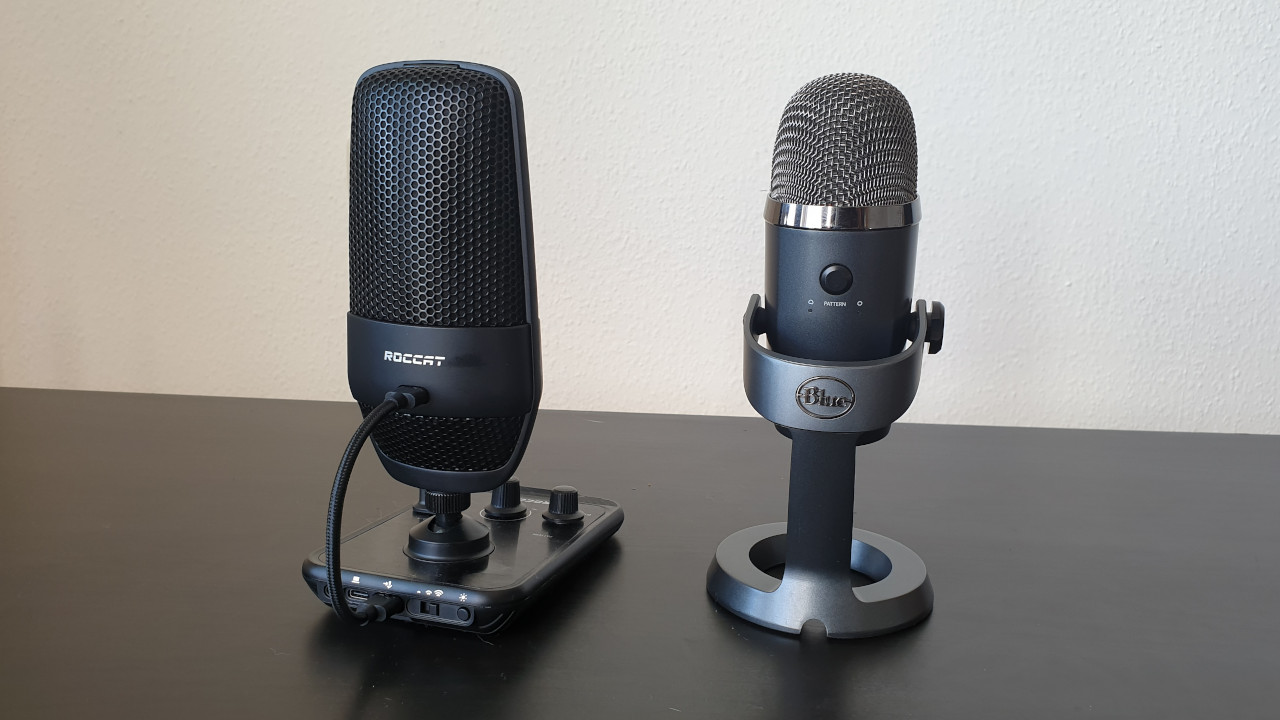
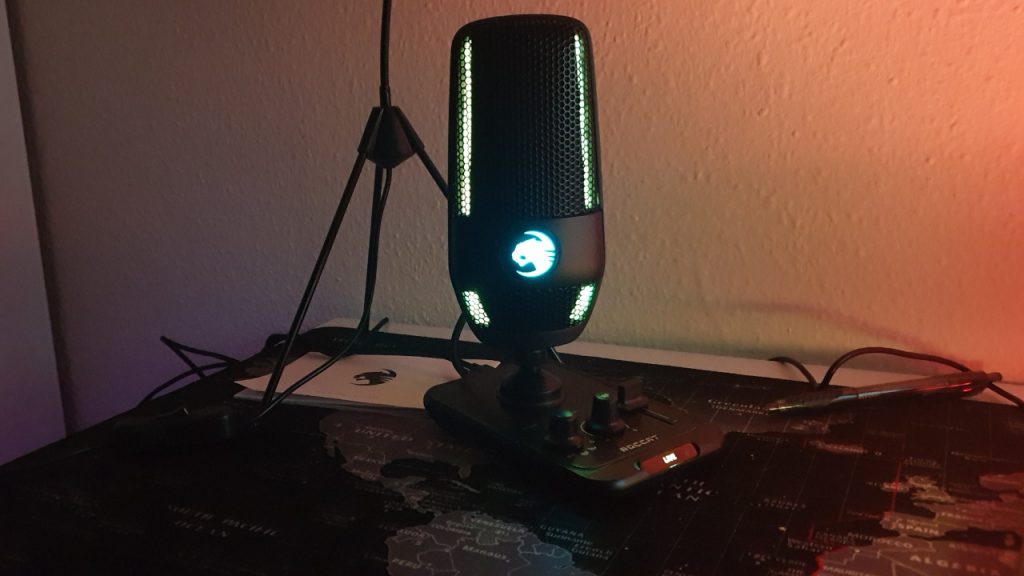
The Roccat Torch stands on a square base where all control functions for the microphone are integrated. Here you can adjust the recording volume (gain) of the microphone, change the polar patterns, or turn the device completely off. The controls are intuitive and easy to understand. The elements have a good tactile feel and are also easy to operate.
On the back of the microphone, you can also connect a headset via the 3.5mm jack. On the top of the microphone, there is a quick-mute function. If you touch the microphone at the top, you can mute or activate it.
With the Roccat Torch, the microphone is connected with the control elements. Then the plate with the elements is connected to the PC. If you want to hang the microphone, you have to keep it connected to the plate.
Yeti Nano
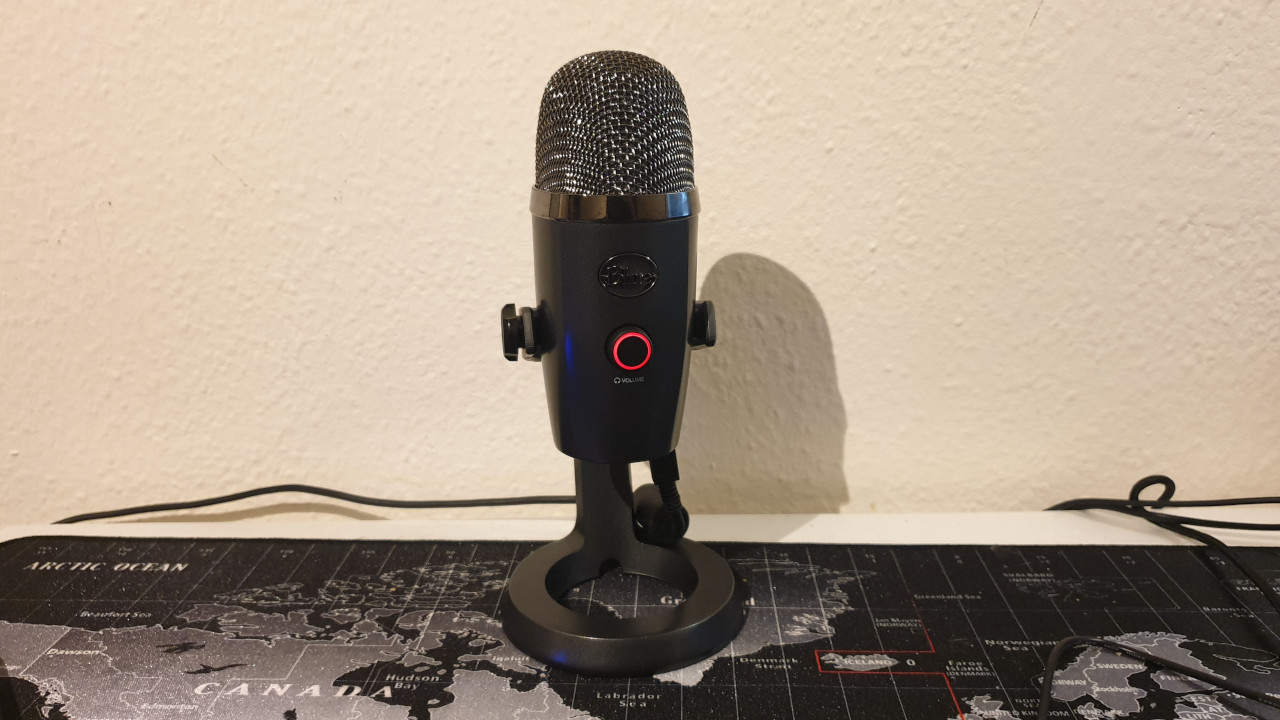
The Yeti Nano sits in a round holder and is mounted there. On the front, there is a round switch on the body of the microphone, which allows you to switch the volume of the connected headphones and mute the microphone. On the back, there is another switch to change the polar patterns. You can also connect a headset via the 3.5mm jack on the bottom of the microphone.
If you want to hang the microphone, you can connect it directly to the PC. The stand has only a supportive function with no additional features. The Yeti Nano is available in various color variations. The microphone completely dispenses with color play and RGB.
Conclusion on Design and Build
We prefer the design and build quality of the Roccat Torch in comparison to the Yeti Nano. In particular, the modern USB-C port on the Torch is more appealing than the micro-USB option on the Yeti Nano.
With the Torch, we can reach all important settings via the panel below the microphone, while the Yeti Nano offers significantly fewer adjustable options directly on the microphone. However, the downside is that the Torch requires a bit more space on the desk and must always be connected to the panel.
If you want to hang the microphone, you have to first connect the hung Torch with the button and then plug it into the PC. This step is unnecessary with the Yeti Nano.
Winner: Roccat Torch
Build Quality
In this section, we look at the build quality of both devices and compare them. We will then explain which of the two devices makes a better impression.
Roccat Torch
The plate with the control elements and the microphone itself are made entirely of plastic. However, the surface of the plate has a metallic look, giving it a valuable impression and reminiscent of the Roccat Pyro, where Roccat uses a similar design. The body of the microphone is mounted on the housing with a metal thread.
Yeti Nano
The Yeti Nano features a sturdy metal desktop stand, giving the microphone a high-quality impression. The buttons on the front and back are large enough to be easily and comfortably accessible.
The cable management on the underside is not very convincing once the microphone is on the table. Here the connection cable bends significantly, which will not be beneficial for the durability of the cable in the long run.
Conclusion on Build Quality
In terms of build quality, the Yeti Nano has the edge and overall impresses us more than the Roccat Torch. The Yeti Nano’s stand is made of metal, and the microphone itself appears to be more qualitatively manufactured than the predominantly plastic Torch. The only exception is the connection cable on the Yeti Nano.
Winner: Yeti Nano
Software
Here we look at what software the microphones offer. We discuss the functions of the software and how intuitive it is to use.
Roccat Torch
Roccat uses the new NEON software, as with the Syn Air Pro. We are using version 0.91.6-beta. At this moment (October 27, 2021), the software only offers one function. With the software, you can only turn the microphone’s lighting on and off for now. Microphone functions or an equalizer are not available to us.
Yeti Nano
The Yeti Nano uses Logitech G-Hub software. We are using version 2021.10.8013. Currently, within the software, we can adjust numerous microphone functions. For example, we can adjust the input gain or use an equalizer for the voice. Alternatively, we can choose from several presets.
In another aspect, we can additionally adjust the microphone signal and set noise suppression or determine under which threshold the device should not pick up sounds. This is useful, for example, if you don’t want your listeners to hear the typing of your keyboard.
Conclusion on Software
With software, the Yeti Nano is the clear winner. You can make numerous adjustments to the microphone through the G-Hub software, which is extensive. The software for the Torch is very poor; you can only turn the lighting on and off.
Winner: Yeti Nano
Price
The suggested retail price (RRP) for the Roccat Torch is 99.99 euros, and you currently can’t get it cheaper.
The RRP for the Yeti Nano is 120 euros; however, you can currently get the microphone for around 90 euros on average. Over the past 6 months, the price has ranged from 90 to 110 euros.
There is no clear winner when it comes to price, as both are closely priced at the time of the review (as of October 27, 2021). You pay 99.99 euros for the Torch and about 9 euros less for the Yeti Nano.
Winner: Tie
Audio Quality
The recording quality is perhaps the most important criterion for evaluation. After all, a microphone should primarily produce recordings of acceptable quality. In this section, we want to explain whether the microphones can meet expectations.
Roccat Torch Sound Test
The Roccat Torch offers three different recording modes. In addition to the cardioid mode, the device provides a stereo mode and a whisper mode.
The stereo mode is especially helpful when spatial sound is important or when you want to conduct a conversation with multiple people. The whisper mode is said to enhance and compress the input signal simultaneously. This way, even with a quiet voice, good recordings should be possible.
In the test, both the cardioid and stereo modes convinced us. Our voice is clearly understandable, and the microphone reproduces the speaker’s voice neutrally and without distortion. We set the microphone up about 20 centimeters away, and it sounds clear and understandable.
In the whisper mode, the compression can be clearly heard, which is why we hardly used this mode. Additionally, we sound uneven in volume, and not everything is transmitted.
However, the Roccat Torch is susceptible to interference. The stand with the control elements picks up vibrations and transmits them into the microphone. If you make adjustments to the microphone, your listeners may hear that. If you sit in a larger room and the microphone is farther away, the sound quality also suffers.
For recordings, the Torch is not always practical since you cannot adjust sound and other properties through the software. We are hoping that Roccat will provide more comprehensive software in the future.
Yeti Nano Sound Test
The microphone offers two different recording modes. In addition to the cardioid mode, there is also an omnidirectional mode. While the first mode is especially suitable for podcasts and streaming where one person speaks, the omnidirectional mode is intended for instruments, multiple voices, and singing. The microphone does not offer a bidirectional mode for a conversation between two people.
In the test, both recording modes work very well, but we mainly use the cardioid pattern. The recording quality is high, and it is possible to position the microphone 20 centimeters away from the head without compromising quality. However, the click sound when pressing the mute button is audible in the recording. There is also a slight echo in the audio track.
However, we noticed that it takes some time for the microphone to sound really good. However, if you take the time to click through the software and adjust the microphone to your voice, you will get a really good microphone.
Conclusion on Audio Quality
Both devices offer high quality: With both, we are clearly and distinctly understood, and our voice sounds natural at a distance of 20 centimeters. In both cases, a gaming keyboard is positioned between us and the microphone. In larger rooms, you will hear some echo with both devices. The echo is somewhat more pronounced with the Yeti Nano.
The cardioid pattern impresses us with both the Roccat Torch and the Yeti Nano. We prefer the stereo mode of the Roccat Torch over the omnidirectional mode of the Yeti Nano, which sounds too muffled. The Yeti Nano does not have a whisper mode, but the exclusive Roccat mode does not convince us either.
Winner: Tie
Roccat Torch or Yeti Nano – Which is the better microphone?
Both microphones offer different strengths and weaknesses, but overall we prefer the Yeti Nano. The deciding factor in the end is primarily the more mature software with the Yeti Nano. Here you can make numerous adjustments, while with the Roccat Torch you currently have to rely on the basic settings being in order.
Thus, the purchase decision ultimately also depends on what you expect from your microphone. If you want good basic settings without having to adjust much, then the Roccat Torch is the better choice. Here you can also make necessary adjustments directly on the device. The Roccat Torch is a good microphone for beginners in the podcast or streaming field who do not want to waste much time on adjustments.
However, if you take the time to go through the numerous settings of the Yeti Nano, you will end up with a better microphone overall. With BlueVo!ce and the equalizer, you have significantly more options here.
Roccat Torch
Who should choose the Roccat Torch? If you are looking for a microphone with good base settings and stability on the desk, then the Roccat Torch is a good choice. The microphone looks nice and allows synchronization with other Roccat hardware. The new NEON software has great potential but currently offers too few functions. The price for recording quality and build is reasonably set.
Yeti Nano
Who should choose the Yeti Nano? If you are looking for a microphone with good build quality and many adjustment options for around 100 euros, then the Yeti Nano is a good option for you. The software is mature and offers numerous functions, and the microphone takes up little space on the desk. However, you will have to forgo colorful lighting like on the Roccat Torch.
Further recommendations: If you are looking for suitable headphones for the microphone or just a gaming headset, check out our buying guide here on MeinMMO: Here we present the best gaming headsets, headphones, and microphones that you can currently buy.
The best gaming headsets you can buy in 2021

Your opinion is important to us!
Do you like the article? Then let us know!