
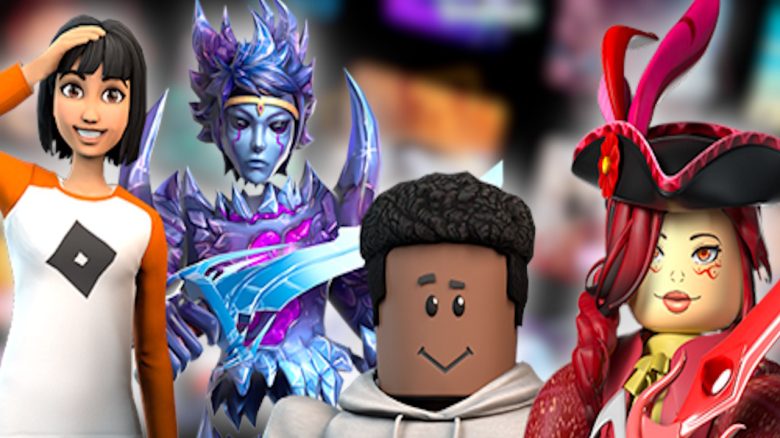
Roblox is one of the largest and most popular gaming platforms out there. But what can you actually do with it and how does it work? MeinMMO has gathered the most important information for you.
What is Roblox? Roblox was released on February 27, 2008, and started as a creative game-building kit that resembles a mix of Lego and Minecraft. The platform is primarily visually geared towards younger players and allows them to develop and share their own games.
There are virtually no limits to the imagination: From shooters to racing games and puzzle adventures to role-playing games or MMOs, nearly every genre is represented. The games created by users can then be tried and played free of charge by other players.
Everything you need to know to dive into the worlds of Roblox can be found here.
All about Roblox platforms and age recommendations
What age is Roblox suitable for? The educational specialists from the Player Guide NRW recommend Roblox for ages 16 and older. The USK has also raised its age recommendation from 12 to 16 years (see USK). This is mainly due to the following points:
- You need certain English skills to understand the game
- There are chat options that are not adequately moderated
- Due to the anonymity of the internet, there are dangers such as cyber grooming, where children and adolescents can be lured into sexual acts by adults (see ZEBRA)
- Some games contain themes and content that are not suitable for younger children, such as violence, virtual relationships, horror, or alcohol consumption
- There is an in-game shop where you can buy cosmetic items for real money
Useful tips on parental control settings for Roblox can also be found at ZEBRA, a project of the State Institute for Media NRW, or at medien-kindersicher.de.
Where can you play Roblox? Roblox is available on PC (Windows and Mac), smartphones and tablets (iOS and Android), Xbox, PlayStation, and VR headsets (Meta Quest, Pico, Valve Index, HTC Vive). You can download it either from the platform’s own store or the Roblox website.

All about Roblox accounts, access, and currencies
Can you play Roblox just like that? To use the features, you need a Roblox account. You will need to provide your date of birth and a username. It should be noted that the date of birth must be truthful (for the sake of youth protection) and that the username should not be associated with your real name.
For players under 13 years old, the platform automatically activates stricter privacy settings and chat filters, which is why accurate information about age is really important.
Can you also play Roblox offline? No, Roblox is a purely online platform. You cannot use it without an internet connection.
Is Roblox free? Generally yes, but there is an in-game currency called Robux that you can purchase with real money.
What exactly are Robux? Robux are a virtual currency for the in-game shop at Roblox. You can buy them for real money and then use them in the in-game shop to purchase cosmetic items for your avatar, your player character, to customize it. However, these items have no effect on the game itself, only on the appearance.
All about the structure, functions, and gameplay of Roblox
How is Roblox structured? Basically, there are two main aspects in Roblox that you can use:
- Experiences: This refers to the games created by users that you can play
- Roblox Studio: This is the function or program that you use to create games for Roblox
In addition, playing together with other players plays a large role. Many use Roblox as a sort of virtual meeting place to chat and play together. Accordingly, much of the gameplay occurs primarily online.
How do you navigate the main menu? Once you log in, you are taken directly to the start page. There you will find:
- Home: Here, personalized recommendations are displayed. The section “Today’s Selection” highlights currently popular or new experiences, while “Recommended for You” suggests games based on your previous gameplay.
- Discover: This is the main catalog for finding new games. It is divided into categories such as “Most Popular”, “Top Ratings”, and a variety of genres to make browsing easier.
- Avatar, Marketplace, and Create: You can access the avatar editor, the marketplace for virtual items, and the Creator Hub from the main navigation bar, where you can start Roblox Studio.
- Profile and Settings: Here you can edit your profile and access important account, security, and privacy settings.
How do you find the right game and start it? To search for games, you can use the search bar or the “Discover” tab. Choose a game that interests you and press the green “Play” button.
How does multiplayer work, or how do you play together with others? In Roblox, you have various ways to connect with other players or play together:
- Friends List
- You can find friends by their usernames using the search bar and add them to your list by sending them a friend request or accepting one from them
- Invite friends to games or join them
- In the overview of your desired game, you can invite players from your friends list via a button
- You can see what your friends are currently playing through the friends list and join them
- Party Function
- This function allows you to form a group and then start a game together
- Communities
- Long-term groups that operate like guilds, allowing many players to exchange ideas simultaneously and collaborate in developing games using Roblox Studio
- Chat Window
- Through the chat window on the website or in the app, you can chat 1:1 with your friends or other players in your game
It should be noted that these chats are not moderated and you can never know who is really on the other side of the screen unless you know them from school or your personal environment. Therefore, caution is advised when dealing with strangers.
How do you create a game with Roblox Studio and how do you navigate it? Roblox Studio is the free, integrated development environment (IDE) for creating Roblox games and content. It is a powerful application for Windows and macOS that is automatically installed along with the Roblox Player and includes everything you need to build, test, and publish 3D experiences.
You will have access to the following features:
- 3D Viewport: This is the central window where the virtual world is visualized and built. Here, you move objects and navigate with the camera.
- Explorer: This window shows a hierarchical list of all objects in your game.
- Properties: When an object is selected in the Explorer or Viewport, this window displays all its configurable attributes, such as color, size, material, transparency, and behavior.
- Toolbar: The bar at the top contains the main tools for manipulating objects (moving, scaling, rotating) as well as options for testing and publishing the game.
This allows you to create virtually any type of game and experiment.


If you want to get started in Roblox as a player to familiarize yourself with the platform, it makes sense to first check out various games to get a feel for what is possible. Here we have a list of the best games, sorted by genre: Roblox: 8 of the best games by genre

Your opinion is important to us!
Do you like the article? Then let us know!