


In times when many games are only bought digitally, returns can be quite a challenge. Luckily, it is possible to get a Steam refund, which means receiving a refund on Steam when you want to return games on the platform. We summarize what you need to know.
Can you return games on Steam? Since 2015, it has been possible to return games that you purchased directly through Steam under certain conditions. However, you cannot simply play through new games and then request a refund. Specific conditions apply for Steam refunds.
If you comply with these, you can return the games without providing a reason and get the full purchase price refunded.
This also applies to the offers of the Summer Sale 2019, which is currently taking place:
What should you consider when returning on Steam? The main factors in a Steam return are the timing of the purchase and the existing playtime.
- The purchase should not be older than 14 days
- The game should not have been played for more than two hours
Special rules also apply for add-ons, pre-orders, or bundles:
- DLCs can be returned up to 14 days after purchase, provided the main game has not been played for more than two hours. This does not apply to content that irreversibly upgrades a character.
- In-game purchases can be returned within 48 hours, as long as they have not been modified, consumed, or transferred by then.
- Pre-orders on Steam can be canceled anytime before release. After release, pre-orders are subject to the normal return rules for games.
- Steam credits can be refunded within 14 days of purchase, as long as the credits have not yet been spent.
- For games purchased in a bundle, each individual game is subject to the normal return rule: you can refund individual games up to 14 days after purchase, as long as you have not played it for more than two hours.
- If a refund for a content is not possible, this will be indicated on the respective shop page.
Returning a game on Steam – How does it work?
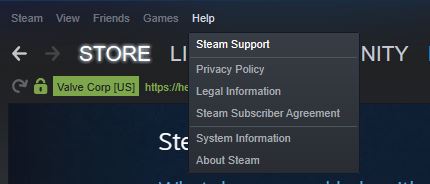
How to request a refund: You can return games via the Steam website or directly through the launcher on your PC. In the PC program, you will find the respective function under “Help” in the upper left corner. Then click on “Steam Support”.
If you prefer to go through the website, visit the page help.steampowered.com and log in there. You can also find support on the website at the top of the screen.

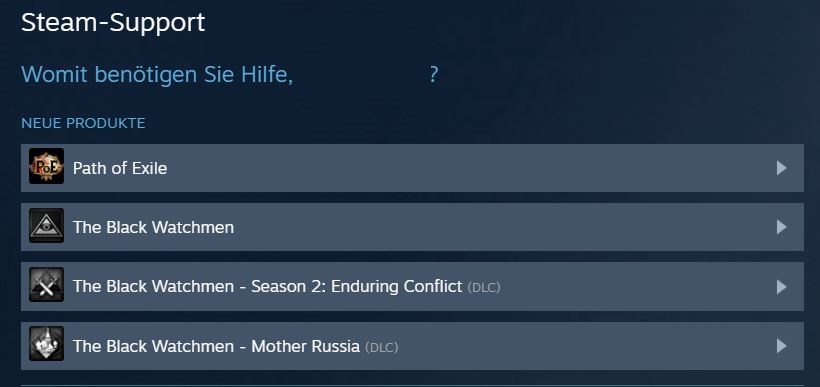
When you access the support page, your recent games will be shown that you have either played or purchased. By clicking on the respective game, you can select the issue for which you want to return the game.
Select either “Technical problems with the game”, “DLC or bonus content missing”, or “It is not what I expected” for the return. Under these points, you can further specify your report and then request a refund.
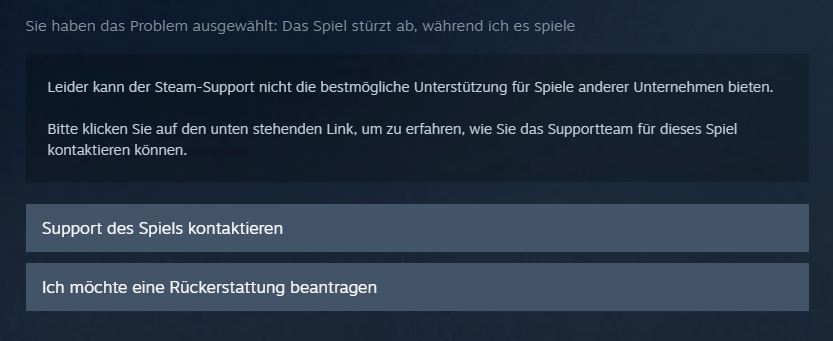
By clicking the button “I want to request a refund”, the selected game and any purchased DLCs will be displayed. You can choose the way you want your money refunded and provide further optional information about your issue with the game.
Steam Refund – What you should still know
How long does the refund take? After you have submitted your request for a refund, it may take a while for the request to be processed and for you to receive your money back. This can range from a few hours to a few days.
Once your request has been processed, you will receive an email. If you selected that you want the refund as Steam credits, you will see the amount appear in your Steam profile after processing. The money will then be transferred to you within seven days.
Can you cancel a refund? If you have requested a refund, you can also cancel it anytime before it has been processed. You just need to access Steam’s help page and cancel the refund request as long as it has not been processed yet.
Then you keep the game in your account and do not receive any money back.
Can I also return games that I have played for more than two hours? Normally, only games that you have not played for more than two hours can be returned. However, there are occasionally exceptions.
The MMORPG Bless Online had many issues at its launch on May 28, 2018, which frustrated players. They complained about bugs, missing features, and poor performance, and vented their anger in the reviews.
Valve then made an exception and refunded players their money, including those who had played Bless for 20 hours or more.
Refund or delete the game? Be careful: Do not select the option “I want to permanently remove this game from my account” for a return. This choice will remove the game, but you will not receive a refund.
Steam refund for gifts: Gifts that have not been redeemed can be refunded like other games within the 14-day period or under a playtime of two hours. Redeemed gifts can be refunded under the same conditions, but the recipient of the gift must request the refund. The money for the purchase will then be credited back to the original buyer.


Your opinion is important to us!
Do you like the article? Then let us know!