

PUBG Battlegrounds is a realistic shooter where every fraction of a second can count. That’s why we reveal the 8 most important settings that can improve your gameplay thanks to more FPS and better visibility.
No matter how beautiful games can be with high graphics settings – players who want to win a lot maximize their frames per second (FPS). This applies to Fortnite as well as to PUBG.
For this reason, we recommend the 8 most important settings you can use in PUBG in 2022. These settings directly and indirectly improve your gameplay, thanks to higher FPS and better visibility. This gives you huge advantages:
- You can react better and faster to enemies
- Aiming at enemies becomes easier because movements are displayed more smoothly
- Enemies at a distance are clearer and recognizable earlier
Our recommendations are based on personal experiences, as well as compiled settings from professionals, streamers, and experienced players. The professional settings can be viewed anytime on sites like prosettings.net.
The best graphics settings in PUBG
Our recommendations:
- FPP camera FOV: 103
- Antialiasing: Very low
- Post-processing: Very low
- Shadows: Low
- Textures: Medium (lower if you need more FPS)
- Effects: Very low
- Foliage: Very low
- View distance: Medium
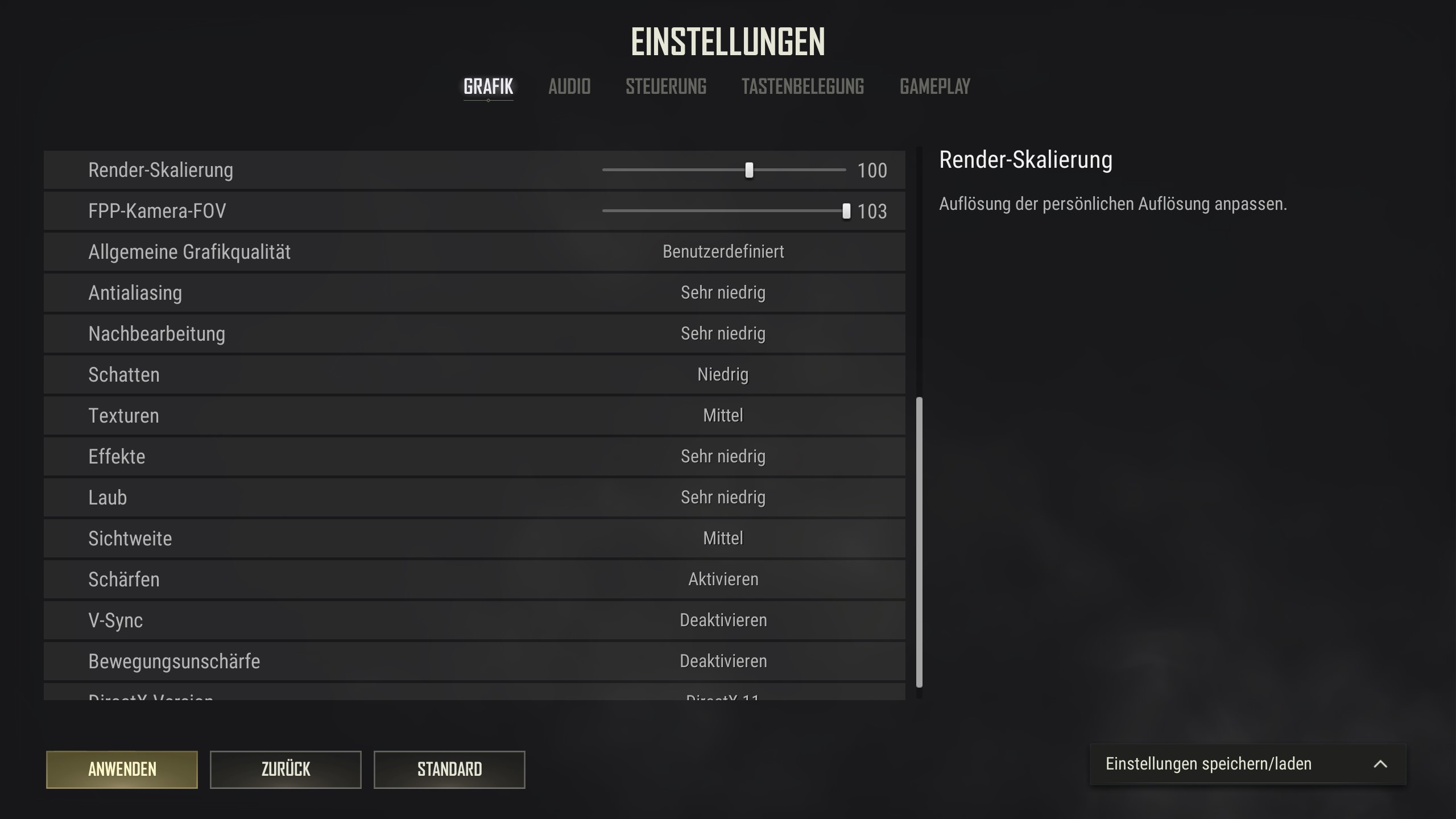
These are the 8 most important settings. You can adjust the other settings as you like. In the image above, you can see how we prefer the remaining settings.
Why these recommendations?
- FPP camera FOV:
This FOV value is not particularly high compared to the maximum in other games, so it does not distort your field of view or make enemies appear too small. At the same time, with a higher field of view, you have a better overview of your surroundings and are less likely to be surprised by enemies.
- Antialiasing, post-processing, effects:
We have set these settings to Very Low because they have the greatest impact on your FPS and largely only enhance rare effects or details. The image quality would be noticeably better if these values were higher, but the FPS would also suffer. We do not want to make this trade.
- Shadows, textures:
We have the most leeway with these values regarding personal preferences. The lower we set these settings, the higher the FPS – but the game will also become noticeably uglier. We have chosen compromise values here, but you can reduce or increase them according to your preferences. If you want the game to look nicer, set the values higher; lower if every frame matters to you.
- Foliage, view distance:
The settings for foliage and view distance are the most controversial among PUBG experts. The lower the values are, the less foliage, shrubbery, trees, and buildings can be seen at a distance. This helps to see enemies better but can conversely make important map elements ‘invisible’.
For foliage, we have chosen Very Low because the absence of bushes is less significant from a strategic perspective, although it can occasionally provide significant advantages. The following photos show the difference between Very Low and Ultra.
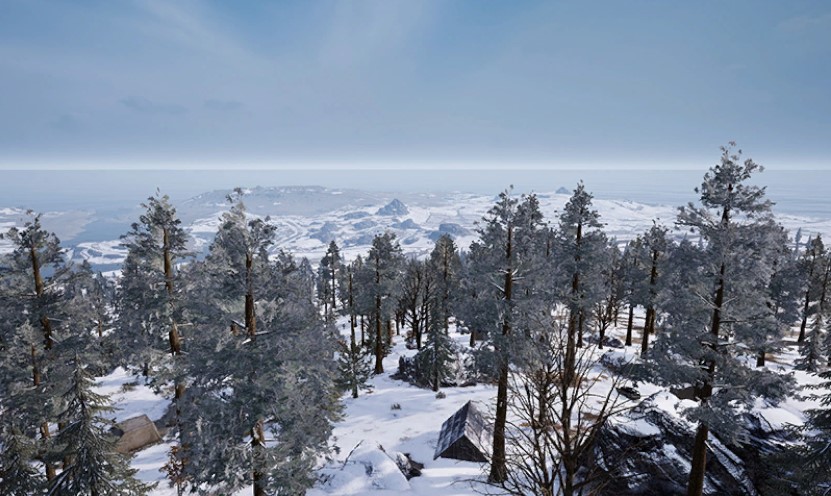
Foliage: Very Low 
Foliage: Ultra
For view distance, we have chosen the medium setting. Very low does have the most advantages when it comes to recognizing distant players. However, it is particularly noticeable when landing that buildings only become visible a long time after you have jumped. The average value is here a compromise between the visibility of map elements and enemy players.
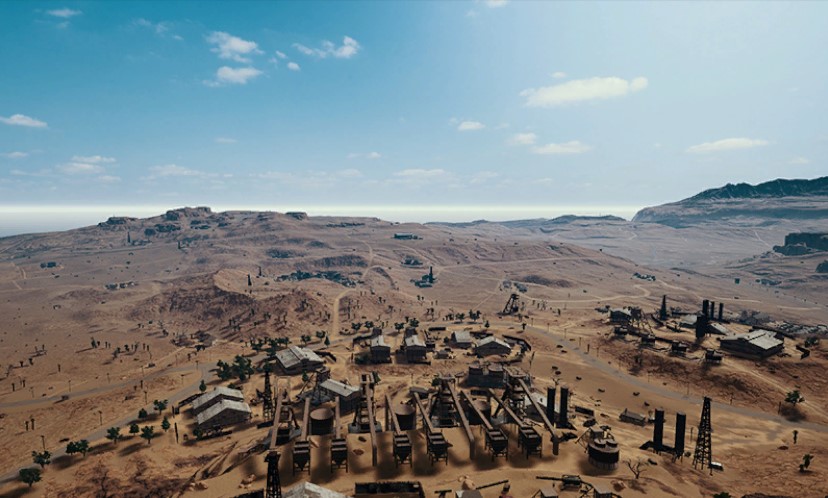
View Distance: Very Low 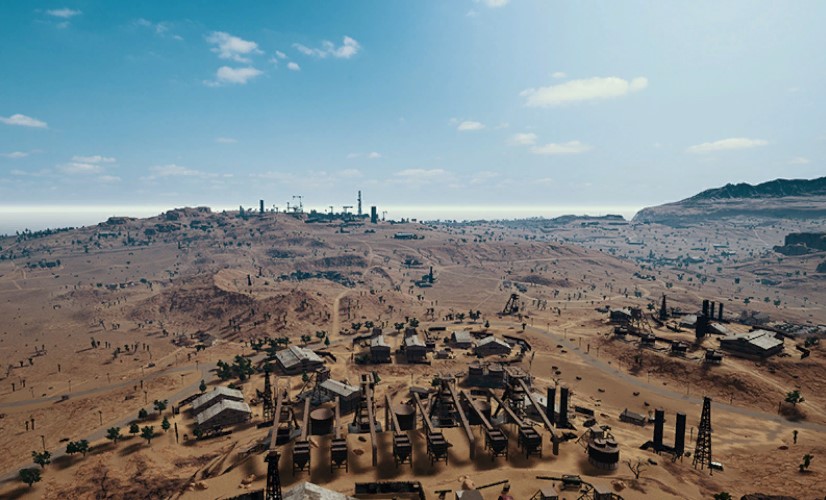
View Distance: Ultra
Low graphics settings are a big gameplay advantage in shooters
In multiplayer shooters, you should almost always lower the graphics settings to maximize FPS. The higher the FPS, the more information is displayed per second. This has 3 major advantages:
- The more FPS, the smoother the displayed movements appear. This is visually more pleasant and puts less strain on the eyes and attention span in the long run.
- The smoother the movements are, the easier it is to follow these movements with the crosshair. In other words, aiming becomes easier at higher FPS.
- The more information is displayed, the faster and easier you can react to suddenly appearing enemies or quick direction changes during strafing.
However, the poorer graphics are absolutely offset by the advantages in gameplay and visual clarity. This is a trade-off that competitive players make without much thought. The higher the refresh rate (the Hertz value) of your monitor, the more pronounced these advantages become.
Low graphics settings have another big advantage that is more pronounced in PUBG than in most shooters: The fewer graphic details displayed, the fewer elements exist in the game world that can obscure enemies.
If you adjust the settings so that less shrubbery is displayed, enemies cannot hide in this shrubbery anymore. While this may make the forest landscape look barer than in marketing screenshots – you have a huge gameplay advantage in these situations.
As we want to improve our gameplay, we also recommend opting for the lack of the wonderful view.
These are our recommendations for the settings in PUBG, as well as the explanation for them. If you have never played PUBG or haven’t touched it in years, you might want to know if it’s worth starting in 2022. We are happy to give you a detailed answer:
Is it worth starting PUBG in 2022?

Your opinion is important to us!
Do you like the article? Then let us know!