


In Pokémon GO, trainers often lose their precious passes due to the behavior of other players. A trick is supposed to save you some frustration. Our MeinMMO author Franzi Korittke tested it for you and explains how it works.

Which passes are involved? In Pokémon GO, trainers have been able to invite other players to remote raids or participate in raids in other regions using so-called remote raid passes for quite some time.
However, trainers often leave the raid lobby just before it starts. This naturally causes frustration among players, because they often lose their valuable remote raid passes. I recently tried a tip from reddit that is supposed to help with this. I have summarized below how you can use it yourself.
How to secure your remote raid passes in the future
What problem are we talking about? Trainers often report that they were invited to a raid and other players left the raid lobby just seconds before it started.
This is particularly annoying when you don’t notice it in time and can’t complete the raid on your own. Typically, you find yourself fighting alone and losing your precious remote raid pass. This was also recently reported by reddit user Kangabolic, which is why trainers gave important tips on how to behave in raids.
Some trainers also revealed a trick on how not to lose the passes in such a situation. I wanted to find out more and tried it for you.
How the trick works
Make preparations: Before you get invited to a raid next time, you should make a few preparations. You will need a team of “dead” Pokémon for the raid, meaning monsters that you would normally have to revive. You can create this easily. It’s best to proceed as follows:
- Tap on the Pokéball in the center of your screen and open the “Battles” menu option.
- Swipe left once to open the “Team” tab.
- You will now see the different leagues of PvP battles and below that the “Gyms & Raids” option. Click on the “+” behind this menu item.
- Now you can come up with a name for your team. I called it “dead team”.
- Next, you should select Pokémon for your team. I chose weak Pokémon with low CP because I wouldn’t need them in battle anyway.
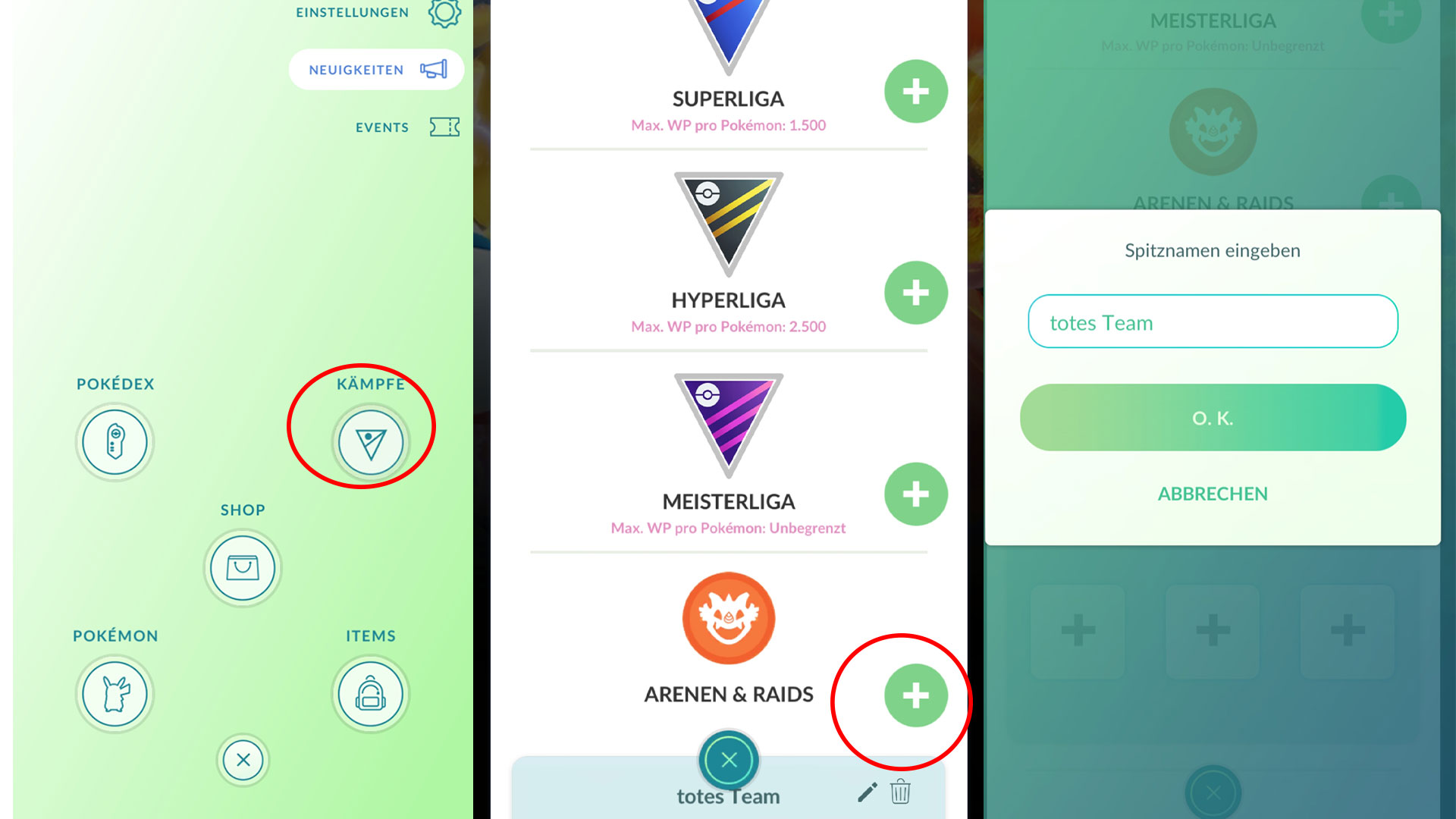
Once you have chosen your team, you will need to have the Pokémon battle, because as already mentioned, you need a “dead” team. I initiated a gym battle, selected the team, and let myself be defeated.
How to use the team in the raid: When you get invited to a remote raid, you can initially join normally and observe the situation in the lobby. If you are unsure whether the trainers might leave the lobby just before the start, you can now select your “dead team”.
In addition to the suggested Pokémon that the game shows you automatically, you can also select previously set teams. Just swipe through the Pokémon area until you find the prepared team you want. Since you have already sent the Pokémon into another battle, they are now grayed out and have no energy left.
Once the preparation time of the raid has expired and the battle begins, you will land in a separate screen. Your Pokémon are not alive, so they cannot fight the raid boss. Here you have the option to choose another team. You can also see how many trainers are in the raid.
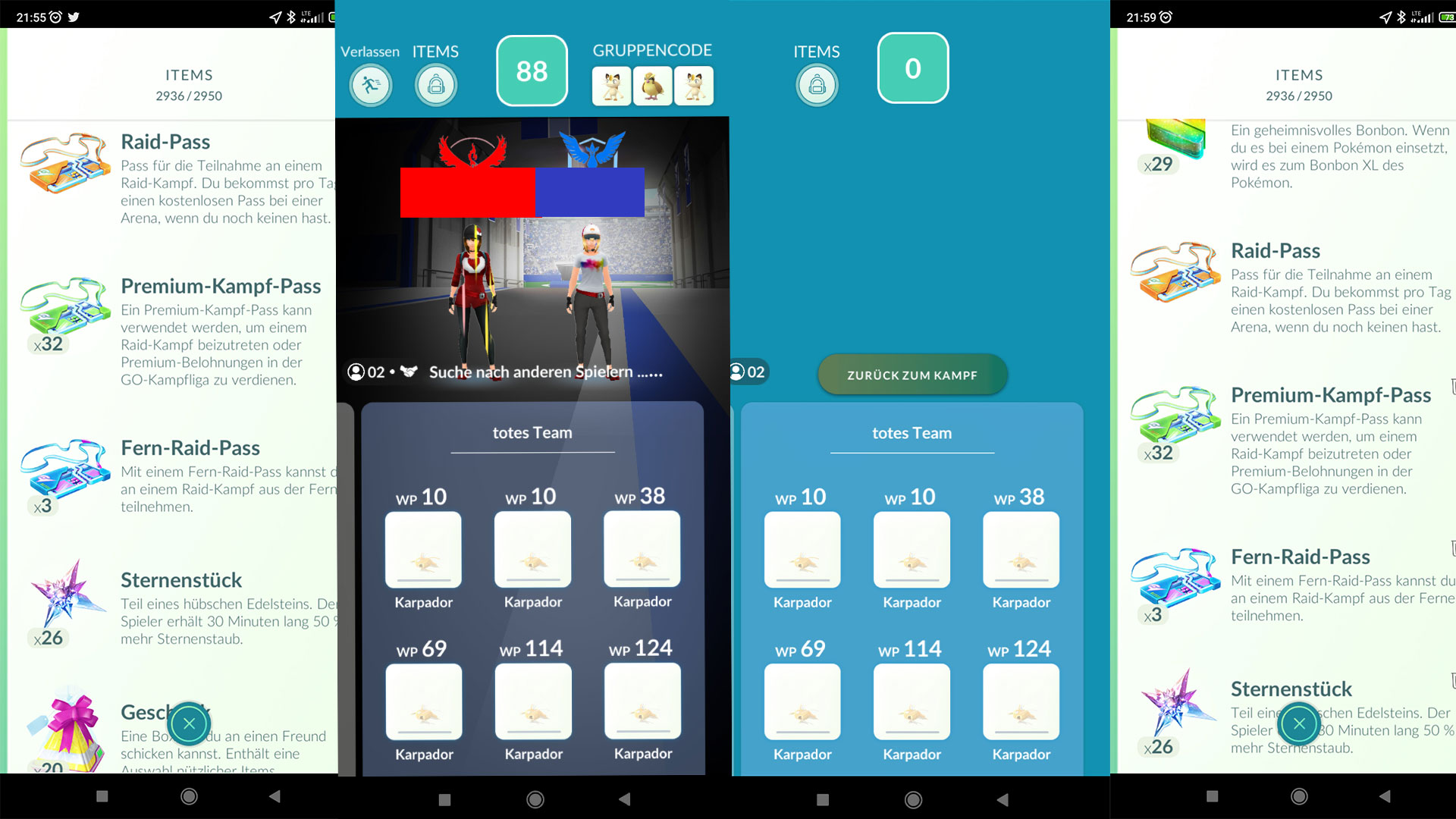
In my attempt, there were two of us, a friend and I. If that feels like too few trainers, or if you are left alone on the list, you can completely close the game at this point, delete it from your phone’s history, and restart it.
If you did everything correctly, your remote raid pass should still be in your item bag. As you can see from the previous image, I had 3 remote raid passes in my item bag both before and after.
By the way: If all players stayed in the raid, instead of closing the game, you can also simply assemble a corresponding team and return to the raid via “back to battle”.
A selection of the best attackers in Pokémon GO can be found in the following video:
My conclusion on the reddit trick
My expectations: When I read about the trick on reddit, I honestly couldn’t imagine that it would really work. But I thought it was an interesting approach to save your pass in such a situation, which is why I had to try it out.
Because I have also been confronted with such issues numerous times, I could empathize with the frustration of the players very well. After trying it for the first time, I expected to be able to simply leave the raid as usual. However, the corresponding icon was not available, which is why I simply closed the game.
I have since tried it multiple times this way, and it has always worked with my “dead team”. According to some trainers, it should also work if you use a team without monsters, but I cannot confirm that for the moment.
Would I use it again? Yes, I find it a good way to secure my remote raid pass if players leave the lobby just seconds before the raid and I am left alone. Therefore, I will mainly use my team when I do not yet know the other trainers who invited me or know that they like to change their minds at the last minute.
However, I believe it should really only be a stopgap in such cases. Better communication among trainers would definitely be preferred here.
What has your experience been with remote raids? Will you try this trick in the future as well? Or do you play more with people you know and don’t have these kinds of problems? Feel free to share your opinion here on MeinMMO in the comments and discuss with other trainers about it.
In a few weeks, the spooky season in Pokémon GO will begin. We will show you what information and leaks we already know about the Halloween event 2022.

Your opinion is important to us!
Do you like the article? Then let us know!