


In Pokémon GO, many trainers have been waiting for a way to chat with each other and arrange raids. Campfire is supposed to make that possible now. Our MeinMMO author Franzi Korittke has tried out the new app and shows you how it works.

Which app is it about? After trainers of Pokémon GO have been demanding a chat function for many years to plan raids or level-ups together, Niantic has now developed a new app that aims to make that possible: Campfire.
With it, you should be able to network not only within Pokémon GO but also across the various Niantic games. I took a closer look at the new app and will show you how it works.
How to get access to Campfire
What is Campfire? Campfire is an app from Niantic that revolves around communication between players of the various Niantic games. With it, you can chat, join groups, and send smoke signals when you want to play raids.
How do you get access to Campfire? Basically, Campfire is not yet available for all players. To use the app, you currently need an invitation from another player who is already using the app. Download Campfire in advance from your Play Store or App Store.
To get access, you can post in specific Campfire threads on reddit. The concept of the thread is quite simple: You express that you want an invitation to Campfire and wait for a message from another reddit user.
You exchange your trainer code from the game with this person so they can send you a friend request and eventually invite you to Campfire as well. Depending on how many requests are ahead of you in the reddit post, it may take a while.
If you have successfully registered for Campfire, a small green symbol will appear on the right side of the screen in Pokémon GO. You can use this to switch directly to Campfire. Additionally, you now have the opportunity to invite other players yourself. The mentioned reddit thread, for example, assumes that you will continue the concept and invite the next users.
How to invite friends to Campfire
How can you send invitations? To send an invitation to another trainer, you must already be friends with them in one of your Niantic games. If that is the case, you can click on the round symbol with the person in the bottom right corner of Campfire.
You will now see in the orange box how many of your friends are already using Campfire. Clicking on it will display them. If your desired friend is not listed here, you can invite other trainers from your friends list using the “Add Friends” button.
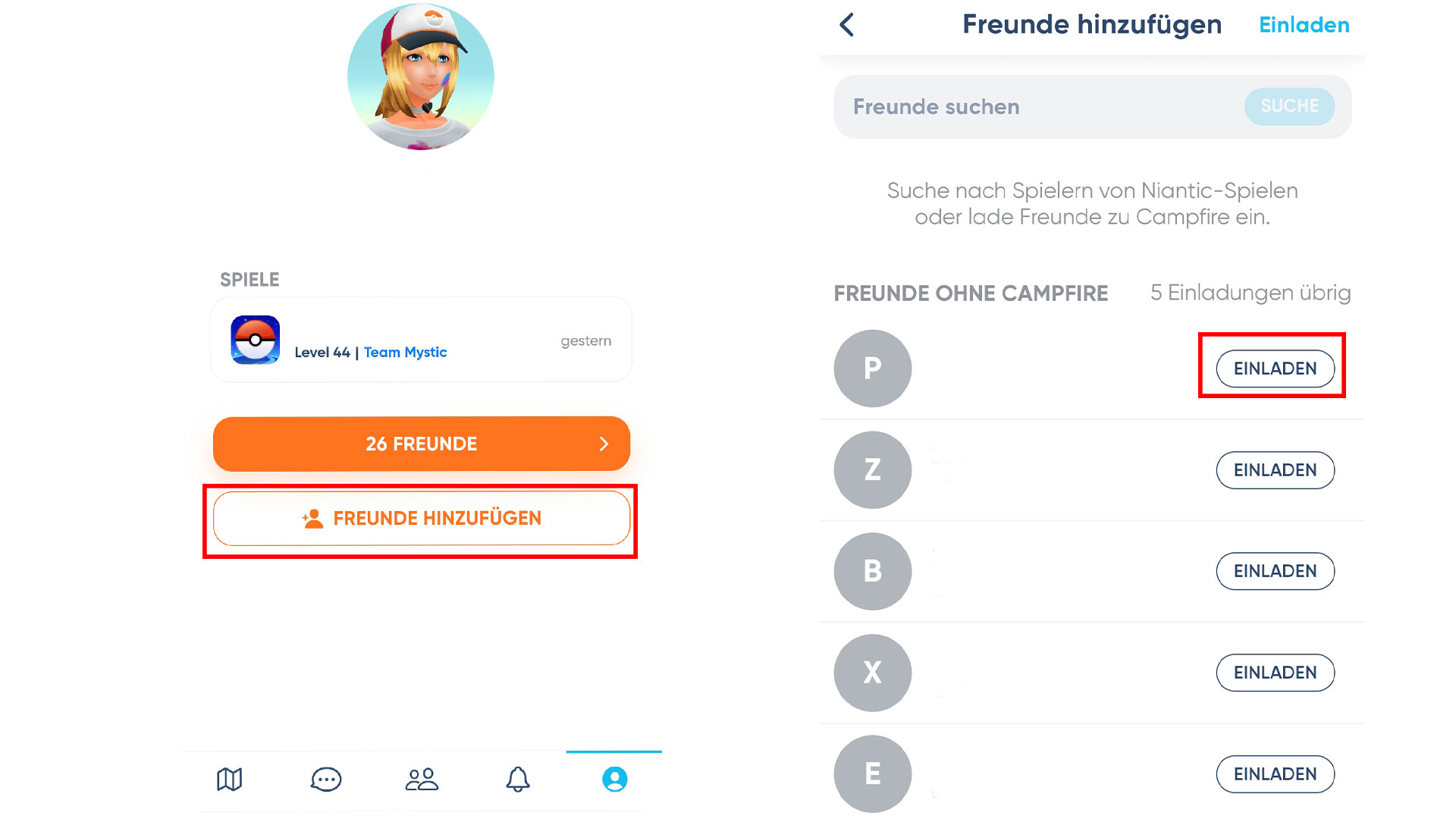
How many invitations can be sent? Currently, each trainer has a maximum of 5 invitations available that they can send to friends from their friends list. Therefore, it is best not to send invitations indiscriminately, but to ask people in advance if they even want access to Campfire.
Using Campfire – Raids and Chats
How do you indicate that you want to do raids? As soon as you open Campfire, you land on a map view. All stops and arenas in your vicinity will be displayed, and ongoing raids will also be shown there. Alternatively, you can access this mode by clicking on the map symbol.
If you find a raid nearby that you would like to participate in but are looking for teammates, you can simply click on the corresponding arena in Campfire. You can then join the arena. This opens a chat window through which you can coordinate with other players around the raids and send signals.
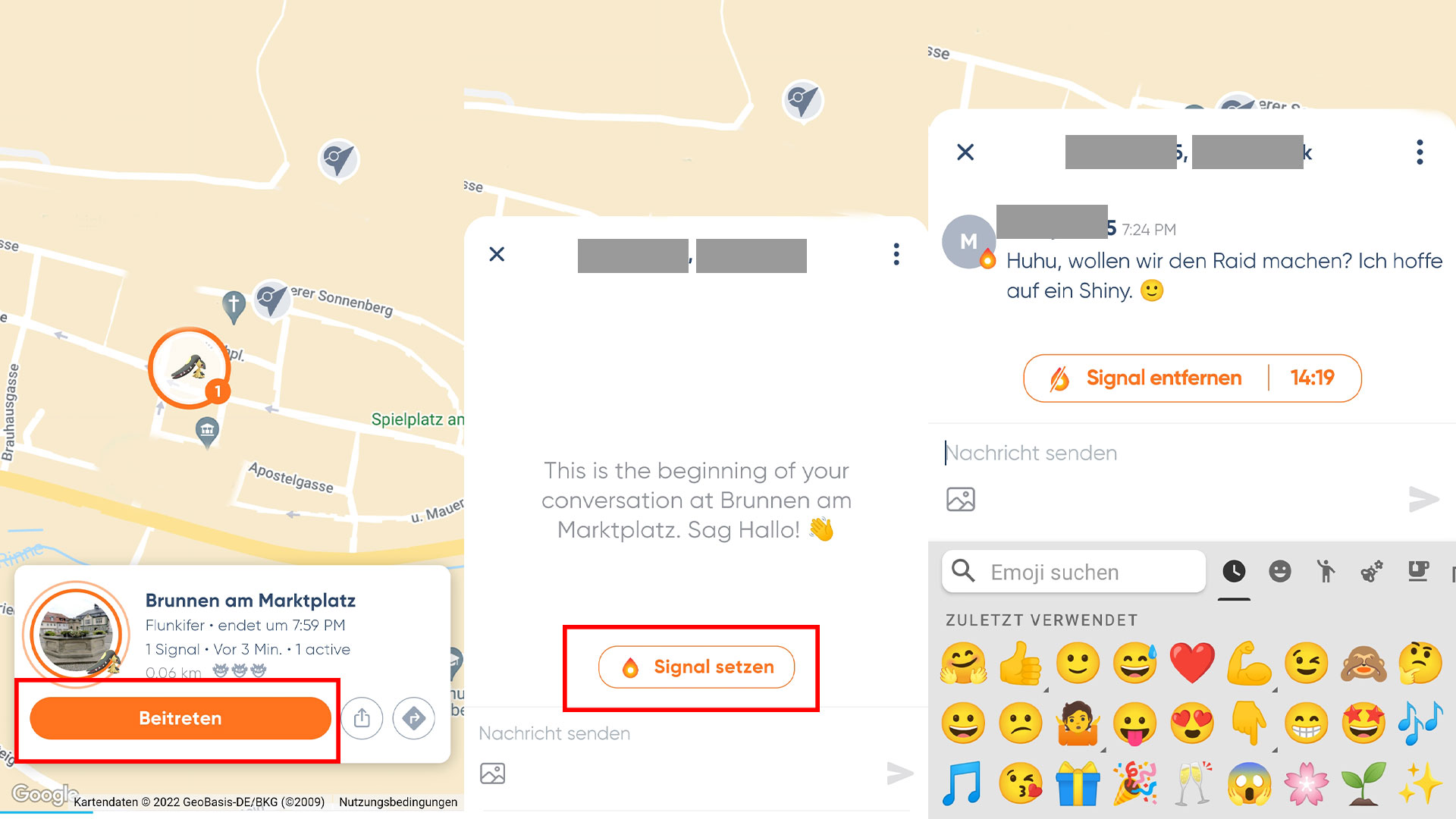
Your signal lasts for 15 minutes after setting and then automatically ends. If you are still looking for like-minded individuals, you can set it again.
Based on the orange borders around a raid boss on the map, you can also recognize signals from other players and join the respective arena if interested.
How to chat with other trainers
In Campfire, you have several options for writing to other players. One option, which only exists temporarily, is the chat function at arenas. However, if you want to stay in touch with your teammates permanently, you can do this either through a private chat or a group chat.
This is how the private chat works: To start a private chat, you must be friends with the respective trainer in one of the Niantic games and they must also use Campfire. If that is the case, you can select them from your friend list and click “Send Message”.
Once you have had contact with each other, all messages will be displayed by clicking on the speech bubble at the bottom of the screen. Alternatively, you can also start a new chat through the speech bubble. To do this, click on the pencil symbol in the bottom corner and select the desired trainer.
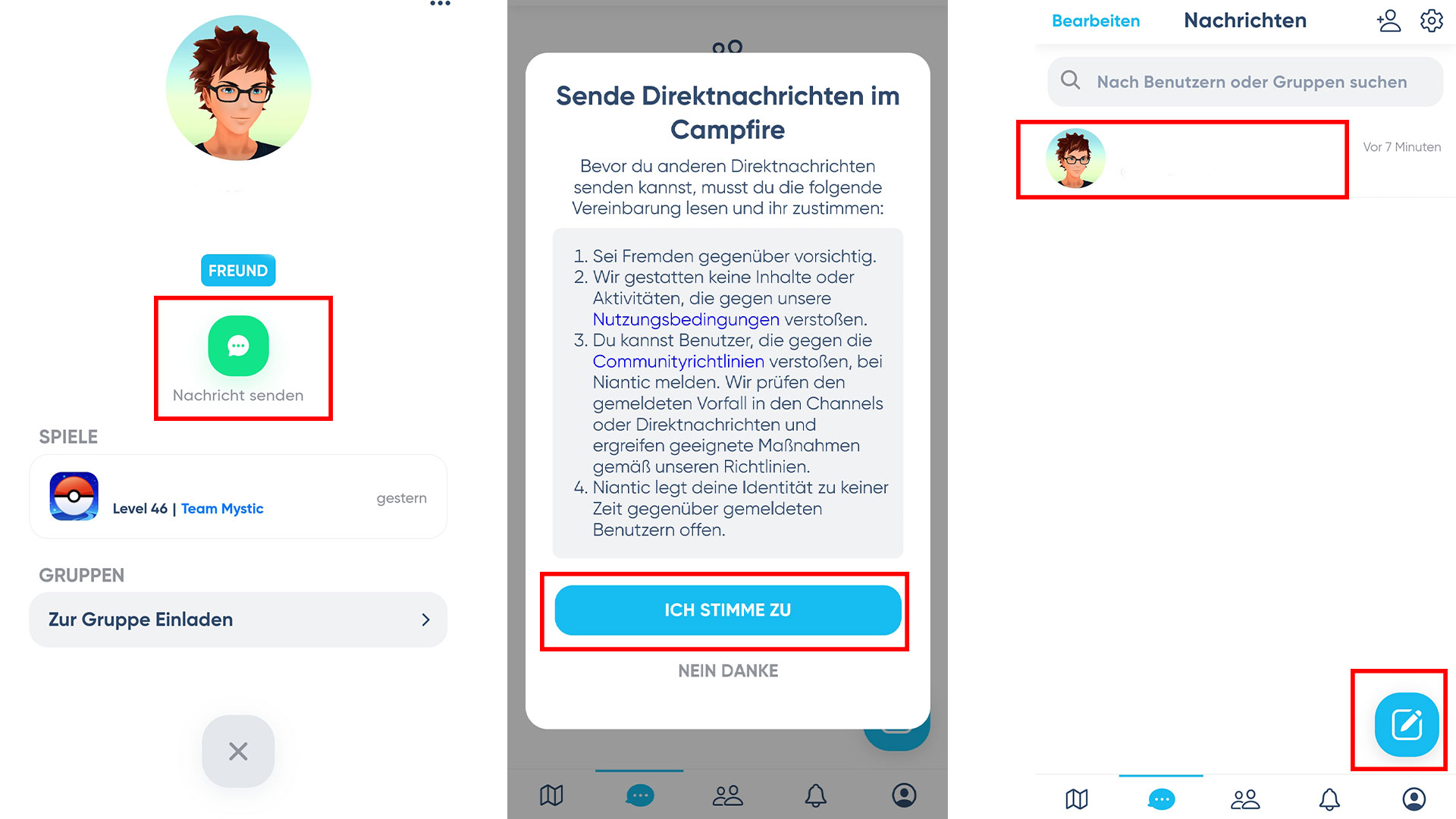
If the respective player is not yet connected to Campfire themselves, you cannot write directly with them yet. It is best to send them an invitation.
This is how group chats work: If someone has a local community that prefers to communicate in Campfire, they can also use groups for communication. To do this, click on the symbol with the two people.
The group menu will now open. Here you will initially see numerous groups that have already been created. By clicking on the “Join” button, you can become a member there and exchange information via so-called channels.
These have been created by the group admins and offer users, similar to Discord, better orientation and a clear structure for the group. For example, in the group “Pokemon GO Official”, you can use the channel “lets-be-friends” to meet new trainer friends.
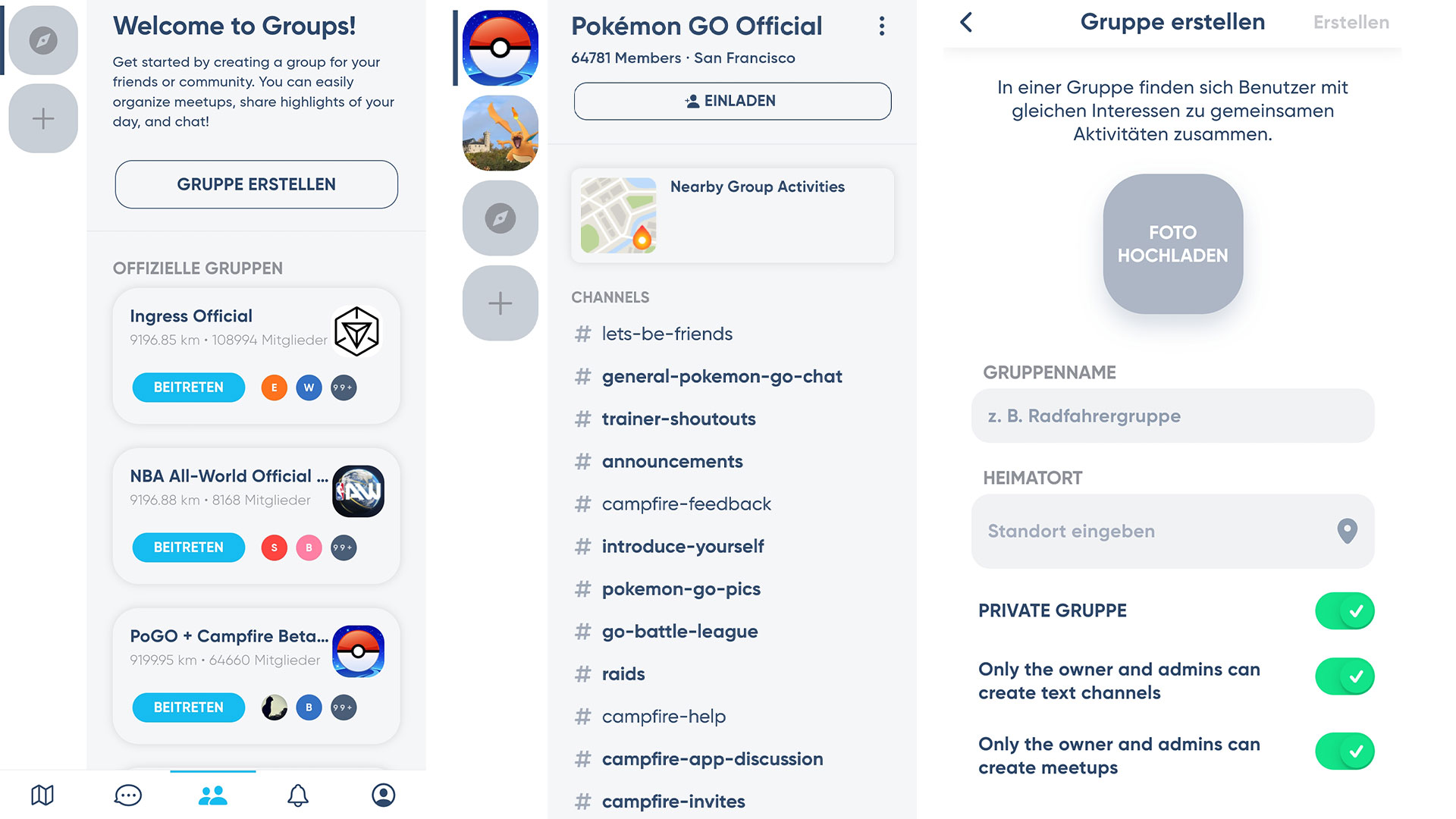
Create your own groups: If the group you are looking for is not in the list, you can alternatively create your own group and invite your friends to it. To do this, click on “Create Group” in the group menu. Now you just need to give it a name and make a few settings, and you have your very own group.
You can then add your friends to the group using the “Invite” button. However, anyone who is not yet using Campfire will also need an invitation to the app. Additionally, it is also advisable in your own groups to structure communication better by assigning channels.
My personal conclusion about Campfire
What I liked a lot: I think it’s great that Campfire finally provides the opportunity to directly contact other trainers. This is especially worthwhile if you often participate in raids together or want to arrange friendship level-ups.
I also find it great to set signals to indicate interest in a raid. Especially when you’re in a region where you don’t know anyone, this way you can more easily find teammates who can support you in a raid.
Moreover, you can move the map. So you see – unlike in Pokémon GO – not just a small part, but can also push it, for example, to the neighboring town and see what raids are taking place there.
Additionally, the group function allows you to connect with other players in your area whom you may not have been able to contact before because they are not in the typical local WhatsApp groups. At the same time, there is no obligation to be friends with these people in the game or to share private contact details, as is common in many messaging services.

This is what still needs to be improved: The biggest sticking point for me with Campfire is that it is still a standalone app. You always have to switch back and forth to write, which is especially annoying when you want to do a raid together.
I miss an overlay function through which you can also write to players while you are already in the raid lobby. It would be practical to also receive last-minute registrations from other players or be able to report issues while participating in a remote raid so that you might wait a moment for the raid.
Also, signals at arenas should be integrated directly into Pokémon GO in my view. If you don’t receive a corresponding notification that a signal is active nearby, you might miss it, even if you were in the game.
Can I recommend the new app? I can basically recommend Campfire since I really like the many different functions. Finally, you can chat with other trainer friends, join local groups without everyone having my personal data, and I can show that I want to do a raid.
However, since Campfire is not yet easily accessible through a simple registration, unfortunately not many players are active in my area. This makes the use quite manageable at the moment. Often, contact with these people already exists through other means, which makes it difficult to establish new contacts in my region at the moment.
However, this hopefully changes with the official release. When that will happen, and you can also secure Campfire without an invitation, is currently still unknown. If there are new updates on this, you will definitely find out from us on MeinMMO.
Do you already have access to Campfire? If so, how do you like the new app? Let us know in the comments.
A new Pokémon from the 9th generation was recently teased in Pokémon GO. We show you everything about the appearance, forms, and location of Gierspenst.

Your opinion is important to us!
Do you like the article? Then let us know!