

For a quest in Pokémon GO, you also have to take a photo of your Pokémon. This can take quite a while if you have to search for the monster on the screen beforehand. We show you how to do it faster.

This is the situation: “Take a snapshot of a Pokémon” or “Take a photo of your buddy” are quests that are known in Pokémon GO. These tasks can be solved quite quickly if you turn off a setting.
Then you no longer have to annoyingly search for your Pokémon in AR+ mode and scan the ground for movements.
AR+ mode can be deactivated
What you need to do: Go to your settings in Pokémon GO. You can find them by tapping the Pokéball in the bottom center of your screen. In the top right, you’ll see “Settings”.
AR+ is a bit further down. There you need to uncheck it and deactivate the AR+ mode. Once you have done that, you can only take pictures in the regular AR mode.
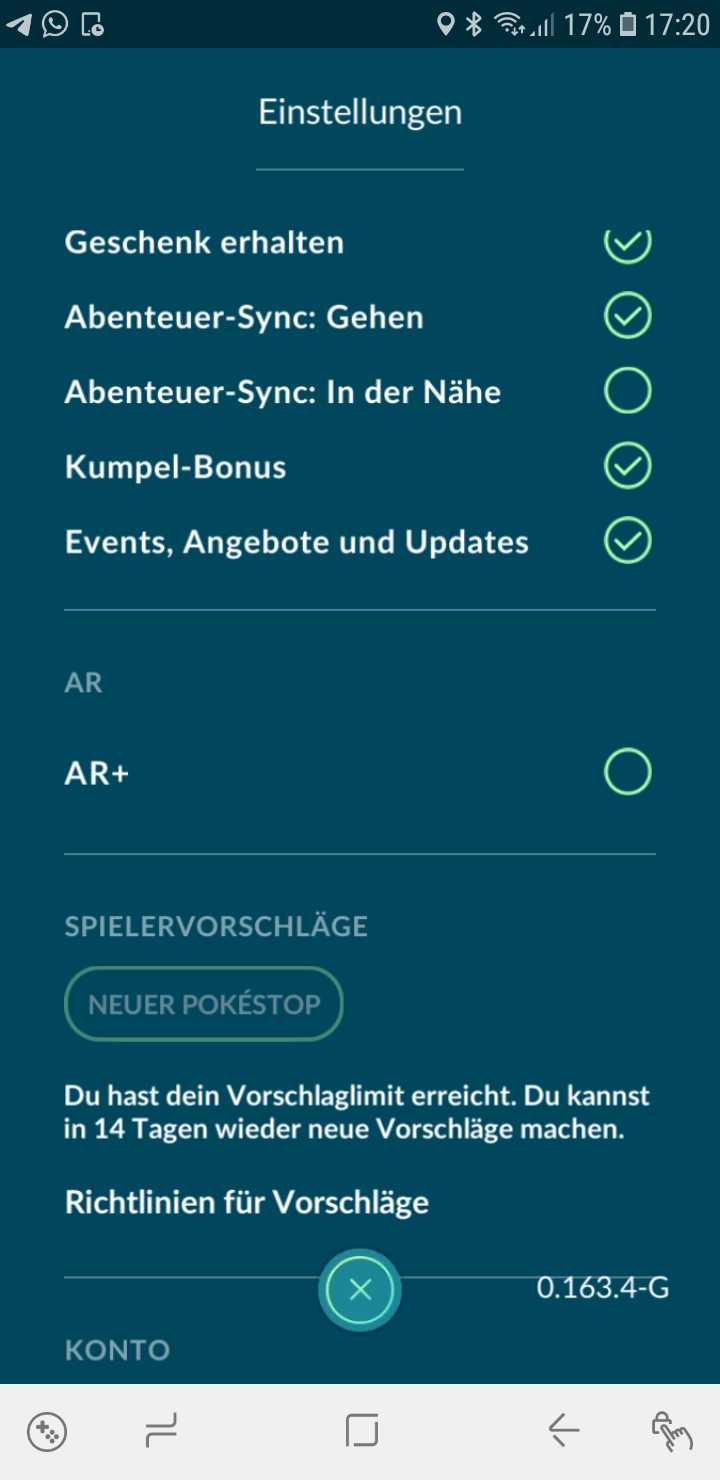
What is it good for? When AR+ mode is turned off, you don’t have to endlessly search on the screen for the Pokémon. It simply appears directly on your phone, and you can photograph it.
This also applies to your buddy if you want to pet or feed him.
This saves an incredible amount of time, as looking for the Pokémon can also take a minute. It needs a smooth surface. In regular AR mode, it doesn’t need that.

What if I want to take beautiful pictures? Surely the AR mode is not suitable for that. It just doesn’t look “realistic” anymore when the Pokémon is in the picture.
If you want to photograph Pokémon again because you are at a cool backdrop, you can simply turn the AR+ mode back on. For that, you just have to check the setting again.
Problems with AR+? Then check out these known errors.
Have you heard the story of John Travolta and Pokémon GO?


Your opinion is important to us!
Do you like the article? Then let us know!