


An important component of Pokémon GO is, besides catching wild monsters, participating in raids. However, there is not always a local community to support you in battle. Therefore, our MeinMMO author Franzi Korittke tested the app “Poke Genie” and explains how you can complete raids with it.

What are raids? In Pokémon GO, Pokémon can not only be caught in the wild, but also with the help of raids. These are fights between trainers and a raid boss, which is a specific Pokémon that occupies the respective arena in the game for a certain period.
Depending on how difficult the raid is, you can tackle it alone or might need support from other players against some monsters. This is especially the case for legendary Pokémon in level 5 raids.
However, not all trainers can rely on a local community, which is why remote raid passes in the game are particularly popular. With these, you can be invited by friends to raids in other regions of the world.
If you are poorly connected here as well, you can be invited to these raids using various apps. I tried this with Poke Genie on my Android device and will explain how it works.
With Poke Genie, you can participate in raids
What kind of app is Poke Genie? Poke Genie was originally designed to allow players to evaluate their monsters in the game. However, this is not well-regarded by Niantic and violates their terms of service. This could potentially mean a ban, so you should use this app for these purposes at your own risk.
A function that has also existed since the introduction of remote raids in Poke Genie: you can network for raids. This way, players can host raids near them through the app and invite other trainers.
Does Poke Genie cost money? No! Poke Genie is generally free. Depending on which raid you want to participate in, you may need some patience. For example, the ultrabeast Kaguron caused long waiting lines at the raids.
This is how Poke Genie works on Android
How can you be invited to raids? To participate in one of the raids, you must first create an account. Your trainer name and trainer code will also be recorded here. For everything to work, this information must match your in-game details.
Once you have registered successfully, you can get started. To be invited to a raid, you should proceed as follows:
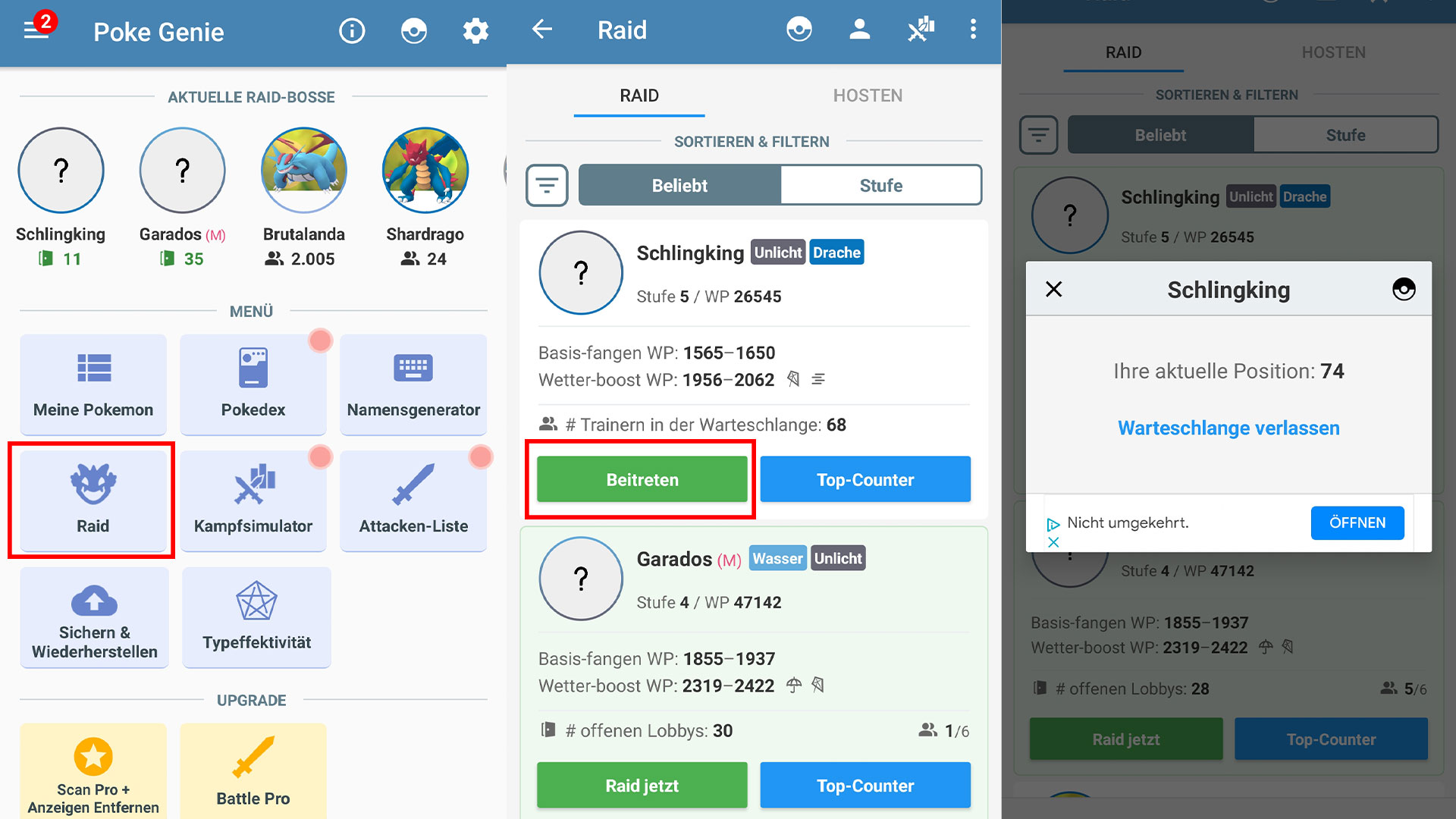
- Click the “Raid” button on the homepage.
- Now the raid selection opens, where you can see which raids are available and how many people are already in line.
- Select your desired raid.
- After a small window opens showing your current position in the queue, you must wait. If you no longer feel like the raid, you can leave the queue via the corresponding button.
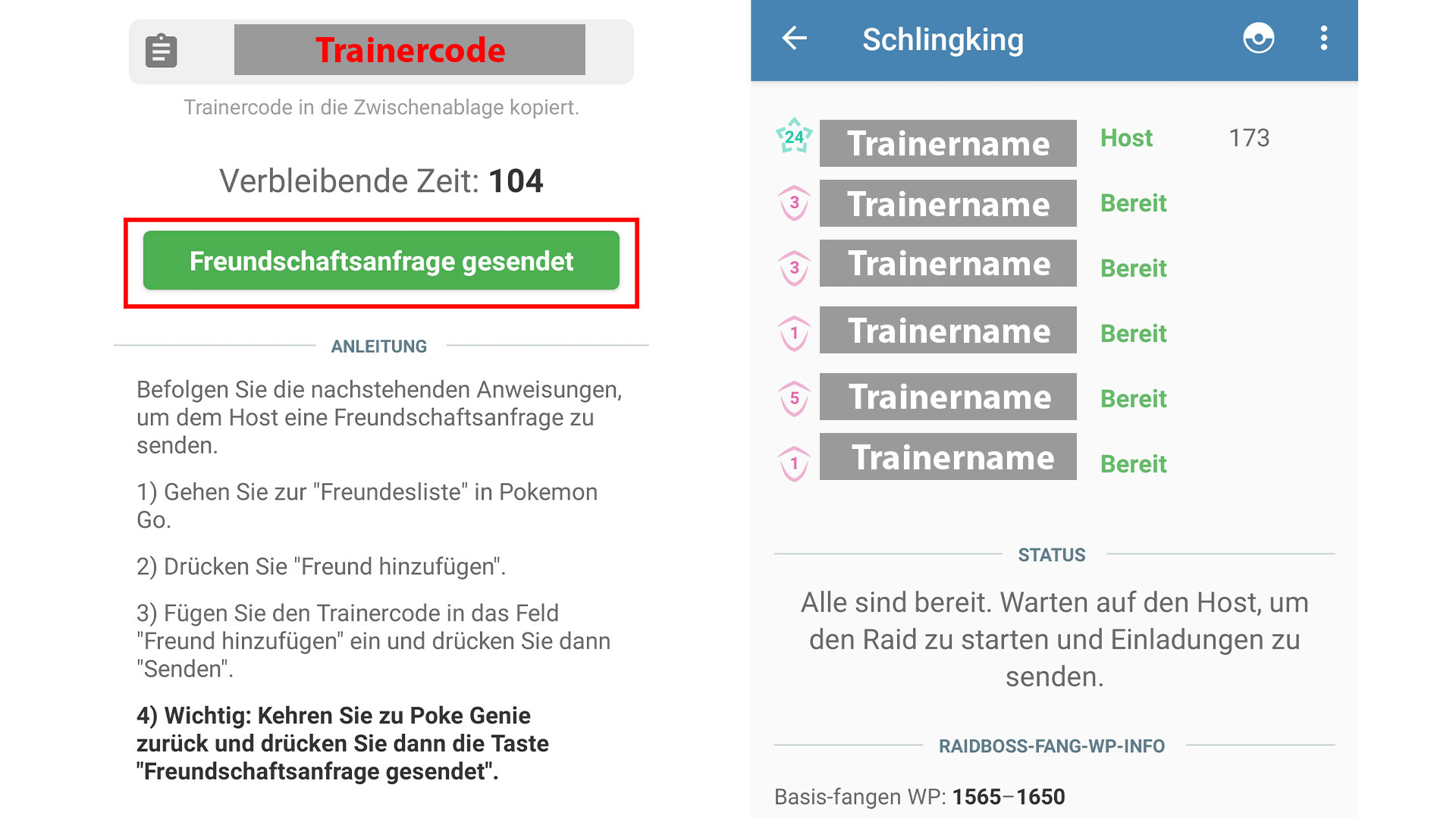
- If a spot opens up for your desired raid, a window will finally open that shows you the trainer name of another player and their trainer code.
- Copy the trainer code.
- Then quickly switch to the game and send a friend request.
- Go back to the Poke Genie app and confirm the “Friend request sent” button. Note that you only have a short amount of time to do this, which you must not miss if you want to participate in the raid.
If successful and the other player accepts your request, you will receive a list of all participants in the raid in the app. Now you can switch back to the game and prepare for the invitation to the respective raid.
What happens next? The further steps are like in any other remote raid. The bar in the lower right corner lights up orange and you just need to click on the respective raid and join via remote raid.
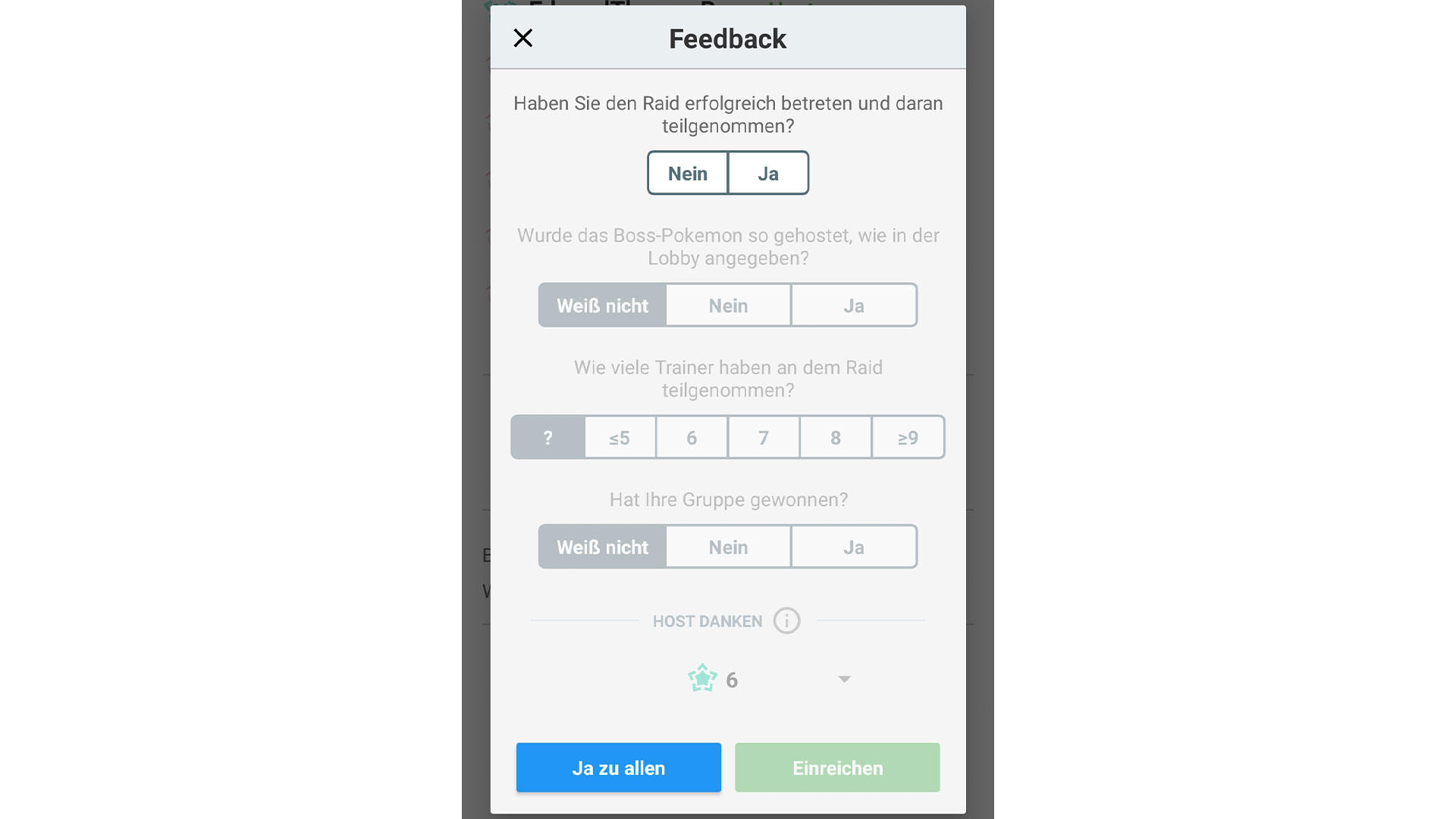
Once you complete the raid and encounter the raid boss, you need to switch back to the Poke Genie app. Here you now have the opportunity to rate the hosted raid.
Can you also host raids yourself?
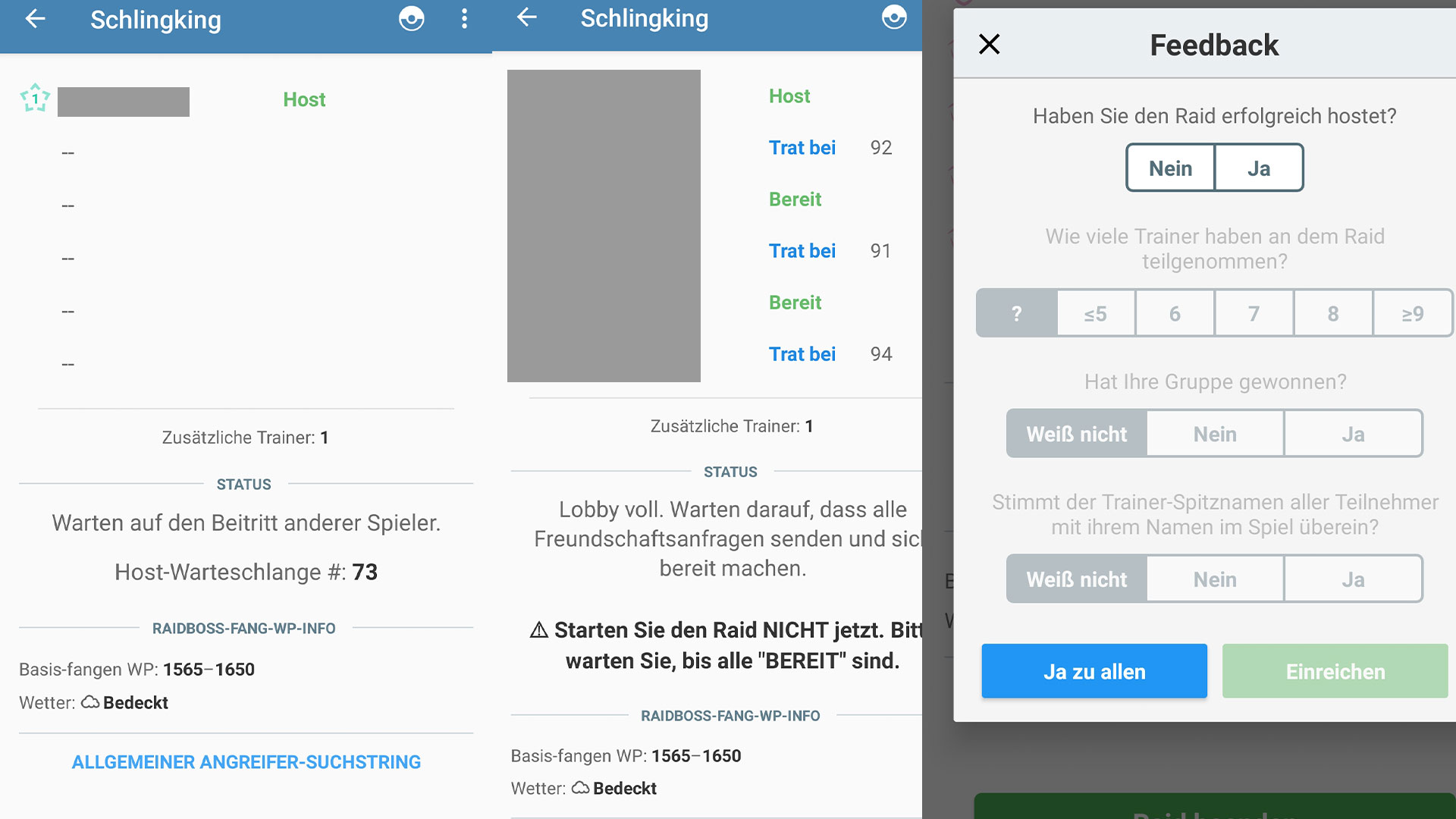
Yes, for this you need to click on the “Host” category under the Raids section in the Poke Genie app. Now you can start an “Overlay”. By clicking the corresponding button, your game will open, and you can scan the respective raid. Next, you need to answer a few questions about the raid in the Poke Genie app, such as the weather or how many additional players are participating.

If you have successfully hosted the raid, you will end up in a queue. Your placement will be displayed accordingly. This way, you can assess how long it will take. Once it’s your turn, the list fills up with names. Now you can switch to the game and accept the friend requests.
Once all trainers are ready, you can invite them and conduct the raid normally. Afterwards, you should switch back to Poke Genie and rate the raid accordingly.
My personal conclusion about Poke Genie
Advantages of the app: Poke Genie offers a good opportunity to be invited to remote raids with its app. This is especially interesting for players who do not have a solid community or trainer friends who regularly invite them to raids. Thus, these players also have a chance to secure the respective raid boss.
Furthermore, there are often problems with invitations to remote raids with friends because players leave the lobby just before the raid starts. This is less likely to happen with Poke Genie since the trainers explicitly wait for participation in this raid.
Additionally, players can also host their own raids, saving remote raid passes.
Disadvantages of the app: What annoyed me about using the app was the constant switching between apps. I do not use the latest smartphone, so with so many app switches, it often freezes. This is especially annoying when trying to invite another trainer and then not getting back to the Poke Genie app in time to confirm it.
I managed to solve this issue with a second smartphone, on which I launched Poke Genie. I would therefore wish for a slightly simpler process, or at least a corresponding overlay that allows me to interact in both apps simultaneously.
Another drawback in my view is the fact that the app also offers the evaluation of monsters, which, as mentioned at the beginning of this article, is not particularly well-regarded by Niantic and therefore presents a certain risk.
Would I still use Poke Genie? In principle, I find Poke Genie a good thing, especially if you really want a specific monster and can’t find another trainer to participate.
Additionally, there are occasionally monsters that only come to raids in specific regions. It is also helpful to connect quickly and easily in this case. Therefore, I will continue to use Poke Genie from time to time for participating in raids. Nevertheless, I prefer raids with friends.
By the way: To obtain remote raid passes in Pokémon GO, you need to dig deep into your pockets. I finance the coins in the game with Google surveys and will show you how you can do that too.

Your opinion is important to us!
Do you like the article? Then let us know!