

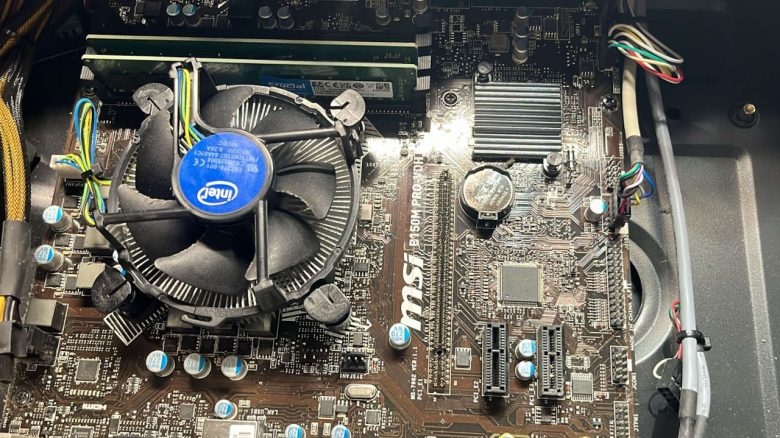
A player acts too hastily during a hardware upgrade. He forgets a small, yet important step before removing the old graphics card. Now he also has to replace the motherboard.
Replacing the graphics card in a gaming PC is usually done quickly. One disconnects the power cable for the additional power supply and removes one or more screws securing the graphics card to the case.
During such an upgrade, a user forgot to unlock the quick release on the PCIe slot out of ignorance in the last step and did not unlock it. He then removed the pixel accelerator despite the significant resistance from the computer and thereby damaged his motherboard.
Hasty hardware upgrade with consequences
What happened during the upgrade? A player wanted to replace the graphics card in his gaming PC. However, he forgot the unlocking mechanism on the PCIe slot. This small plastic lever usually ensures that a graphics card is securely seated in the slot after installation.
Additionally, graphics cards are secured with one or more screws at the level of the slot covers on the PC case. During the installation and removal of the pixel accelerator, the screws are easily noticeable. Not so with the unlocking mechanism, as it is often hard to access and easily overlooked.
While the lever closes automatically during installation, it must be released by hand during removal. If this is forgotten, one will feel a certain resistance when removing the hardware. At the latest at this moment, the lever must be unlocked to avoid damage.
Why didn’t he notice his mistake? In a Reddit post, user Chem2calWaste reports about a friend who experienced this mishap. Why he continued to pull on the graphics card is not explained. It remains unclear which model the card is.
About his friend, he says in the comments on Reddit that he hardly takes care of his PC. Presumably, he made the mistake out of ignorance and thought nothing of it when the graphics card could only be removed with great force.
Since the hardware is already several years old, the friend decided to buy a cheap replacement board for 50 euros. The damaged motherboard is an MSI B150M PRO-VDH with the 1151 socket for Intel processors of the 6th generation, such as the i7-6700(K). Amazon has listed the motherboard since September 2015.



Reactions from the community
What do others say? The community sympathizes with the unfortunate victim. Some users report in the comments under the post about similar experiences and their problems with releasing the lock.
TRIPMIN_Guy tells:
- “When I replaced the GPU, I almost ripped the slot out. I didn’t know there was an unlocking mechanism and just kept pulling.” (via Reddit)
Paavikana always fears damaging the components on his motherboard:
- “I feel for you. I have to unlock mine with a long screwdriver and every time I am so afraid of scratching the motherboard.” (via Reddit)
facw00 sees some partial blame for such accidents on newer graphics cards:
- “To be fair, these levers are really terrible. Especially now, with graphics cards that have three slots and backplates.” (via Reddit)
How are manufacturers reacting? Some motherboard manufacturers are aware of the issue and now offer motherboards that feature a simpler and safer mechanism for the quick release. Asus, for instance, calls this feature PCIe Q-Release.
If you are unsure how the unlocking mechanism is released on your motherboard, a quick look at the respective manual is often sufficient. The appropriate manual can often be found in the download area of the motherboard on the manufacturer’s website.
If you can’t find it there, tech forums or YouTube tutorials are another resource to verify how to safely remove your graphics card from your gaming PC without causing damage.
Installing and removing hardware in a gaming PC can sometimes pose several problems if certain things are not considered. The individual components should always be screwed in and securely fixed as intended by the manufacturers. A user neglected this when installing his M.2 SSD: User is too lazy to buy a screw, secures his SSD with tape on the motherboard
Our title image is a symbolic image.

Your opinion is important to us!
Do you like the article? Then let us know!