


Palworld has launched on Steam and Xbox. We will reveal to you which graphics settings you can use to get the most out of the survival game.
A new game called Palworld has launched on Steam and Xbox, where you can collect so-called Pals. However, the Unreal Engine used requires sufficient performance for the game to run properly. MeinMMO presents settings with which you can improve your performance.
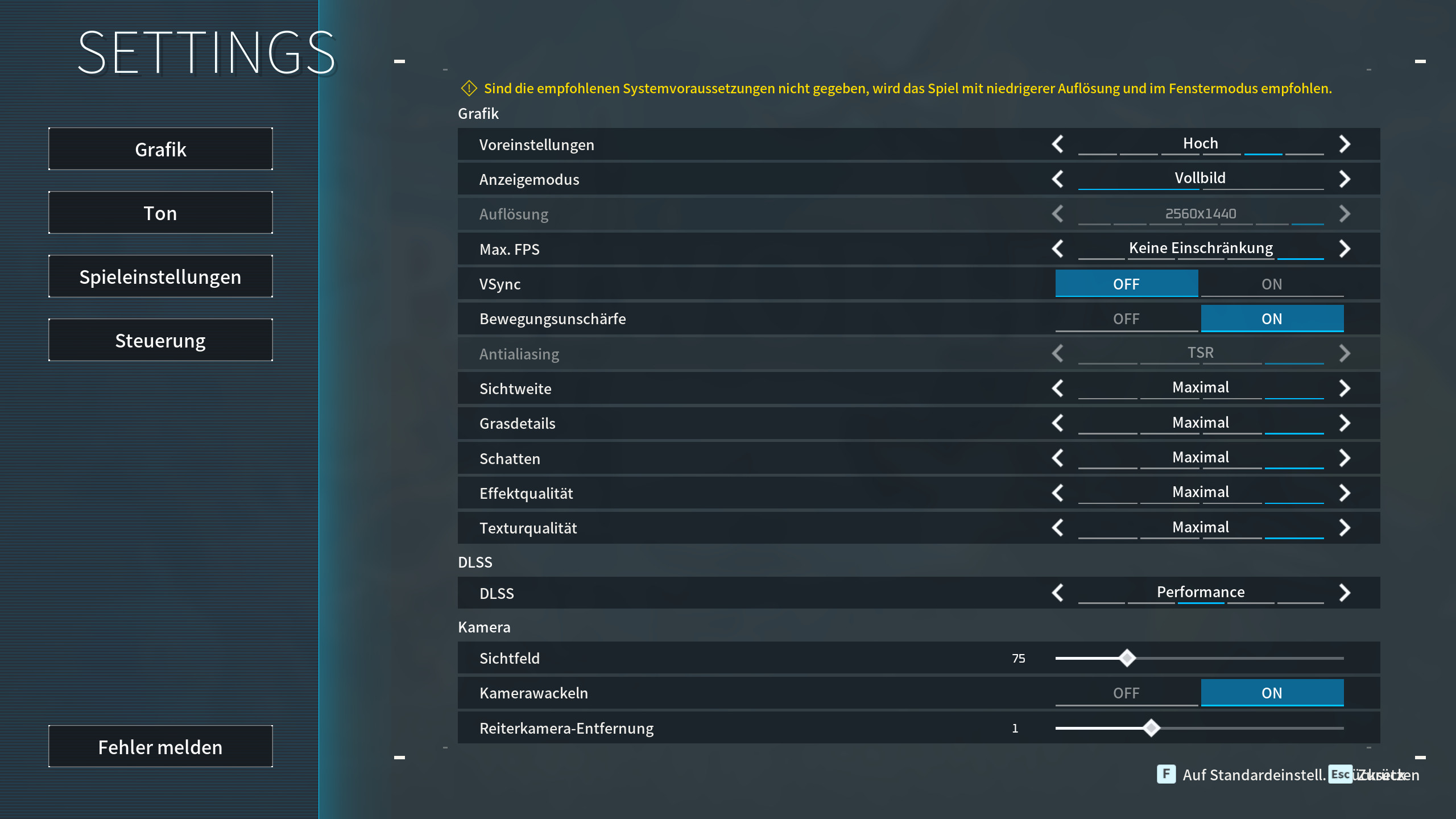
Palworld: The best graphics settings on PC
The following settings are the best compromise between quality and performance. Note that you can only use DLSS with an Nvidia graphics card. If you have a powerful gaming PC, you can also increase the settings accordingly.
- Presets: Custom
- Screen: Fullscreen
- Max FPS: 60 FPS
- Vsync: Off
- Motion Blur: Off
- Anti-Aliasing: Off
- View Distance: Medium
- Grass Detail: Medium
- Shadows: Medium
- Effect Quality: Medium
- Texture Quality: Depending on your VRAM, our recommendation: Medium
- DLSS: Only Nvidia GPUs, our recommendation: Performance
- Field of View: 75
- Camera Shake: Off
We have set the maximum FPS to 60 FPS because the game runs the most stable at this setting. Some users and colleagues report that the graphics card immediately runs at maximum capacity without an FPS limit. You can prevent this by setting the FPS limit. This will also help conserve your GPU. You can find the complete system requirements of Palworld in detail directly on MeinMMO.
Tip: Anti-aliasing is grayed out under certain circumstances (such as high presets). Switch to “Custom” to edit anti-aliasing.
More tips on graphics settings
Activating DLSS: With DLSS, you can significantly boost your performance on PC, but you absolutely need an Nvidia graphics card for that. With DLSS, you can choose both performance and quality. With performance, you get an average of 20 more FPS, while quality looks better.
AMD’s alternative, FSR, is not yet integrated into Palworld. We cannot say if the technology will come in the future. We will update our article with new information.
What has the strongest impact on performance? Texture quality has the most significant effect on performance. If you have a weaker graphics card or limited video memory (VRAM), lower the settings.
Anti-aliasing is also resource-intensive but provides smoother and prettier edges in the game. If you have a weak GPU, we recommend temporal anti-aliasing (TAA), which might make the game look slightly blurred but will run smoother.
What else can increase FPS? If you have very weak performance, we recommend reducing the resolution. This will require your computer to calculate less.
Palworld: Release, platforms, and roadmap – All info on the survival shooter

Your opinion is important to us!
Do you like the article? Then let us know!