


In the Overwatch League, the best players in the world compete. But what hardware do the pros actually use? What are their configurations? A clear table reveals all the details of the Pro Settings.

This article was created in January 2017 and updated on January 30, 2018.
The difference between a good player and a real pro in Overwatch is not just the time and experience invested in the game, but also largely their equipment. To play in big tournaments like the Overwatch League, it’s not enough to just be good – the setup and settings must also be right.
Both the hardware and individual system settings can be crucial to achieve maximum performance in every situation. On the site on-winning, the settings and setups of many different pros from several games are listed – including for Overwatch. The list is continuously updated.

Overwatch Pro Settings – How eSport Stars Play
The settings that distinguish a pro from a casual player range from the DPI value of the mouse to the refresh rate of the monitor. More is not always better. A brief overview of the most important values and what they indicate:
- DPI Value: The Dots-Per-Inch value, or DPI (dot density), roughly indicates the speed of the mouse. At 400 DPI, the mouse cursor moves 400 pixels per moved inch; at 1600 DPI, it moves 1600 pixels.
- Mouse Polling (Mouse Hz): The Mouse Polling value, also known as Mouse Hz for hertz, indicates how often the mouse reports its position, i.e. how precise it is. At 1000 Hz, the mouse reports its position 1000 times per second to the computer.
- (Overwatch) Sensitivity: Multiplies the DPI of the mouse by the in-game mouse sensitivity.
- “cm”=360°: indicates how many cm the mouse must be moved to make a 360° turn in the game (depends on Sensitivity and DPI value).
- Hz (Monitor Refresh Rate): Indicates how often the monitor refreshes the image each second. Does NOT correspond with FPS, but indicates how many FPS are possible.
In the following graphic, you can see the settings from the New York Excelsior team. They are currently the favorite for the first place in the Overwatch League.
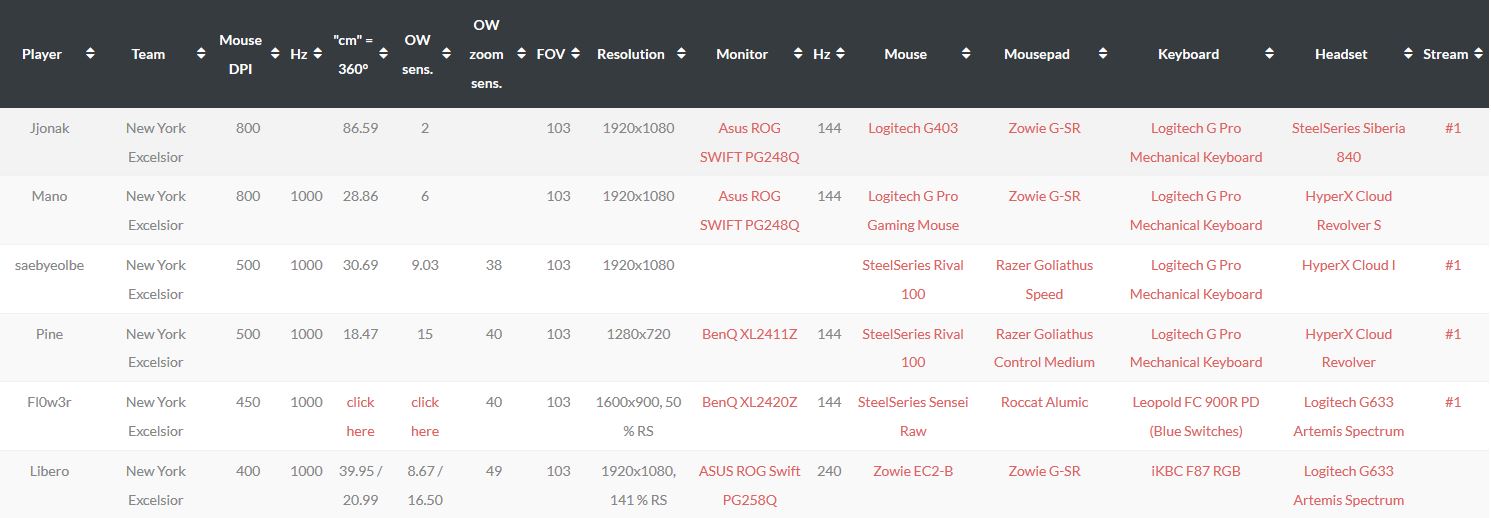
Almost all pros swear by the hardware of 144Hz monitors from the XL series by BenQ, with the most used model 2430T found here on Amazon*. Almost none of the pros use a monitor with less Hz, although some use those with a refresh rate of 240. The rest of the hardware is not necessarily indicative, as much depends on sponsorships.
If you are looking for a few suggestions to emulate your idol or simply want a decent “basic setup” for a solid start to a gaming career, you can find the exact list of all current players of the Overwatch League and many streamers on om-winning.com.
*Affiliate link: We receive a small commission for a purchase. Thank you for your support!
For the top 3 of the Overwatch League, things are going downhill – the West can finally catch up!

Your opinion is important to us!
Do you like the article? Then let us know!