

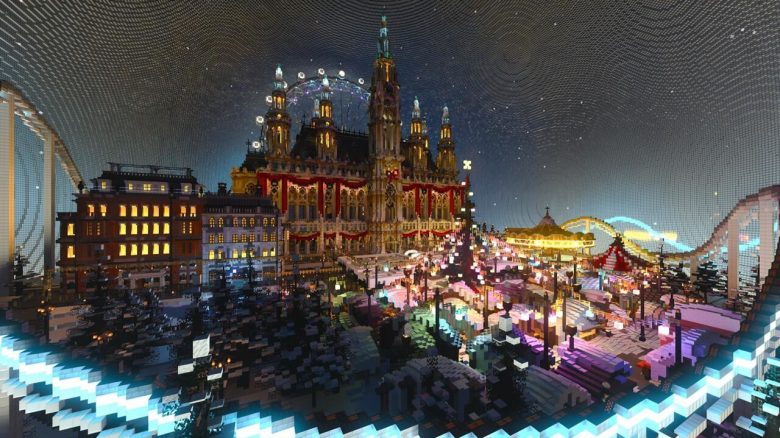
Nvidia has presented a huge map for the game Minecraft in collaboration with an artist. They aim to raise money for a children’s hospital. You can download the map for free.
Minecraft still remains one of the most popular games when it comes to creating your own creations. Just recently, Minecraft made history as it was the first game on YouTube to surpass 1 billion YouTube views.
Now Nvidia and an artist have introduced a huge map for Minecraft. The new festive world offers many opportunities to show you how fantastic ray tracing can look in a game.
What kind of technology is this? About a year ago, Nvidia introduced ray tracing for Minecraft. This brings modern technology into Minecraft, making the world appear more detailed and realistic. You can clearly see the improvement, especially with water reflections or shadow casting. If you want to use ray tracing in Minecraft, you need at least an Nvidia GeForce RTX 2060 or better.
Gigantic Minecraft map consists of three snow globes
The well-known Minecraft artist Ushio Tokura has presented a huge winter map for Minecraft in collaboration with Nvidia. Tokura is said to have taken around 300 hours to create the entire map.
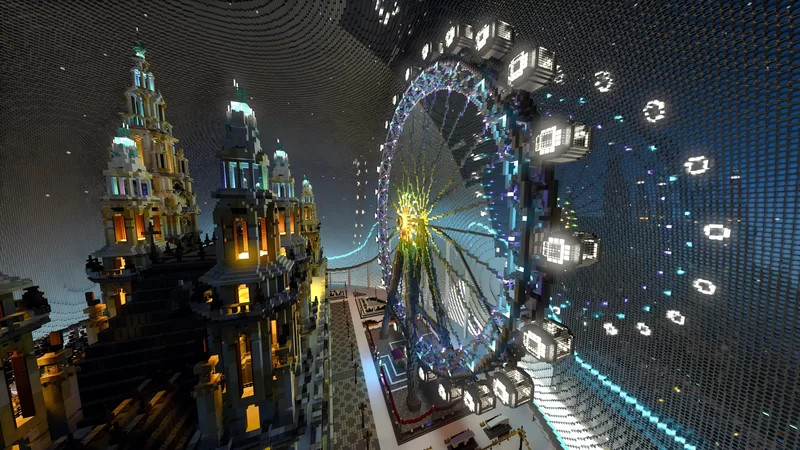
What does the world look like? The world consists of three huge snow globes, each containing its own unique environment – one a winter wonderland, one a Santa Claus village, and the third a winter landscape.
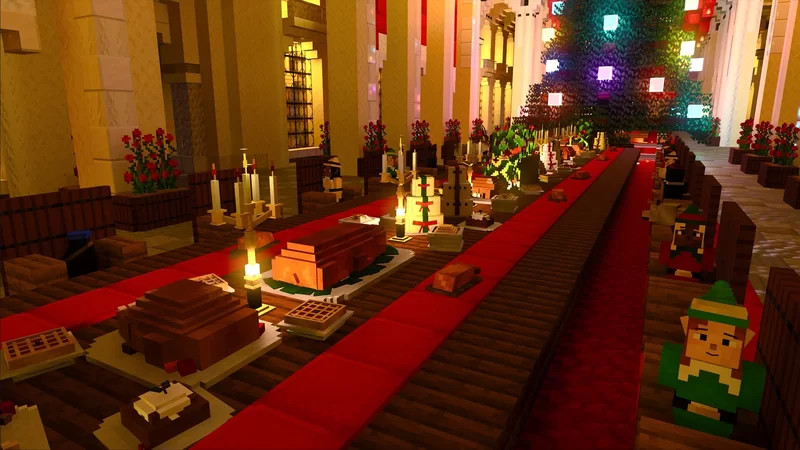
The world features interactive elements such as roller coasters, an ice skating lake, and a petting zoo as well as a handful of playable storylines and quests.
Where can you download the map? You can download the map directly on the website Planetminecraft and try it out (via planetminecraft.com).
How to install the map in Minecraft:
- First, you need to download the map and save it in any location.
- On Windows, use the shortcut Windows+R and then enter “%appdata%/.minecraft/saves/” (without quotes) into the command line. This command will open the saves folder, and the data is always located in the same place on Windows.
- If you are playing on Macintosh, you will find your save files in: ~/Library/Application Support/minecraft/saves/.
- Drag your downloaded map (after unpacking or extracting) into the zip/rar folder ‘Map’ in the saves folder.
- Close the save window and start Minecraft. After that, you can select and start the map.
Where can you find the donation campaign? The project is intended to raise donations for the Great Ormond Street Hospital (GOSH) in London. In the map, you will find the hospital fully recreated. If you visit the hospital in the game, you can donate to the “Home for Christmas” campaign using a QR code. This aims to help seriously ill children eventually return home.
What do you think of the campaign? Have you already downloaded the map and helped Santa with his tasks?
A while ago, a YouTuber wanted to play Minecraft with an RTX 3090. He aimed to prove that one could push Nvidia’s fastest graphics card to its limits. And he actually achieved that:
YouTuber plays Minecraft with RTX 3090 but only manages 5 FPS
How to install the map in Minecraft:
- First, you need to download the map and save it in any location.
- On Windows, use the shortcut Windows+R and then enter “%appdata%/.minecraft/saves/” (without quotes) into the command line. This command will open the saves folder, and the data is always located in the same place on Windows.
- If you are playing on Macintosh, you will find your save files in: ~/Library/Application Support/minecraft/saves/.
- Drag your downloaded map (after unpacking or extracting) into the zip/rar folder ‘Map’ in the saves folder.
- Close the save window and start Minecraft. After that, you can select and start the map.
Where can you find the donation campaign? The project is intended to raise donations for the Great Ormond Street Hospital (GOSH) in London. In the map, you will find the hospital fully recreated. If you visit the hospital in the game, you can donate to the “Home for Christmas” campaign using a QR code. This aims to help seriously ill children eventually return home.
What do you think of the campaign? Have you already downloaded the map and helped Santa with his tasks?
A while ago, a YouTuber wanted to play Minecraft with an RTX 3090. He aimed to prove that one could push Nvidia’s fastest graphics card to its limits. And he actually achieved that:
YouTuber plays Minecraft with RTX 3090 but only manages 5 FPS

Your opinion is important to us!
Do you like the article? Then let us know!