

Since September 9, the open beta of New World has been running. However, the performance seems to be lacking. The community is complaining about low FPS, high input lag, and sound bugs.

What problems are there? In the New World community, people have been reporting performance issues since the start of the open beta. Even PC systems with the strongest graphics card models are struggling.
For fans, this is a big step back. Some explain that New World ran much better during its closed testing phase. We will show you here the voices from the community and tips for resolving the beta issues.
Lower FPS than in previous tests and sound bugs
How do the graphics problems manifest? On reddit , WardJeYx writes that this has been the worst experience in New World so far. “The closed beta was clearly better in terms of FPS and input lag. I don’t know what happened, but I am relieved that I’m not the only one.”
With his system, WardJeYx was able to play in the closed beta with 50 FPS. “Now I’m at 25 FPS with freezes and 180ms input lag. I hope it won’t be like this at release.”
In another thread on reddit , liquidbeansuc also reports a “very bad performance.” The community member explains how the issues manifest. The user plays with an I5-7300HK CPU and a GTX 1050 Ti graphics card.
“When I play on ‘Very High’ settings, I get about 20 FPS. On ‘Low’ settings, I reach about 40 FPS. There is no software active that limits my FPS. My graphics card is at 15% utilization, my CPU at 50% utilization. 2 threads are permanently at 100% utilization.” As a graphics card, liquidbeansuc uses an RTX 3090 and for CPU an i9-7980XE.
What could help? In the comments on reddit, the community advises adjusting shadow settings. “Shadows seem to be a problem. When I set all settings to ‘Very High’, I reach 70 FPS, 30 FPS in cities. If I change the shadows from ‘Very High’ to ‘High’, I reach 100 and 55 [FPS],” explains Nephiko on reddit.
These improved values without shadows are also confirmed by other users on reddit and they recommend reducing the shadow quality when graphics performance is inadequate.
However, in the case of New World, this is only a “quick fix”. Ideally, the game should perform well even with good shadow quality on appropriate hardware.
Better performance in New World – Use these settings
What does Amazon advise? On the Amazongames website, there are some troubleshooting suggestions in technical support. They address low FPS and general performance.
As quick solutions, the team suggests:
- Switch from windowed mode or borderless window mode to full screen – or vice versa. That could increase the FPS.
- Close any program (browser, etc.) that you don’t currently need but is active in the background.
- Check if Windows or other games are currently downloading an update. Tasks that write to the hard drive can significantly reduce your computer’s performance.
If that doesn’t help, Amazon advises the following solutions:
- Go into the game settings and select the “low” option under “Graphics”.
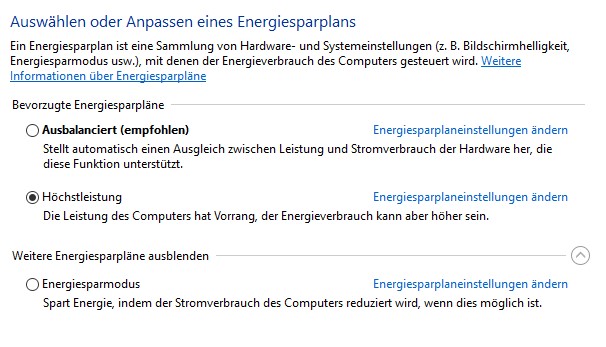
- Open your PC’s power profile and set it to high performance. You can find it by pressing the “Windows key” + “R” and then typing “powercfg.cpl” and hitting enter.
- Look for Windows updates and update your computer.
- Load fewer applications at startup.
- Check for the latest drivers for your graphics card.
- Verify the game data for errors on Steam. To do this, open your Steam library, right-click on New World and click on Properties, select “Local Files” and then the option “Verify Integrity of Game Files …” – Note, this may result in a new download.
- Scan your system for malware.
- Reset your profile in the Catalyst Control Center (AMD) or Nvidia Control Panel to default.
- Check if your system is overheating.
Audio problems? A simple trick can help with sound bugs
What is the problem? Occasionally, the sound in New World doesn’t work properly. The community reports this on reddit. But there is said to be a very simple trick that can help.
This is the solution: On reddit, TactfulRanger writes: “If your audio is bugging out, just open your inventory and close it again.” And it seems to work, as several voices in the thread thank him. One writes, “You are the best! I came here specifically to check if anyone has a solution.”
How is your performance in the open beta of New World? Are you satisfied or did you have problems that you perhaps solved through this article? Let us know your opinion on the subject here on MeinMMO in the comments and exchange ideas with our community.

Your opinion is important to us!
Do you like the article? Then let us know!