


Netflix announced today, May 25, 2022, that the streaming service is getting 4 new games. Three of these games are available today, and these are not the first games on the platform. But how do you even play games on Netflix?
Which games are being added to Netflix? Netflix is adding three new games to its selection today, May 25, 2022. These games are Dragon Up, Moonlighter, and Townsmen: A Kingdom Rebuilt. On May 31, 2022, the release of the fourth game, Exploding Kittens, will follow.
Requirements for Playing Netflix Games
Do I need a Netflix subscription to play? To play a game on Netflix, an active subscription to the streaming service is required. You play the games through your Netflix account and Netflix profile.
As with series and movies, the Netflix games can also be downloaded and played on different devices with the same account. The games cannot be downloaded with the kids’ profiles.
If you reach the device limit and receive the related notification from Netflix, you must log out of an unused device to free up a slot.
Since an active Netflix subscription is necessary to play, the included games do not contain ads or additional costs in the form of in-app purchases.
On which devices can I play Netflix games? The games that Netflix has in its repertoire can only be played on mobile devices with iOS or Android systems.
Netflix games cannot be played on a TV, laptop, or PC. The same goes for game consoles with the Netflix app. This means that playing Netflix games on, for example, PlayStation 4 or Xbox One is not possible.
The following types of mobile devices support Netflix games:
- Android smartphones (with Android 8.0 or higher)
- Android tablets (with Android 8.0 or higher)
- iPhone (iOS 15 or higher)
- iPad (iPadOS 15 or higher)
- iPod touch (iOS/iPadOS 15 or higher)

Installing on Android and iOS Devices
How do I install Netflix games on my device? To play a Netflix game, you need to install the Netflix app on a compatible device and log in with your active Netflix subscription.
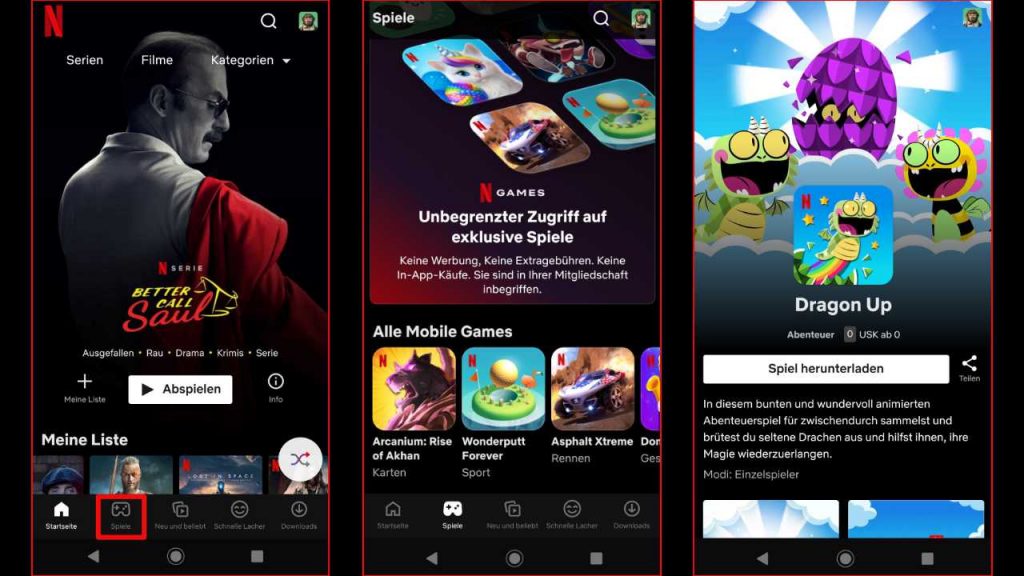
Then, select the “Games” section in the Netflix app. You should find it at the bottom of your screen in the left corner. The “Games” section is located directly next to the “Home” tab.
If you discover an interesting game in the “Games” section, click on it. A presentation of the respective game will then open with trailers, a description, and various images.
You can now either share this game via “Share” at the right edge of the screen with your friends through WhatsApp, Instagram, or similar services, or download it using the “Download Game” button.
If you click on “Download Game,” the “Google Play” store will open on Android devices with the game’s store page. There you will see the age rating, the number of downloads, and ratings, as well as the “Install” button, which you can use to install the game on your device.
On iOS devices, the installation works similarly, with the difference that the App Store opens and you need to click on “Get” or the cloud symbol.
In addition to a growing selection of mobile games, Netflix also offers other exciting content for gamers. While RPG fans can already look forward to the second season of The Witcher, we still have to wait for a second season of Arcane.
The series based on the successful title League of Legends received extremely positive feedback from viewers, which is why fans of the series were concerned in April about a second season when Netflix announced it would significantly reduce the budget for animated series.

Your opinion is important to us!
Do you like the article? Then let us know!