

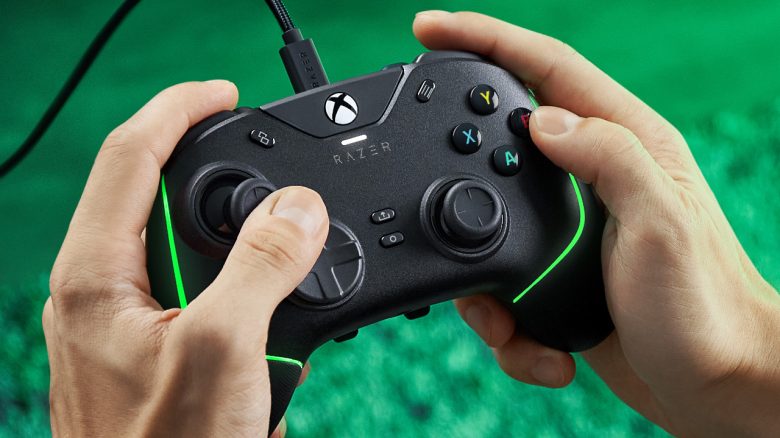
The Razer Wolverine V2 is the favorite controller of MeinMMO author Benedikt Schlotmann. He is now looking forward to the newly announced upgrade for the controller. With many improvements, they aim to compete primarily with the Xbox Elite Wireless Controller Series 2.
I often and gladly play on PC with mouse and keyboard, but there are games where I’d rather pick up the controller. I played the new Dark Alliance in co-op with colleague Benedict and played with the controller because the keyboard controls just felt terribly unfamiliar.
By now, I have various controllers at home for this purpose, but the Wolverine V2 has grown closest to my heart.
Why I like the Wolverine V2: The controller fits excellently in the hand and has mecha-tactile buttons that feel unbelievably good. The buttons provide clear, audible feedback and click pleasantly, being noticeably precise. You can really feel this, especially when you have to click the buttons rapidly and often in succession. And these buttons, at least for me, give a slight feeling of having mechanical switches like those on a keyboard under my fingers.
What I don’t like: Especially for small hands, the controller is not very suitable, as the special buttons are located quite far back. Additionally, you cannot detach the controller’s cable. The Wolverine V2 also does not offer paddles; other controllers are better positioned here.
This is what Razer has now introduced: Now Razer has introduced the Wolverine V2 Chroma as an evolution or a new model of the Wolverine V2. And the changes and improvements sound very promising to me. You can read how much we liked the Razer Wolverine V2 in our detailed test:

Razer Wolverine V2 Chroma – The upgrade will make shooter players happy
Razer expands its Wolverine V2 Chroma with some meaningful features, thus coming very close to the Xbox Elite Wireless Controller Series 2, which is considered one of the best Xbox controllers currently available for purchase.
The highlights of the Wolverine V2, the mecha-tactile buttons and the D-pad, are also included in the Chroma controller. Additionally, there are a few more features that I would like to list here:
Razer Wolverine V2 vs Razer Wolverine V2 Chroma
What are the differences to the Wolverine V2?
- The Chroma version features a detachable cable but is still only usable with a cable.
- On the back, there are so-called paddles that provide you with 4 additional, freely assignable buttons.
- The Chroma controller offers RGB lighting.
- You can configure and even swap the thumbsticks.
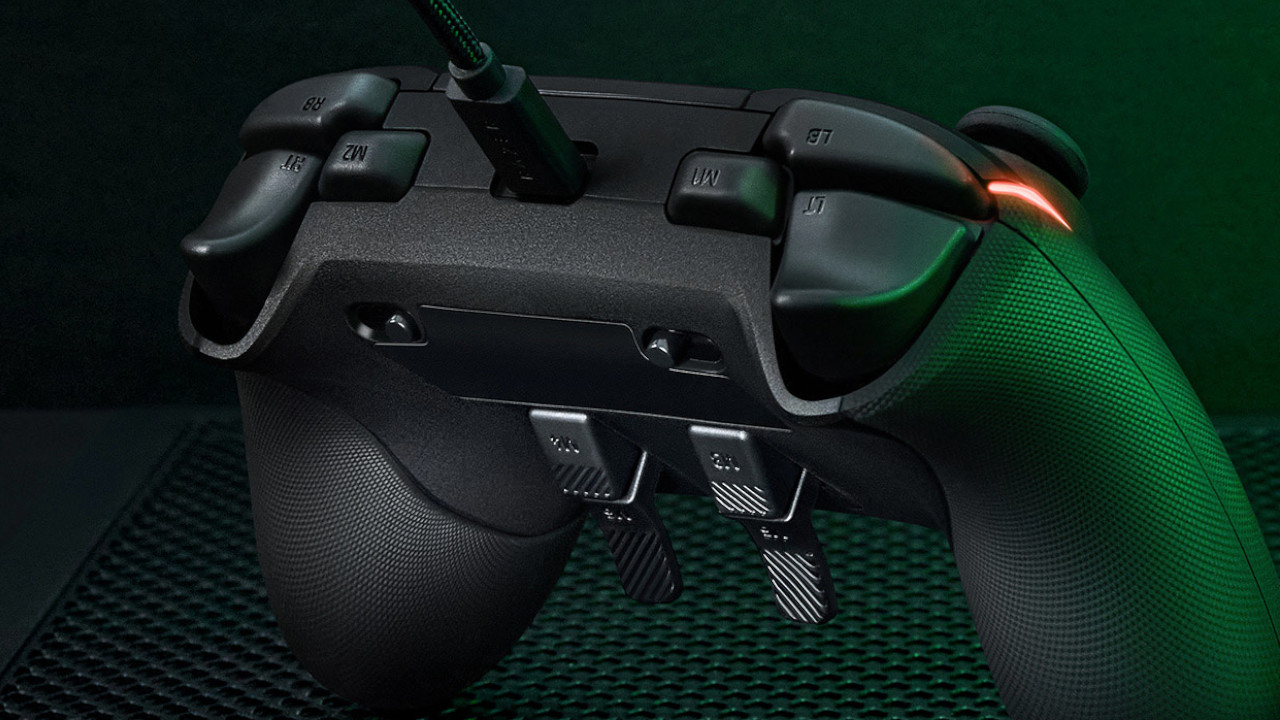
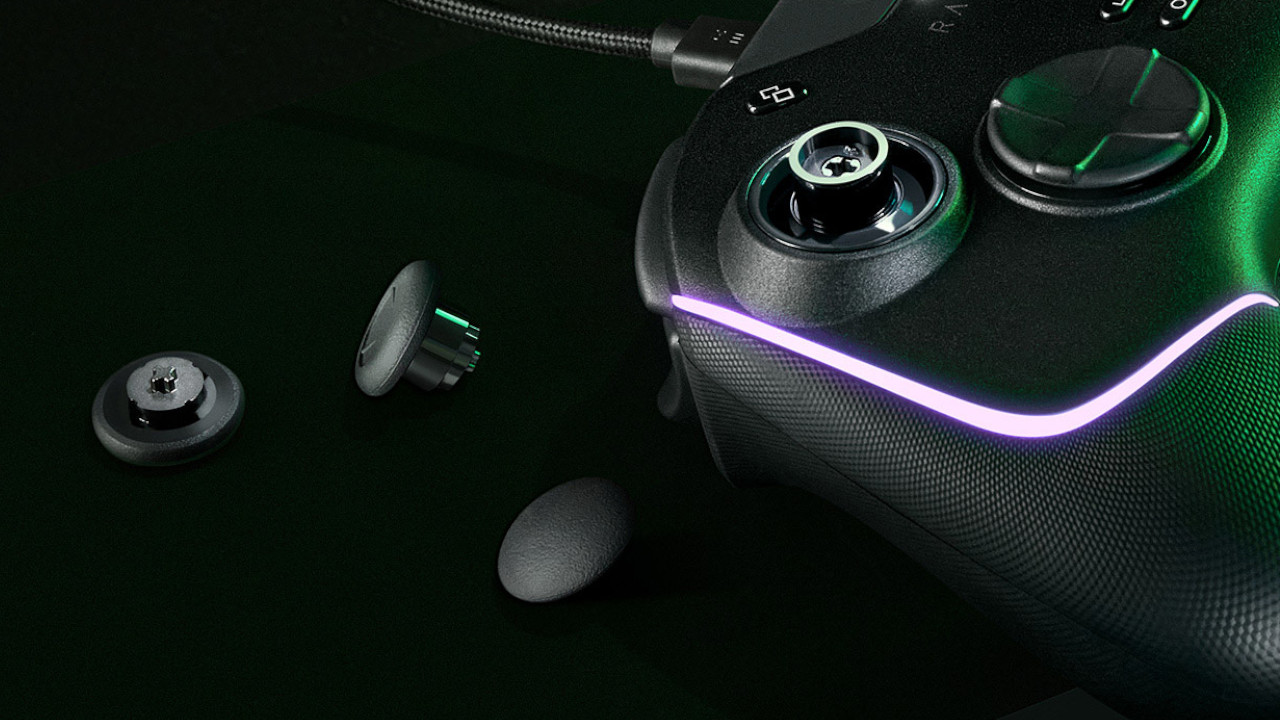
Why I like the improvements: Razer addresses two of my criticisms of the Wolverine V2 with the Wolverine V2 Chroma: Firstly, you can finally detach the cable, and Razer has added paddles on the back.
The controller’s ergonomics remain unchanged. For my large hands, the ergonomics are optimal, but especially people with small hands may not be happy in the long run.
With the paddles, Razer is likely to make shooter players happy, as certain abilities or weapon switches can be assigned to the paddles.
Could there be a problem? At this point, I cannot give you any experience with the new paddles and how accessible they are. The special buttons on the back were not very easy to reach on the Wolverine V2.
Moreover, the ergonomics are both a blessing and a curse. I personally like the ergonomics with my large hands very much, but my girlfriend found the Wolverine V2 too big and preferred to use the normal Xbox Wireless Controller during evening gaming sessions.
Are there any first tests? YouTuber 9to5Toys has already been able to test the controller and has compared the device with the normal Xbox Wireless Controller and the Elite Controller.
In his video, he explains that he prefers the paddle setup of the Elite Controller significantly. The paddles are located on the edge of the controller, and this feels significantly more ergonomic than the paddles on the Wolverine V2 Chroma. Here, the paddles are in the middle of the back. He particularly likes the haptics and ergonomics of the controller.
The Wolverine V2 is especially recommended for gamers with large hands
Razer’s Wolverine V2 is especially optimal for large hands, and according to Razer, the dimensions of the controller do not really change. So if you have small, slender hands, you probably won’t reach all the buttons. I tested the Wolverine V2 with my girlfriend, who could not reach all the buttons.
In terms of price, the Wolverine V2 Chroma is also quite self-assured. The price is set at 159.99 Euros, just slightly below the Xbox Elite Wireless Controller Series 2, which you can currently buy for about 160 Euros. However, with the Elite controller, you also get a wireless connection, which you do not get with the Wolverine V2 Chroma.
For that matter, the Wolverine V2 is significantly lighter at 270 grams compared to the Elite Controller, which weighs in at 345 grams.
If you can forgo RGB lighting, interchangeable thumbsticks, and paddles, I can still highly recommend the Wolverine V2. You get a high-quality product for under 100 Euros with many additional features:
Nevertheless, in my opinion, Razer’s Wolverine V2 Chroma could be a real insider tip for people who enjoy gaming with Razer hardware and have large hands. If you’ve missed features like paddles, you will get a comprehensive feature package.
You can also find more controllers in our buying guide for controllers for PC and Xbox. By the way, you’ll also find the Wolverine V2 as a recommendation for Xbox and PC players.

Your opinion is important to us!
Do you like the article? Then let us know!