

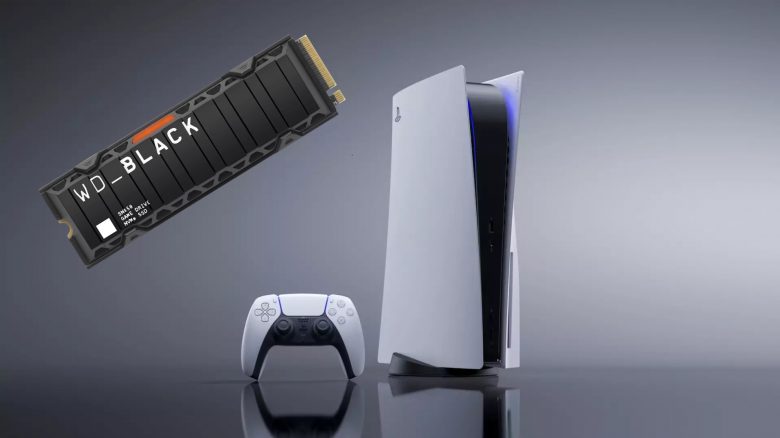
Since the launch of the PS5 in November 2020, there have been a lot of more or less useful gadgets for the coveted console. Here you can read why the absolute must-have for MeinMMO editor Maximilian Dettenthaler is a storage expansion for the PS5 – as unspectacular as that may sound at first.
The plethora of different gadgets, gaming gears, and gimmicks for Sony’s – no longer too – new console is huge. From officially licensed products like the charging station for the DualSense, the PULSE 3D headset, or colored side plates, to a multipurpose charging station, which is also a console stand and cooling system, to truly obscure accessories like a shisha hose holder for the DualSense controller – it feels like there is hardly anything that is not available for the coveted console.
Nevertheless, my favorite accessory is simply an internal M.2 SSD. In this article, I will explain to you why that is.
An SSD storage expansion is absolutely necessary
What is the main memory of the PS5? Both the disc version and the digital edition of the console come with an internal storage capacity of 825 GB out of the box. At first, that may not sound like a small amount. However, the actual storage space of the console is only about 667.2 GB – nearly 158 GB less than “promised”. This storage is needed for the operating system, firmware, and certain updates.
When you consider that large AAA games are requiring more and more storage capacity, it becomes clear that the standard storage of the console will likely not last long.
In our guide, you can read which PS5 version is worth it for you the most and where the differences lie:

The small storage is particularly burdensome for the digital edition of the PS5. Because here you have to download all games and cannot rely on a disc.
How quickly does the PS5 storage fill up? I personally own the digital model of the console and with the download of games like
- Final Fantasy 7 Remake (94.87 GB)
- the PS5 version of Ghost of Tsushima (61.43 GB)
- Hitman 3 (67.08 GB)
- or Elden Ring (45.08 GB)
I can literally watch the console storage shrink. Just with these four games, nearly half of my storage capacity is used up.
It becomes even more absurd when you look at the top 3 largest games. With just the three games
- Call of Duty: Black Ops Cold War (225.3 GB)
- Marvel’s Avengers (184.1 GB)
- Gran Turismo 7 (183.2 GB)
you can nearly fill up the console’s storage to the brim. At the latest, now I have to consider which games I will delete from my internal storage when I want to install new ones. And then there’s also PS Plus.
PS Plus is another reason why an M.2 SSD is necessary for the PS5
As a PS Plus member, you also get three to four new games for free every month and a huge catalog of additional available games, which will quickly lead you to spend a lot of time frustrated sorting or cleaning up your console storage.
Therefore: Be sure to get a storage expansion for your console.
All important information about the new “PS Plus” model can be found in the following article:

M.2 SSDs are not as expensive as they used to be, and installation is easy
Which M.2 SSD can I recommend for the PS5? I can especially recommend the WD_Black SN850 with integrated heatsink.
This M.2 SSD is available in various storage capacities (500 GB, 1 TB, 2 TB) and currently even at an unbeatable offer price of 132.99 € instead of 234.99 € for the 1 TB model at Media Markt and Saturn.
And not only am I a fan of this M.2 SSD: the lead architect behind the PS5 is also excited about the SSD.
Is there anything to consider when buying? In principle, only certain M.2 SSDs fit into your PS5. Sony had explained what minimum requirements an M.2 SSD must meet for the PS5.
If you prefer to buy a different model, then you should also pay attention to the fact that the M.2 SSD already has a heatsink. You can retrofit such a heatsink, but it’s complicated. Moreover, you will only save money to a limited extent.
Other recommended models for the PS5 can be found in our buying guide on MeinMMO:

Of course, it is still a lot of money, but it must be said that good internal SSDs with sufficient storage are now much cheaper to purchase than they were a few years ago.
And then there’s another point that has probably prevented some PS5 users from purchasing a storage expansion: When the long-awaited update, which finally enabled storage expansion for the PS5, came last summer, some users were deterred from social media by having to “open up” their console for the installation of the internal SSD.
How complicated is the installation of an M.2 SSD in the PS5? Certainly, a slot system like that of the Xbox Series X is more practical and comfortable. But I can assure you that the installation is not difficult with the PS5 either. Sony had already explained what you need to consider when installing an M.2 SSD in your PS5.
Moreover, there are plenty of good YouTube videos that explain the installation of the storage expansion slowly and thoroughly, so you really don’t have to worry about damaging your expensive console or the SSD.
In conclusion, I can only say again: yes, purchasing an additional SSD hard drive is somewhat involved and an investment; but one that I believe is definitely worthwhile and truly enables the enjoyment of the comfort of the fast console.
You can finally expand your PS5 storage – This is what you should know

Your opinion is important to us!
Do you like the article? Then let us know!