


Players can use both DirectX and Vulkan in the survival game Valheim . MeinMMO explains how to use Vulkan and what benefits it brings.

Valheim is currently a popular title. With a simple trick, you can extract even more performance from the survival game. All you need to do is use Vulkan.
What is Vulkan, anyway? Vulkan is an API like DirectX. These are necessary for commands to be sent from your game to the graphics card’s software, for example. Vulkan originated from a development by AMD (AMD Mantle).
Which graphics card supports Vulkan? You do not need to download a program or software. Any reasonably current graphics card supports the Vulkan interface. AMD’s oldest graphics card that offers Vulkan is the Radeon 7000 series. Nvidia supports graphics cards up to the GeForce 600 and 700 series.
Valheim – how to enable Vulkan in the game
There are currently two different ways to activate the Vulkan interface for Valheim. We will introduce both methods:
This is the first method: When you start Valheim from your Steam library, you often get a popup menu. Here you can choose between “Play Valheim” and “Play Valheim using Vulkan”.
If you want to use Vulkan, select the second option. You will need to make this selection every time you start the game.
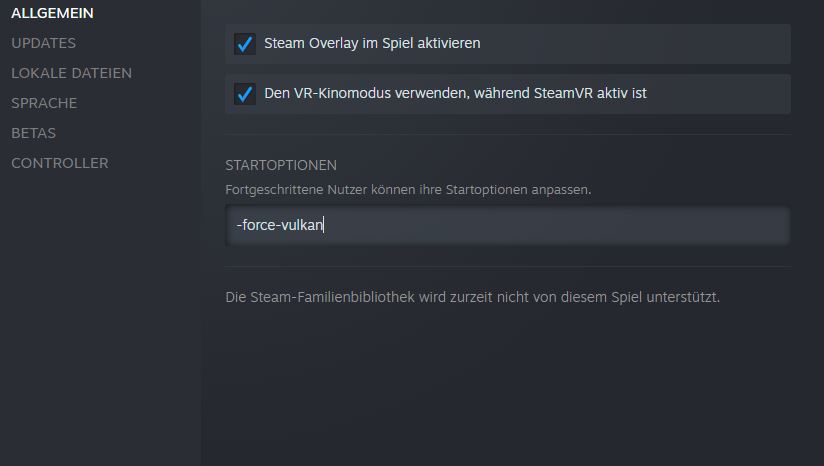
This is the second method: The second method consists of changing the game’s launch options. This is especially useful if you do not receive a popup menu from Steam. The procedure is also quite simple:
- Right-click on Valheim in your library and select “Properties”
- In the “General” tab, you then type the line “-force-vulcan” in the Launch Options area. This forces Vulkan to run in the game.
- However, note that Valheim will always start with Vulkan. If you do not want this, you need to remove the text again.
Valheim with Vulkan offers stability and FPS
The Vulkan interface brings you not only a higher frame rate in the game but also noticeably improved stability. At this point, we want to present you with two videos where you can see the differences for yourself.
The first video shows: YouTuber TroubleChute has shown in his video what advantages using Vulkan brings. The differences are remarkable:
- The maximum FPS increased from 88.1 FPS without Vulkan to 201.8 FPS with Vulkan enabled.
- The average FPS increased from 66.4 FPS to 69.1 FPS.
- The minimum frame rate also increased from 9.7 to 17.9.
The complete video is embedded here for you:
The second video shows: YouTuber Frozn Hood also demonstrated how differently DirectX and Vulkan affect Valheim. In his video, he tests the game with an RTX 3080 and Ryzen 5 5600X.
- The FPS rate increases the most in Full HD and WQHD resolutions.
- In 4K, the differences are the smallest with 4-6 FPS.
The complete video is embedded here for you:
Some players report issues with Vulkan
Valheim does not run perfectly with Vulkan on all systems. Some players report immediate crashes or graphical errors (via reddit.com). For example, Robabankwithabagel writes on reddit:
We will all have different results, just as we all have different performance issues. Until the game is optimized for more PCs and hardware combinations, it’s a “try and see” thing.
As for me, I get an immediate crash, probably due to the mods I have.
Even in our editorial team, we experienced significantly improved performance at times, but also severe graphical bugs in the game. Other players have no issues with the same graphics card.
Some graphical glitches can be viewed in this YouTube video, for example:
Things you should note: If you want to play with Vulkan, you should keep a few things in mind:
- Check if your graphics card software is up to date. You can get this either from AMD or from Nvidia, or you can perform an automatic update.
- If you experience severe graphical bugs or issues, turn off modifications and other changes for testing.
- Turn off vertical synchronization (V-Sync) for testing. This has also been mentioned as a source of problems.
Vulkan offers advantages for players
This is the advantage of Vulkan: Vulkan is open-source and, unlike DirectX, also runs on Linux. Since January 2021, Vulkan has also been officially available for Macintosh (via heise.de) and the Unity engine also supports Vulkan.
For players, the biggest advantage is that Vulkan was developed for multi-core and multi-thread platforms. Games with Vulkan can perform more tasks simultaneously compared to the open-source alternative OpenGL (via viscircle.de). This also reduces the load on the installed processor, as more cores are utilized.
What is the disadvantage of Vulkan? The biggest disadvantage is the limited compatibility with older hardware. If you have a very old graphics card or processor in your computer, Vulkan may not be supported. Many games often offer Vulkan as an optional feature.
More tips for better performance: Are you looking for more ways to improve Valheim’s performance? Then check out this article. Here, MeinMMO presents you with a simple trick to significantly increase FPS in Valheim.

Your opinion is important to us!
Do you like the article? Then let us know!