A few days ago, there was an update on MeinMMO where your profile pictures were reset. Here is a small guide on how to get them back.
This is what happened: During an update on March 14, we introduced a new profile system that provides you with more customization options. More details in the article.
However, this led to your profile pictures being reset and having to be re-uploaded. This caused confusion about how exactly it works because you can actually customize two profiles.
- The new MeinMMO profile
- The WordPress profile
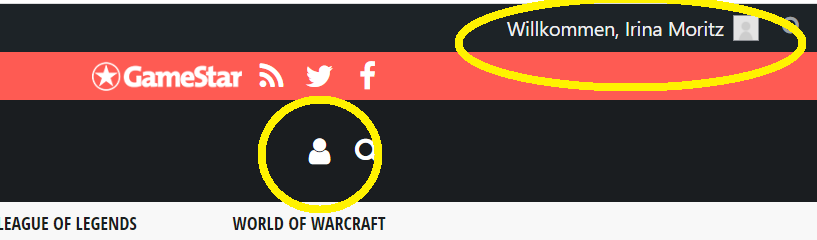
This is the solution: Some of you have reported that your profile pictures are not displayed, although they have been re-uploaded. This is because it happened in the “wrong” profile.
To make the image visible, you need to go to the “person icon” at the top right and click on “My Account”. On the next page, select “Edit Profile” on the left under the avatar window.
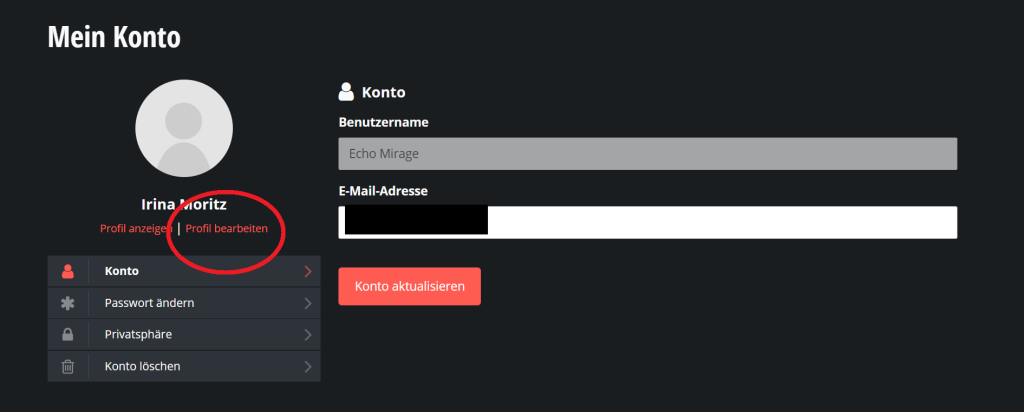
There, you can upload your image and adjust the size a little. Once everything is saved, your profile picture will appear next to your comments.
Regarding notifications for replies to comments
There has also been much demand for the notifications for comment replies etc. to be reactivated. We did not intentionally remove the feature and are currently working to make it available to you as soon as possible.
You will soon receive notifications again when someone replies to your posts or a user you follow publishes their own comment.
The update is expected to go live next week. We will also write an article with all the information about it.
Thank you for your patience.