


In Last Epoch, there are various ways to improve your equipment and adapt it to your build. What the Glyph of Despair plays a role in and where to get it, you will find out here on MeinMMO.

Crafting may seem a bit overwhelming at first glance when starting with Last Epoch and collecting the first items, glyphs, and shards. However, it’s easier than it first appears.
Customizing your equipment is also important to navigate through the content more easily. However, you often find items that have good bonuses in the form of affixes but are not yet perfect. Glyphs help you with that. The “Glyph of Despair” is useful in this regard.
What kind of glyph is this? The Glyph of Despair has the chance to seal an affix on an item instead of improving it. The chance of sealing is higher if the affixes on the item have lower ranks. The chance is also higher for exalted (purple) items and items with multiple affixes.
The sealed affix then moves to its own slot, freeing a space for a new affix. The affix sealed by the glyph cannot be further modified. Each item can only have one sealed affix. The glyph cannot be used for unique and set items.
The factions also play a significant role in your equipment and farming for items:
How to Use the Glyph of Despair at the Forge
How do I use the glyph? To use the Glyph of Despair, open the forge by pressing “F” on the keyboard. You can do this on the go; you don’t need to be at a stationary forge. Drag the item you want to change into the large window in the center.
Then click on the scroll under the item and select the Glyph of Despair. Next, choose an affix on the item that you want to improve. You can only improve and seal affixes that are already on the item and for which you have the appropriate shards.
You select the shard either by clicking on the large plus sign at the bottom or on an arrow on the affix. The arrow appears on affixes that you can improve.
Once you have added the glyph and the suitable shard in the forge, click on “Improve Affix” at the bottom, and with a bit of luck, the affix will be moved to its own slot. If so, you can add a new affix to the item.
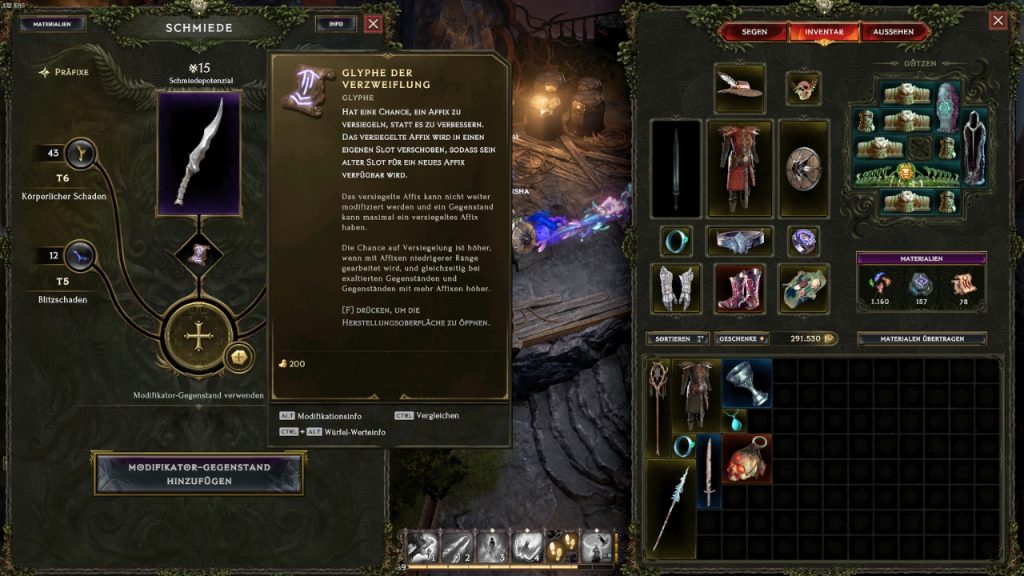
What if I make a mistake? If you selected the wrong glyph or shard, click on them again and select “Delete” on the left. This will only return materials to your bank. However, if you have already improved the affix, the materials are consumed. If the affix is moved to its own slot, you cannot further modify it.
How to Farm the Glyph of Despair
Where can I get glyphs? You can obtain crafting materials through various activities in Last Epoch. They drop from enemies, and you can find them in chests. You also have the opportunity to farm glyphs selectively. However, you do not farm a specific glyph, but glyphs in general.
The following options are suitable for this:
- Prophecies in the Circle of Fate: In the back area of the observatory, the base of the circle, you will find four telescopes. They represent certain types of loot drops and are also suitable for farming glyphs specifically with a prophecy.
- Monolith of Fate: The “Monolith of Fate” is the starting point for part of the endgame in Last Epoch with its timelines. The timelines consist of “Echoes” that reward you with certain item drops upon completion.
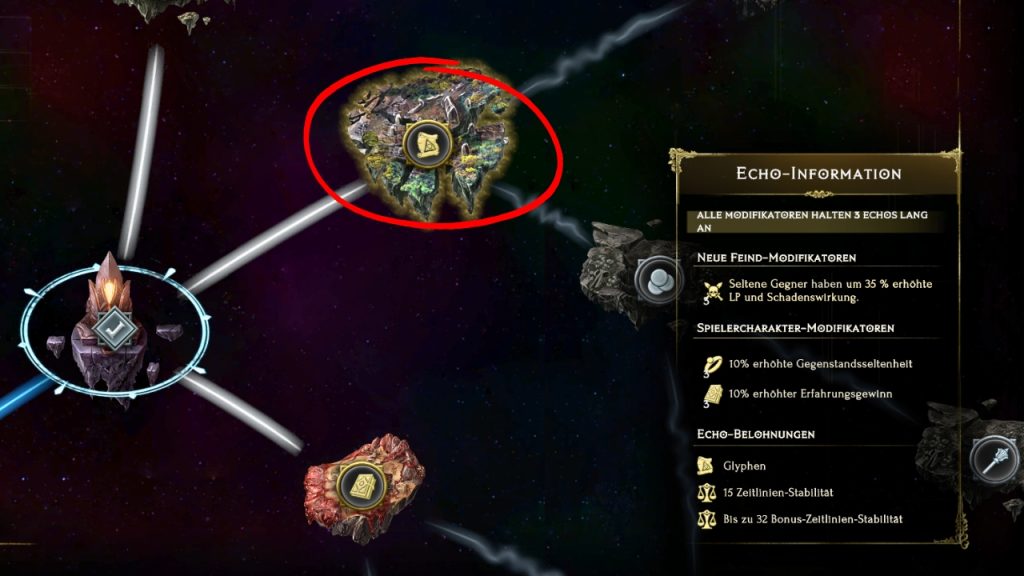
Where can I see my glyphs? In the crafting window, that is, in the forge, you can click on “Materials” to see how many and which glyphs, runes, and shards you specifically have. In your inventory, you will have a general overview of the number of individual materials, divided into shards, runes, and glyphs.
With the materials, you not only improve affixes that increase your damage or armor. You should also keep an eye on values that are also very important: Does Last Epoch feel too difficult? Then you are probably ignoring stats that are more important than damage.

Your opinion is important to us!
Do you like the article? Then let us know!