
You want to change your name in Fortnite Battle Royale in 2026? We will show you how to do it on PC, Xbox One, Switch, and PS4 with Epic Games.
Why should you change your Fortnite name? There are various reasons why one might want to change their display name in Fortnite. This is the name displayed to opponents or to teammates in the Save the World mode.
Maybe you have adopted a new online name and are dissatisfied with the old one. You might just want to try something new. In Fortnite, you have a simple and straightforward way to do this. We will show you how it works on PC, PS4 Mobile, and other platforms.
How often can you change your name? This can be done via your Epic account on the Epic Games website every 2 weeks. So if you are not satisfied with a new name, you can choose a new one again after 14 days. Accounts on PS4 and Xbox One are the exception, as they adhere to the times of the PSN ID and gamertags.
Change Fortnite Name on PC
For PC players, changing your name in Fortnite is straightforward.
- First, visit the Epic Games website
- Log in there with your credentials (email and password)
- If this is a new device you are logging in from, the 2FA code is now important
- After logging in, click on your account name at the top right and select the “Account” option
- Under Personal Data, the first item is the display name, which you can change there.
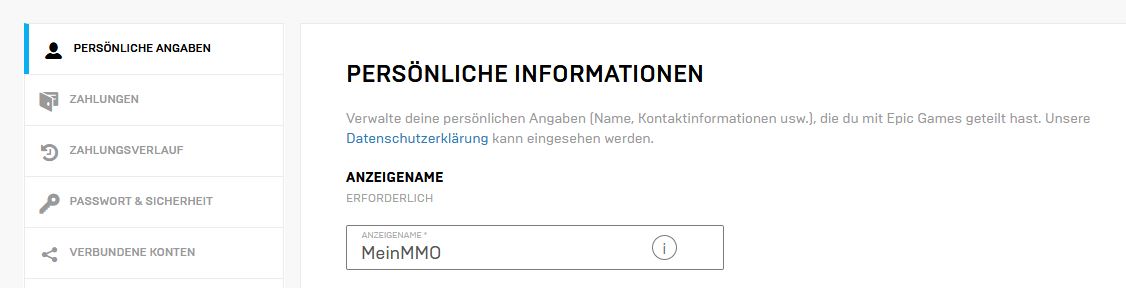
Then re-enter the name in another field to confirm it. Also check the box that you understand that you cannot change the name again for 2 weeks.
Confirm this now and your name is changed.
Fortnite Name cannot be changed? If you cannot confirm after entering the name, it is probably because you changed the name less than 14 days ago.
Another possibility is that you have not yet verified the email address linked to the account. To do this, log into your email account and look for the email from Epic Games. There, you will then follow the link to confirm the account.
Change Fortnite Name on PS4/PS5
Since changing PSN names officially works, you can also change your Fortnite name on PlayStation. Here, Fortnite relies on the PSN name.

Does it cost anything? This change is free the first time. If you want to change the name repeatedly, there is a fee of €9.99 per change. As a PS Plus customer, it only costs €4.99. Keep in mind that after the change, the display name of your PSN account will be changed and will also be displayed in other games.
Change PSN name:
- Select “Settings” from the PS4 menu
- Now go to “Account Management” and then to “Account Information”, “Profile”, and “Online ID”.
- Enter the desired Online ID now or choose one of the suggested names
- Now follow the instructions in the menu to complete the change.
This can only be done on PS4. It is not possible on PS3 or PS Vita.
If you are not satisfied with your new name, you can revert the change.
If you want, you can change your PSN name in the browser – Here’s how.
Change Fortnite Name on Xbox
On Xbox, changing the name is similar to PlayStation. Here, the display name is likewise tied to the console account.

You must change your Xbox gamertag to present a different name in Fortnite on Xbox.
Change Xbox Gamertag (in browser):
- Visit the website Account.xbox.com
- Log in there with your data
- Select the option Change Gamertag
- In the box for the gamertag, enter the new name and then check availability
- If everything is okay, click on update
The change of the Xbox gamertag is free the first time. Keep in mind again, that changing the gamertag changes your name in other games.
Change Fortnite Name on Switch
You can easily change your Fortnite name on Nintendo Switch via the Epic Games website. This works like the name change on PC in point 1 of this article.

- Visit the Epic Games website
- Log in there with email and password or create an account
- Then click on your username at the top right and on “Account” in the dropdown menu
- Under the “Personal Data” section, enter the new desired name now
- Then under “Linked Accounts”, connect this account with your Switch account.
Now, the name you entered on the website should appear in Fortnite on your Nintendo Switch.



Change Fortnite Name on Mobile (iOS and Android)
If you play Fortnite as a mobile version on Android or iOS, you can connect the game to your Epic Games account after installation.

This gives you the possibility to change your name as well.
As with the Switch or PC version, you simply change your display name on the Epic Games website.
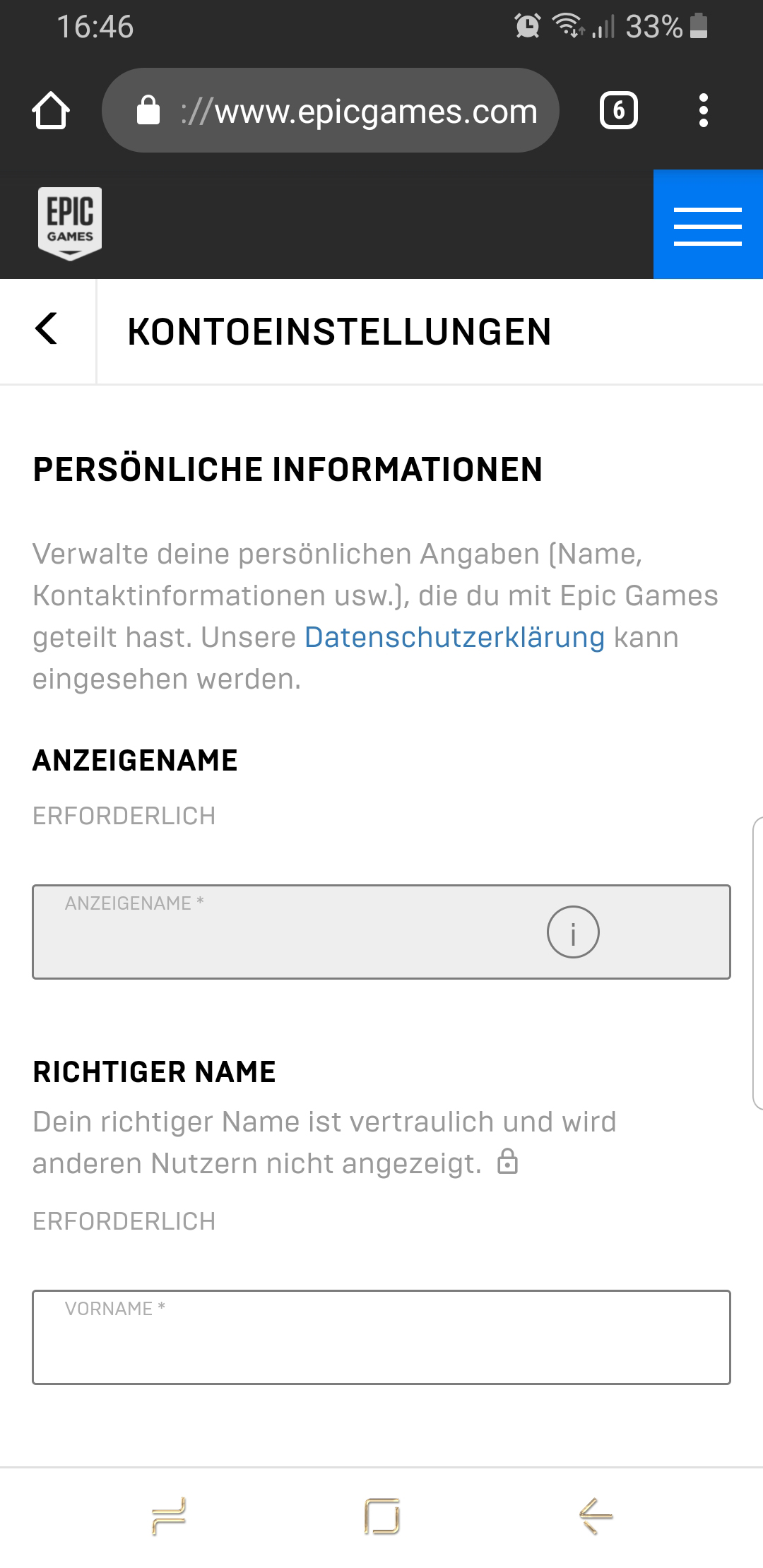
- Visit the Epic Games website
- Click on the 3 lines in the blue box at the top right and click on Sign In.
- You will now be prompted to log in with your email and password
- After logging in, click on the blue box with the 3 lines again, click on your account name, and then on “Account”
- You will land on the options for “Personal Information”, where you can adjust the display name
- If you change the name now, it should also be adjusted in your mobile version of Fortnite at the next login
Once you have changed your name, you are ready for more matches. Have fun in these cool parkour maps in Fortnite.