


Currently, Blizzard’s MOBA Heroes of the Storm is in the Closed Beta, but a carefree beta test feels different. Network spikes are causing choppy matches time and again.

A beta is meant to find and eliminate bugs. However, this becomes difficult when some of the test subjects are plagued by so-called network spikes and can only play with restrictions. These network spikes cause constant stuttering and disconnections. For affected players, a match often feels like a slideshow. Despite good latency and constant FPS, HotS becomes nearly unplayable.
What helps against lag in Heroes of the Storm?
These network spikes are nothing more than lost data packets on the way to the Blizzard servers and back. However, what these lag spikes are attributed to remains unclear.
The problem could be local to the computer, a virus program, or even with the Internet provider. At least that is what customer service assumes. Strangely, players say they do not experience these issues in games like World of Warcraft, Diablo, and others. Additionally, the problem is often dependent on the time of day and is mostly present in the evening hours during “rush hour.” The mods of the BattleNet forums repeatedly refer to various support articles from Blizzard:
- Firewall, Router, and Proxy Settings
- Perform a Pathping Test
- Connection Issues and Latency Troubleshooting
Solutions for Network Issues
A Blizzard customer service representative states that only a “relatively small number of players are affected.” Strange, the official US & EU forums and Reddit are overflowing with network spike threads.
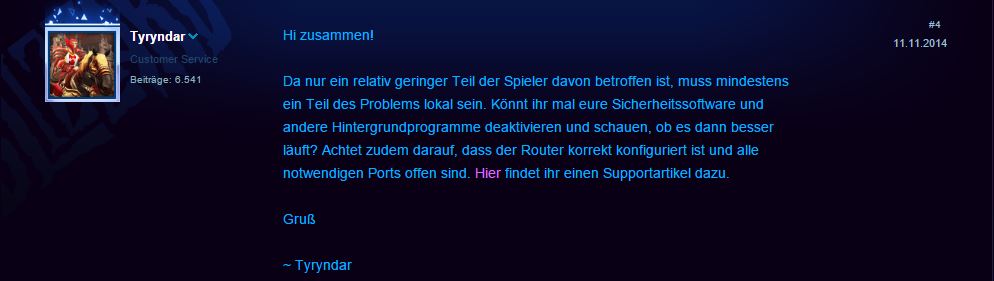
Fortunately, some players have taken the problem into their own hands and actively searched for solutions, which – as unavoidable – are sometimes quite adventurous. Here is a summary of solutions that have helped some players:
- Minimize sound quality.
In the sound settings, set the sound quality to “low” and for the audio output device, do not use the “default” output, but select the sound card directly. This has resolved the issue for some players. - Minimize graphics quality.
In the graphics settings, despite high FPS, set the quality to “low.” - Change power settings in Windows.
To do this, go to the control panel in Windows Vista, 7, 8, or 8.1 and click through the following tabs: Power Options -> Select your current power plan (Balanced, Power Saver, or High Performance) -> Change plan settings -> Change advanced power settings -> A new tab will open. In this, look for “Processor power management” and open this by clicking on the +. Then find the “maximum processor state” and change the value from 100 to 99. This means your processor will no longer run at 100% under full load, but only at 99%. This has also helped some players get their network spikes under control. - Update drivers.
You should ensure that all your graphics and network card drivers are up to date. - Reinstall HotS
A complete reinstallation of Heroes of the Storm has also resolved the issue for some.
Looking at the suggested solutions, one quickly realizes that they only vaguely relate to lost data packets. When and how Blizzard will find a definitive solution to the problem remains to be seen.
Since only a “relatively” small portion is allegedly affected, there surely are other priorities on Blizzard’s to-do list. It’s just unfortunate if you have invested €35 for a founder pack and are now affected by these network spikes. Therefore, one should always be clear that purchasing a founder pack comes with risks, as a beta is not a finished game – even if it’s Blizzard.
Are you also affected by the problem? Unfortunately, I am…

Your opinion is important to us!
Do you like the article? Then let us know!