

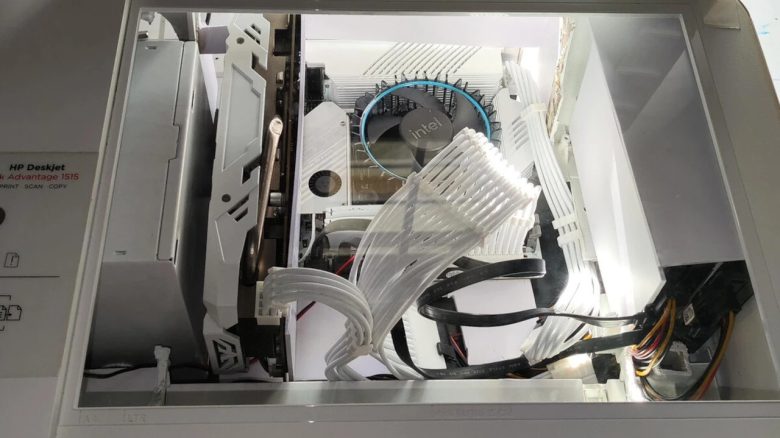
In a post on Reddit, a user presents his extraordinary PC case. To save money, he disassembled an old printer and installed his hardware components in it. The community is excited about this brilliant idea.
PC builders like to get creative when assembling their systems. Sometimes they have to be inventive out of necessity to solve problems during the PC assembly. Others simply don’t want to spend unnecessary money and therefore rely on what is available to them. For example, a tinkerer built a gaming PC out of an old microwave.
In this case, it was an old multifunction printer with an integrated scanner that had to serve as a PC case. How the user went about it, you can find out here.
“An ITX case is a bit too expensive for me” – From printer to gaming PC
What did the tinkerer do with his PC? The user “Ill-Drawer-1953” shared some pictures of his extraordinary PC case with the community on Reddit. In the project, he completely disassembled an old multifunction printer. Then he made some modifications to the empty printer case. This way, he was able to install his PC hardware in the printer.
Originally, he wanted to buy a very compact PC case in ITX format. Such cases are significantly smaller than regular desktop computers. But he said “An ITX case is a bit too expensive for me” and decided to completely rebuild the printer instead.
How did he go about it? First, “Ill-Drawer-1953” checked whether his hardware would fit in the printer at all. With a size of 17 cm x 17 cm, the existing ITX motherboard was small enough.
Once he was sure that his project wouldn’t fail due to oversized components, he started to dismantle the interior of the printer and cleaned the completely yellowed outer parts. Sometimes, PC projects fail also due to poor decisions by manufacturers who place stickers in the wrong locations.
For sufficient cooling, he cut a hole in one of the two sides of the case and attached a fan grill from the outside. This was to ensure that the power supply received enough fresh air. To securely install the graphics card and power supply, he also laid a PVC board about 5 cm thick on the bottom of the printer case.
He secured the board additionally with hot glue. In order to be able to turn on the PC, “Ill-Drawer-1953” installed a power button in the former control panel of the printer.



Installed Components and Plans for the Future
What PC hardware was installed? The tinkerer does not specify every component in detail. He provided the following information:
- Motherboard: Jginyue B760i-Snow Dream for Intel CPUs (Socket 1700) and DDR4 RAM
- Processor: Intel Core i3-13100, 3.40 GHz base clock
- Graphics card: AMD Radeon RX 580
Motherboard: Jginyue B760i-Snow Dream for Intel CPUs (12th/13th generation, Socket 1700) and DDR4 RAM
To achieve a noble appearance, almost all parts are kept in white color. Through the glass pane of the original scanner unit in the printer, one has a clear view of all the components inside. Only the CPU cooler with its black fan and some cables slightly disrupt the overall picture. Fortunately, he does not have to deal with the cables of 17 fans, as is the case with this gamer.
Is the project now finally completed? No, some adjustments are still to be made. In the comments under his post, the tinkerer reveals that he wants to switch the AMD graphics card for an Nvidia RTX 4060 TI. In addition, he also wants to replace the CPU cooler, which is black, with a better model in white.
Members of the community also give him tips on how to improve the overall cooling of the system. The user Pfannkuchen93 goes one step further and demands a built-in display:
The scanner cover must become an LCD, that would be so great!
But even without such extras, he receives a lot of praise for his project. Copytechguy says:
Thank you. Absolute top job. I love this idea so much.
What do you think of his idea? Do you perhaps have such a crazy case at home?

Your opinion is important to us!
Do you like the article? Then let us know!