

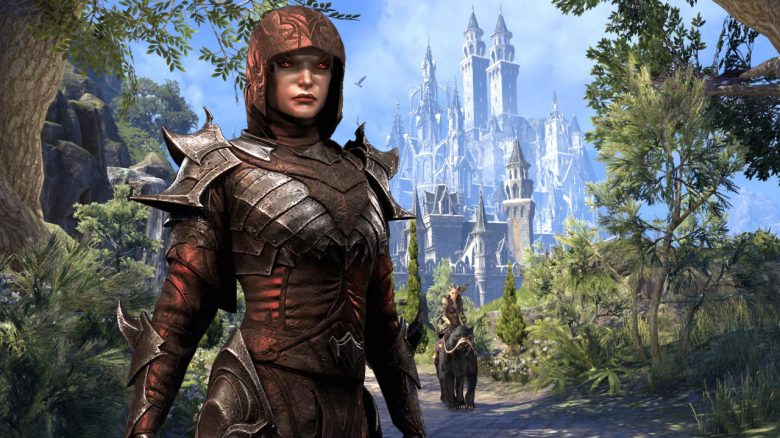
The MMORPG The Elder Scrolls Online (ESO) is now nearly 7 years old. With a graphics mod, the online role-playing game shines in a new light.

What kind of mod is it? The modification ESO Redefined by developer Exhalted has a significant effect on the PC version of the MMORPG. Thanks to new lighting and revised shadows and colors, a completely different atmosphere is created.
Interestingly, it wasn’t as noticeable before the mod, but in direct comparison with the new lighting, the original ESO now appears very cold. The revised colors, the richer shadows, and the different light in ESO Redefined make the world of Tamriel now seem more like a Mediterranean holiday paradise.
This can be compared to the difference in atmosphere between the original The Witcher 3 and the addon Blood & Wine. The entire atmosphere in the extension of CD Projekt’s role-playing game feels like a summer vacation. And it’s the same in Tamriel with the mod ESO Redefined.
Additionally, the nights are darker and no longer appear so bluish. The dungeons are also given a gloomier atmosphere, making them appear even more threatening.
You can watch the differences in the video:
A New Atmosphere for the MMORPG ESO
How is the mod received in the community? We summarize some user opinions for you:
- 김뤄셀 writes (via Youtube): ‘Wow, this looks great. Now I might try ESO too.’
- MiddleFinger says (via Youtube): ‘Holy Moly, this is really cool!’
- Cuban Cucumber explains (via Youtube): ‘I also love how Vvardenfell looks. I always found it too bluish and colorful for a land with so many volcanoes.’
- Out The Cuts has a suggestion (via Youtube): ‘They should officially introduce this mod with an upcoming update!’
Here’s how to get the mod: Downloading and installing the mod is very simple. We explain how it works:
- You can download ESO Redefined from Nexusmods (via Nexusmods). The file is only 13 MB in size.
- Then, extract the file.
- Copy the contents to the directory: SteamLibrarysteamappscommonZenimax OnlineThe Elder Scrolls Onlinegameclient
- Open the file Reshade.ini and change the preset path according to your directory.
- Now start ESO and press Shift and F2.
- Select ‘ESO: Redefined’ from the menu that opens.
The following should be noted: You may need to adjust the brightness settings in the game again. If you encounter problems at startup, rename the file ‘dxgi.dll’ in the ESO directory to ‘d3d11.dll’. Additionally, you should expect a performance drop. Your fps may significantly decrease due to the mod.
What do you think of the mod? Do you find the visuals of ESO better now, or do you prefer the original version?
There are more modifications for The Elder Scrolls Online. MeinMMO presents the 18 best UI mods to you.

Your opinion is important to us!
Do you like the article? Then let us know!