

In addition to Google Stadia, Microsoft’s xCloud or Shadow, graphics manufacturer Nvidia has now also launched its cloud gaming service GeForce Now. GeForce Now promises to let you play your own games from Steam for free. What games does Nvidia offer and is 4K and Linux supported? What are the differences to the other providers, can I use existing subscription services and what do the first reviews actually say?
What is GeForce Now? GeForce Now is a cloud gaming service, similar to Google Stadia or Shadow.
Cloud gaming always requires a fast internet connection but promises to make users less dependent on expensive hardware: Instead of investing several thousand euros in high-end hardware, cloud gaming promises to provide this high-end performance for a small fee.
In the following, we want to introduce you to Nvidia’s new streaming service. At the end, we have summarized the first reviews around GeForce Now for you.
GeForce Now – Costs, Requirements, and Operating System
What does GeForce Now cost?
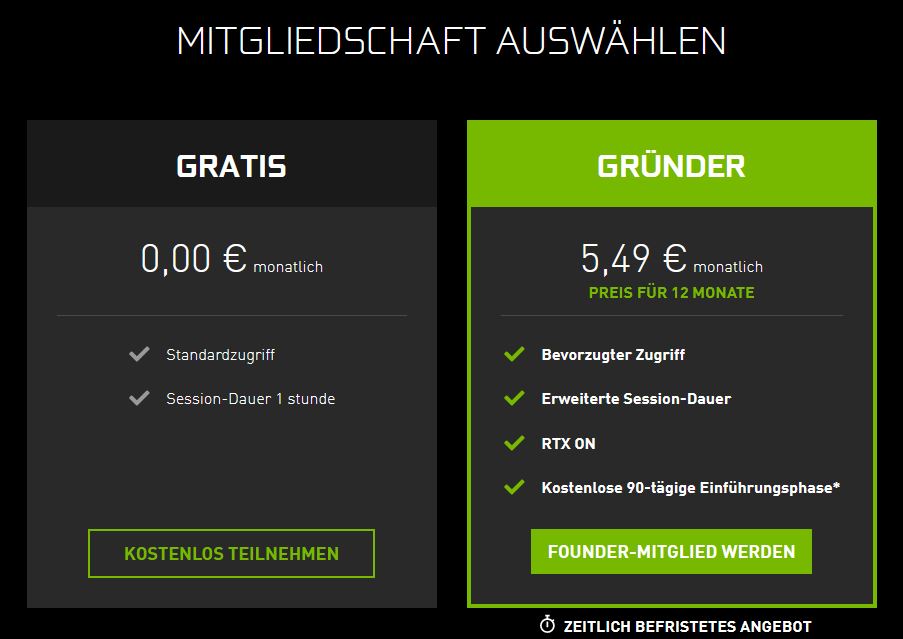
Nvidia’s streaming service offers two different models:
- With the free version, you can use GeForce Now for one hour, after which you have to rejoin a virtual queue.
- The paid version costs 5.49 euros per month. Here you can play for a maximum of 6 hours at a time and have access to ray tracing. After that, you also end up in the queue, but are prioritized compared to free users.
If you subscribe within the first 90 days, you pay 5.49 per month and get the first three months for free. Nvidia calls this the “introductory phase.” This price only applies for the first year; Nvidia has stated that this is a special price for the Founder.
If you’re interested in GeForce Now, you can check out Nvidia’s new streaming service on its official product page (external link).
Which operating systems are supported? GeForce Now officially supports Windows 7 and 10, Macintosh, and Android. There is no app for iOS, and Linux is not supported.
The online magazine It’s Foss criticizes that Linux is excluded from GeForce Now, although the goal of cloud gaming should actually be that all players – regardless of the operating system – can play together. However, this is not guaranteed by GeForce.
What hardware requirements does GeForce Now need? Those who want to use GeForce Now must install the client from Nvidia. Additionally, they must meet the following requirements, which are relatively low:
- A dual-core processor with at least 2.0 GHz or faster
- 4 GB of RAM
- A graphics card that supports at least DirectX 11. Nvidia recommends at least a GeForce 600 series, a Radeon HD 3000 series from AMD, or Intel HD Graphics 2000 series
Can I use GeForce Now in the browser? Those who want to use GeForce Now must either install the program on Windows or Mac, or alternatively use the app for Android.
In contrast to Google Stadia, GeForce Now cannot be used in the browser. Therefore, the streaming service is currently also not compatible with Linux because the client cannot be installed there.
GeForce Now – Internet Speed
How fast does my internet connection need to be? Nvidia recommends in its own FAQ (external link) how fast your internet connection needs to be to play reasonably well.
- For 720p at 60 FPS, you need at least 15 Mbit/s. However, if you want to play somewhat comfortably, the speed should be a bit higher.
- For 1080p at 60 FPS, you need at least 25 Mbit/s. Nvidia recommends an additional performance of at least 15 Mbit/s, which would bring you to about 40 Mbit/s.
- Nvidia also recommends using a wired Ethernet connection or a Wi-Fi router with 5 GHz.
GeForce Now – Games, Launchers, 4K, and Subscription Services

Which games are supported by GeForce Now? GeForce Now currently supports around 1000 games from various developers. There is currently no complete list available, and you cannot specifically browse your game library for compatible titles.
Instead, you can access the Nvidia website (external link) to enter any game title and see if it is supported by GeForce Now.
Can I play my games for free? Anyone can stream their games for free through GeForce Now because GeForce Now only provides the hardware for streaming. You must already own the games to be able to stream them. Unlike Google Stadia, you cannot purchase games through GeForce Now.
Which launchers are supported? In contrast to Google Stadia, which initially offered only a handful of games, you must already own the games to use them with GeForce Now. The streaming service supports the most common libraries like Steam, Origins, or Uplay. However, it varies from game to game whether it is officially supported or not.
Which games work with GeForce Now?
Games from Activision Blizzard no longer available? Nvidia has announced that all titles from Activision Blizzard will be removed from GeForce Now. While Nvidia does not provide any reasons, the new strategic alliance between Blizzard and Google is believed to be behind it.
Games from Bethesda no longer available? Nvidia has also announced that all titles from Bethesda except one will no longer be available through GeForce Now.
Does my favorite MMO work? Games like Destiny 2, which also runs on Stadia, as well as Apex Legends or Guild Wars 2, are officially supported by GeForce Now. Supported titles also include free-to-play titles like Fortnite or Dota 2.
Many older titles are still not supported. For certain titles, such as Black Desert Online, you are also bound to Steam. If you own the game outside of Steam, you currently cannot play it through GeForce Now.
GeForce Now considers the content ratings of the respective countries. This means that if you use GeForce Now in China, your favorite game may not be available. You cannot bypass country restrictions or similar using GeForce Now.
What happens to my save games? For those playing with GeForce Now, their data is stored locally on the server – and deleted immediately after shutdown. Games that use cloud saves, as is the case with many games on Steam, Origin, and others, are not affected.
However, those who play games that do not offer cloud saves will be out of luck, as GeForce Now always deletes local data. So far, no game on the list has been noted that does not support cloud saves. In particular, you are safe with MMOs.
Does GeForce Now support 4K? GeForce Now supports a maximum of Full HD (1080p) at 60 FPS in both the free and paid versions. 4K is not yet supported by GeForce Now.
Can I use subscription services with GeForce Now?? According to a Reddit post, it is indeed possible to use Uplay+ through GeForce Now. GeForce does not differentiate between purchased or “rented” games in this regard. Ubisoft games can be started and played with GeForce Now.
Origin Access or Xbox Game Pass are officially not supported, but games like Battlefield can certainly be started with GeForce Now.
How does GeForce Now work?
With GeForce Now, the user does not install games on their own PC. Instead, you only install the client from Nvidia to establish a connection with the server.
The gameplay and also the “installation” take place entirely on the server. The user simply sends commands from the mouse and keyboard to the server and simultaneously receives the image data. Practically speaking, it works like a video stream.
Your own PC, console, or smartphone then only takes on the task of displaying the stream. The main tasks are performed by the server and the internet connection. And here lies the biggest hurdle: Without a fast internet connection, cloud gaming does not work.
What hardware is behind GeForce Now? Sufficient performance is provided by a CC150 CPU and an RTX T10-8 GPU from Nvidia itself. This is particularly interesting because the Nvidia GPU cannot be bought in official stores. Thanks to several clues, details about the individual components are now known (via WCCFTech.com).
The Intel processor has 8 cores with a total of 16 threads. Two players share one processor (so-called nodes). In addition, there is 16GB of dynamic RAM, of which about 2 GB is occupied by the system.
The RTX T10-8 GPU from Nvidia provides sufficient performance to stream games in Full HD. WCCFTech suspects that two players share a node, one of whom requires less performance and the other more.
What do the first reviews say about GeForce Now?
Meanwhile, the first tests of Nvidia’s new streaming service are also available. We have summarized the first reviews for you and present them here.
TechRadar: Best Streaming Service Because the Competition is Weak
TechRadar is skeptical about GeForce Now: The online magazine writes in its conclusion:
Nvidia’s GeForce Now is currently the best streaming service – but only because the competition is so weak. The performance is decent, the interface is confusing, but the large number of games and the fair price make it interesting.
Review by TechRadar.
IGN: Great Service for Old PCs, Bad Interface
IGN praises the ability to play well on a very old PC with GeForce Now. The poor interface, which is very confusing and not intuitive enough, is criticized:
It’s something special to play a new PC game on a Mac that is almost a decade old. Aside from the terrible interface and lack of games, GeForce is a fun service. But with a weak internet connection, the service barely works.
Test by IGN
Chip.de: Great Android App, But Missing Settings Options
Chip.de especially praises the excellent Android app. With it, you can play modern titles excellently. Furthermore, the editor from Chip.de states:
We also find it very inconvenient that GeForce Now only adds a game to the profile after installing it once through the search. This means anyone unsure about what to play must browse their libraries in other ways. There is no option to sort the Steam library by compatible titles.
Test by Chip.de
MeinMMO: Good Concept, but Only Condition for MMOs Recommended
Also, our author Alexander has been able to try GeForce Now. He was able to play his favorite game Guild Wars 2 through GeForce Now, and his conclusion about the new streaming service is:
Nvidia is somewhat ahead of its competitors like Google Stadia with its concept regarding games and the integration of Steam, but I still prefer to rely on my own, beloved PC and upgrade it for a few more years before hopefully the infrastructure improves on all sides in the future.
Alexander in his play report on Mein–MMO.de
Conclusion on the GeForce Now – Tests
What do the reviews say? Overall, the tests agree that GeForce Now requires a strong internet connection.
Many are bothered by the confusing and poor interface and the lack of ability to filter games or to be able to see directly on Steam which games are compatible.
The ability to use your own games clearly distinguishes GeForce Now from Google’s competitors, and the current price of around 6 euros is also fair for the service.
Are you interested in the competition to GeForce Now? Since November 2019, you can now use Google Stadia. You can find all information about Google’s streaming service with us:


Your opinion is important to us!
Do you like the article? Then let us know!