

A user purchased a graphics card, but he has had difficulties for years. A small switch has now solved all his problems. MeinMMO explains to you what is behind it.
Graphics cards are still very expensive at the moment, but prices for GPUs are falling again. Some users are even willing to resort to a used graphics card due to the high prices.
A user did exactly that and had problems with his used graphics card for years. Now he explains how he solved his annoying issues and crashes. And the solution is quite simple.
Small switch solves years of problems and headaches
A user bought a used graphics card a few years ago. On reddit, he explained that he had been experiencing issues with the graphics card since purchasing it in 2019 (via reddit.com). Games regularly crashed or the system settings would simply reset.
Often, my graphics processor worked perfectly, but when I set the settings too high and went too far, [that] caused my computer to crash, turning the screen black, or it [the PC] was unstable and the screen flickered and my programs crashed because my graphics processor was reset.
In his thread, he explained that he finally found the solution to the problem after 3 years. And the solution was quite simple.
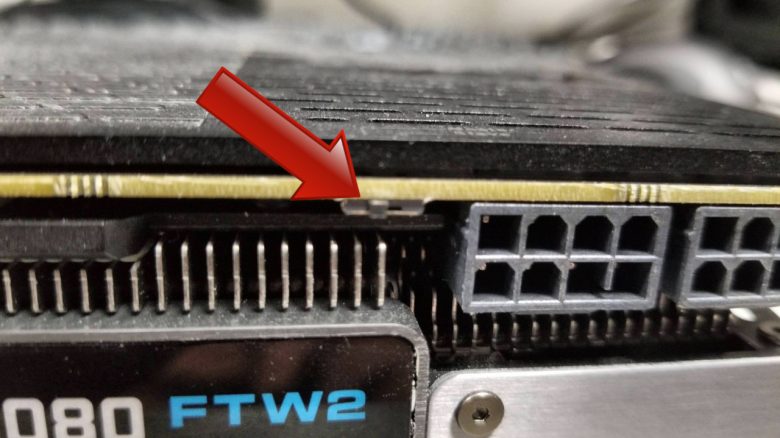
Before I could install the new BIOS, I learned that my GPU has a dual BIOS switch on the card, which was set to the second position, while the first position corresponds to the default settings.
Where was the problem? Some graphics card manufacturers use a dual BIOS on their graphics cards. This means that there are two different BIOS systems on the graphics card that can be switched between. Often, this includes a silent BIOS, where the graphics card runs quieter and uses less power, and a BIOS for overclocking.
The switch between the systems is done either directly in the BIOS or with a small physical switch on the graphics card. In the title image, you can see an example of the switch on an EVGA graphics card (via evga.com).
The user simply had to turn off the computer and use the switch on the graphics card. Instead of the mining BIOS, he could now use the manufacturer’s BIOS again. And after the user flipped this switch, all the problems vanished in an instant.
What does this mean for me? If you are buying a used graphics card and it may also come from a mining system, check during installation whether the graphics card has a BIOS switch. Because with this small check, you can save yourself many problems or at least a long troubleshooting process.
If you are buying graphics cards from a mining system, you should be extra cautious. You are not always dealing with professionals who handle their graphics cards for mining carefully:
Chinese miners flood the market with used graphics cards RTX 3080 – They are cheap, but be careful

Your opinion is important to us!
Do you like the article? Then let us know!