

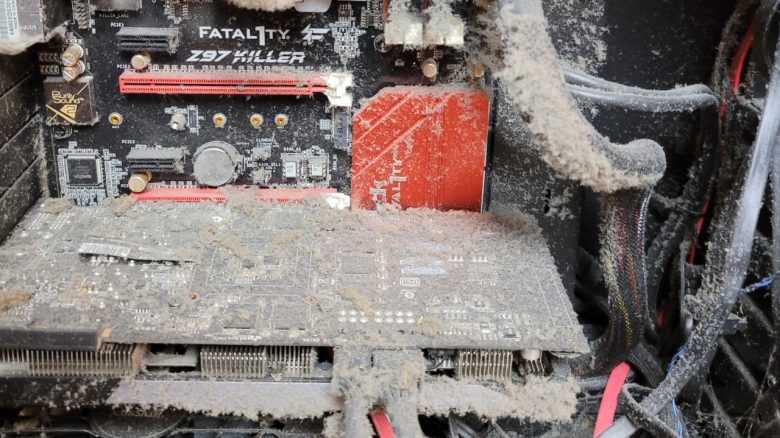
A user shows their gaming PC and it is heavily polluted after many years. You shouldn’t wait so long to clean it if you want to do a favor for your PC (and yourself).
A gamer had shown the inside of their gaming PC on reddit, which they haven’t opened even once in 6 years. The system looks accordingly terrible and causes surprised faces in the community.
However, you shouldn’t wait so long to open your gaming PC and should regularly take a look inside. Because regular maintenance or cleaning won’t harm your PC if you do it right.
Dirty can cause PC overheating and lead to other problems
Why should you clean your computer regularly? Dirt and dust clog the airways for air or your fans. This causes some components or parts to not dissipate heat properly and therefore overheat.
The processor and graphics card then throttle performance to deal with the heat or shut down in emergencies to protect components. Your PC will therefore always get slower.
Moreover, dirty fans are significantly louder because they have to spin much faster to sufficiently cool components like the CPU or graphics card.
If dust and dirt also accumulate moisture, then in the worst case, metal parts in your computer can start to rust. However, this is rather rare.
Even the “greatest gamer” and YouTube streamer Dr Disprespect has major problems because he doesn’t want to clean his PC for a long time.
Can I prevent my PC from getting dirty? Dust can never be completely avoided. Particles enter the apartment while airing out, and furniture and clothing also lose small particles. Human skin sheds skin flakes and hair that also contribute to dust formation. Your fans, power supply, and graphics card draw air into the case and take dust along with it.
Especially if you have your gaming system placed in the living room or bedroom, there is particularly high dust formation. Pets or smoking also promote the pollution of your system.
With a good dust filter in the case, you can at least reduce the dust. Some modern PC cases already offer integrated dust filters. However, you should not forget to clean these regularly. Because even dirty dust filters can slow down air circulation or the fans can suck the dust from the filters.

Simple tricks on how to clean your system
If you want to clean your PC, then the computer should be turned off and disconnected from the power supply. You shouldn’t remove the dust from the inside with a vacuum cleaner or your fingers. The vacuum cleaner and also the natural grease of your skin can damage your hardware.
An effective method is to use compressed air spray or a set of small brushes with which you can gently clean the motherboard, graphics card, fans, and heatsinks. You can remove particularly stubborn dirt with a soft toothbrush.
By the way, we advise the normal PC gamer against disassembling the power supply for cleaning: Because even after disconnecting from the power supply, contact with live parts is life-threatening.
If you’re looking for extensive cleaning tips and tricks on how to proceed best, then check out the following guide on MeinMMO:
8 tips to keep your gaming PC cool and make it faster

Your opinion is important to us!
Do you like the article? Then let us know!