

Fortnite is lagging for some players who installed Update 11.30. Epic Games Support offers a solution for players experiencing lag in Fortnite. We show you what you should do.

What is lagging in Fortnite? Stuttering and freezing are currently a big problem in the Fortnite community. On social media, some players are complaining that they can no longer play properly.
The complaints have increased recently, after today, on December 12, Update 11.30 was deployed to the servers.
Fortnite players report that they can no longer play properly in matches because the lags and stutters are greatly affecting the gameplay.
The solution for lag from Epic Games Support
This is what the developers say: On the Twitter page of Fortnite Status, the Epic Games team addresses the current issues. They write that they are currently looking into reports of lag and connection problems.
Shortly after, they were able to identify a key part of the problem. It is related to DirectX 12, they write on Twitter.
Some of the stability issues are related to the DX12 beta. While we are working to fix the issues, we recommend switching to DX11.
If you are having trouble starting the game, go to the Fortnite settings in the launcher and type “d3d11” in the additional command line parameters.
You can access the command line parameters like this:
- Start the Epic Games Launcher on PC
- Select “Settings” on the left side
- Scroll down to Fortnite
- Expand the tab
- Check the box with the command line parameters and enter d3d11 there.
- Then start Fortnite
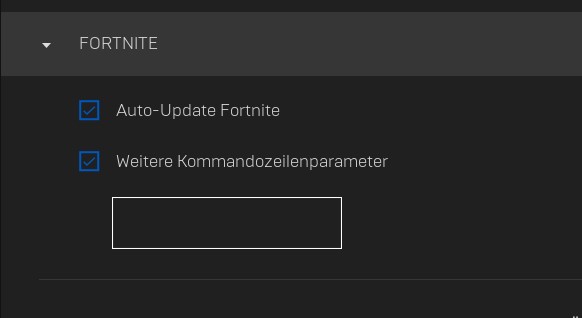
The option to select DirectX12 was introduced to Fortnite weeks ago.
What about PS4 and Xbox? No hints were given in the tweet for console players on how to resolve lag or connection issues. This is also being criticized on Twitter.
We will inform you when Epic Games provides further solutions or gets the problem under control. Until then, we will show you all the changes that the new patch has brought to Fortnite:


Your opinion is important to us!
Do you like the article? Then let us know!