


In FIFA 23, the 10-hour trial has started early, but players on PC are receiving error messages. The community is already looking for solutions.

Although the 10-hour trial for FIFA 23 was supposed to start on September 27, it has been available since September 26 around 4:00 PM. However, while the trial version can be started on PlayStation and first games can be played, players on the PC version are reporting difficulties.
These are the problems: Some PC users report that they currently cannot start the trial. They receive various error messages.
- An anti-cheat banner may appear instead of starting the game
- If starting from the desktop, you may receive the message “You do not have access”
- In the launcher, the message “404 – An error occurred in the matrix” may also appear
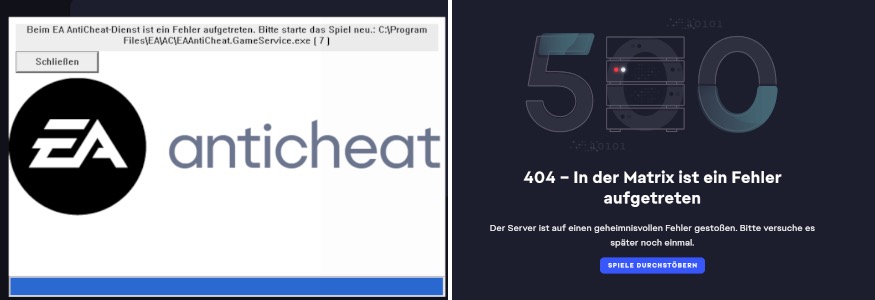
Update, September 27, 10:00 AM: EA has now addressed some of the issues in the “EA Sports FIFA Tracker” (via Trello) and noted them as “under investigation”:
- “Some PC players experience an error during the update process EA anti-cheat error when trying to start the game.”
- As a workaround, EA suggests: “Close the error message and start the game again.”
- “[PC] Some players cannot start the game due to other anti-cheat apps.”
- Workaround: “Uninstall other anti-cheat apps”
Here continues with the original article.
The issues are already being discussed in the FIFA subreddit – with initial solutions being suggested.
Players discuss issues, seeking solution for FIFA 23 launch on PC
This is what players say: In a megathread about the launch of the EA trial on reddit, players are currently collecting issues such as an empty collection in the EA PC app, anti-cheat problems, and long loading screens.
Initial solutions are also available. For example, user “XVince” writes (via reddit):
- One should first uninstall EA Anti Cheat for FIFA 23 (under xVinci at C:Program FilesEAAC)
- Run Origin as administrator and start FIFA 23. Then EA Anti Cheat will want to reinstall.
- Launch FIFA 23 after installation.
Other users recommend enabling TPM 2.0 and Secure Boot. After that, FIFA 23 should be launched as an admin. Both TPM 2.0 and Secure Boot must be enabled through your BIOS or UEFI in Windows. You cannot enable these functions directly through Windows. If you are already using Windows 11, both functions should already be enabled. Learn more about TPM here.
Some users explain that these methods have worked for them to get into the game. Others say that this hasn’t helped them and continue to report problems.
Generally, it does not seem to be universal solutions for the problems.
For example, there is still the problem of the long loading screen with the text “FIFA 23”. Here, players report that sometimes it can simply be solved by waiting. It may simply be a server problem due to high traffic.
Currently, there are no official solutions yet. As soon as there is news about it, we will keep you updated here. Do you currently have problems starting on PC, or solutions? Tell us in the comments.
Have you already arrived at the trial? Then you can find a cheap Bundesliga starter team for the start in FUT 22 here.

Your opinion is important to us!
Do you like the article? Then let us know!