

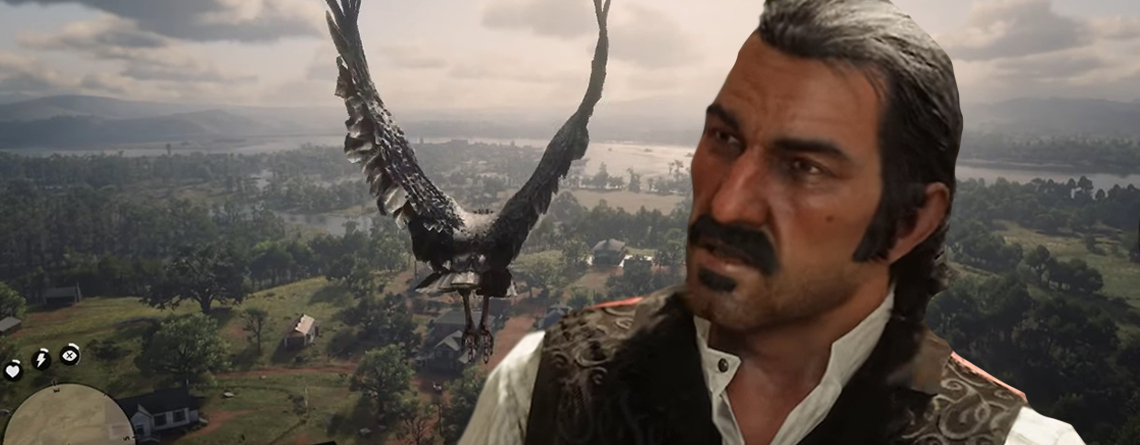
Only a few hours after the release of Red Dead Redemption 2 on PC, modders were already hard at work. They are developing quirky mods that replace your cowboy with eagles, wolves, or other animals.
What is this mod? On the platform Nexus Mods, there is this tool that frees you from the body of Arthur Morgan and transfers his soul into a wild animal.
The software is simply called “Model Swap” and is still a work in progress. Nevertheless, you can already download and install the unfinished project to swap bodies. It works with various characters or animals from the world of Red Dead Redemption 2. The mod uses files that you can easily load and apply.
So if you want to explore the world as an eagle, you just load the corresponding save game and take to the skies. However, the controls may take some getting used to, according to Eurogamer .
On the YouTube channel of RobbinRams, you can see what such an eagle flight looks like in RDR 2.
This birdwatcher is already thrilled with RDR 2, but with such a mod, he is sure to have even more fun.
Are there any issues? The creator of the mod, TanyaeNorth, explains that not all models work. So you have to experiment a bit to see what works. Crabs are currently unfortunately invisible, but panthers are said to work. All adult male models are reportedly not functioning.
Additionally, it is important that you first back up your save file elsewhere, so you can restore it if needed. You should also not enter the online world, Red Dead Online, with these mods, but only play singleplayer.
Flying as a bird was also possible in the console version of RDR 2. But on PC, it is even easier to achieve this with mods.
How to install mods in RDR 2 on PC?
Here’s how to swap your save game: Open your Rockstar Games Launcher, click on Settings, click on Red Dead Redemption 2 under your installed games, and then click on “View save files” and “Open”. It’s best to create a backup of this folder now.
Now download the mod from Nexusmods.com. Open the folder you downloaded from the mod platform, select the appropriate model, and copy and replace it in the target folder. That should complete the swap, and you’ll have a new model to play with in RDR 2.
What models are you using? There’s so much to see in the PC version!

Your opinion is important to us!
Do you like the article? Then let us know!