In Pokémon GO, crashes are currently on the rise. You often have to restart the app to play smoothly. However, there is a trick to bypass some restarts.
This is the current problem: Since one of the latest updates in Pokémon GO, crashes have been recurrent. The screen turns white or the character disappears. In the end, only a restart of the app really helps.
A Trainer counted his restarts on Community Day with Magikarp. He restarted his app over 130 times that day. Many trainers are just annoyed by the crashes and wish for a fix.
A trick can at least bypass some restarts.
Tapping wildly prevents restart
When does the problem occur? Especially when using incense, it is a common issue. If you tap on a Pokémon while it’s about to despawn, your app will freeze.
The incense attracts a Pokémon several times per minute on Community Day. It often happens that you want to tap it just as it is about to despawn.
If this happens, your screen will turn white and you can’t do anything except restart the app.
How can you bypass the bug? If your screen is white, you can just tap wildly on it. This might allow you to hit another Pokémon, a gym, or a PokéStop. If this happens, the white screen will disappear and you can continue playing without a restart.
Alternatively, you can also try to find your field research “blind” and take a Pokémon from the quest stack. This will also make the bug disappear. However, you need to know precisely where your quest stack is located.
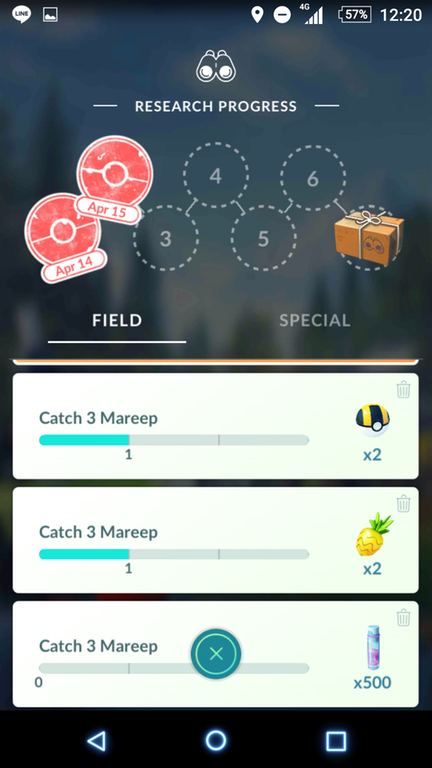
What other tricks are there? For months now, there has been a bug in Pokémon GO where you can’t tap Pokémon or PokéStops, but can still move everything else. If this happens, just go to your quest stack and catch a Pokémon from there. After that, the bug should disappear.
Another trick helps you catch Pokémon quickly. With the catching trick, you save a lot of time during an encounter with a Pokémon.
Only a restart helps here: Currently, there are also frequent occurrences where your character disappears from the screen and you can’t interact in any other way. If this happens, only a restart helps. So far, no trainer has found a solution for this.
What does Niantic say about this? The developers have not yet made any specific statements regarding bug fixes. So, for now, you still have to live with the crashes. Perhaps the next update in Pokémon GO will bring a fix for the errors.
If your game is running smoothly, you can benefit from the Enigma Week. It brings you new shinies and numerous exciting Pokémon.