On Reddit, a user showcases their gaming PC with 17 fans. Builders in the community are appalled when they see pictures of the chaotic wiring behind it. A clean cable management is nowhere to be found here.
A neatly wired computer not only looks better. In case of a problem or hardware upgrade, a tidy cable management makes troubleshooting or remodeling easier.
The user in this post doesn’t care about that at all. He has a staggering 17 fans installed in his gaming PC. But he didn’t think about proper wiring. We show you his mess of cables and tips from the community to do better next time.
Cable management for 17 fans? – “It’s not worth the hassle!”
What kind of computer is mentioned in the Reddit post? The user “FireNinja743” shared several pictures of the inside of his gaming PC with the community. He primarily uses the computer for games and programs he needs for work. As he says himself, he wanted to feel the airflow while operating it and has installed an incredible 17 fans in his PC.
Where are the fans located in his case? The 17 fans have been installed by the gamer at various positions throughout the computer. With one exception, all of them are securely mounted. For the high number of fans, the Corsair 5000D case looks very tidy:
- 3x in the front of the case
- 1x at the back
- 3x in the side panel
- 6x at the radiator of the all-in-one water cooling for the CPU
- 3x additional fans for the graphics card (2x under the card and 1x loose at an angle)
- 1x for RAM cooling
If you count the fans of the graphics card and the motherboard chipset, you arrive at an unbelievable total of 22 pieces. The user in this post does not have that many fans in his PC, but he has even more coolers.
Why are so many fans a problem for wiring? At first glance, his gaming PC looks very orderly. However, the true extent of the cable mess is revealed at the back of the motherboard.
In addition to all the cables for the fans, there are also cables for RGB lighting, power supply of the individual hardware components through the power supply unit, and SATA data cables coming together. To make matters worse, a SATA SSD is also stuck in the middle of this chaotic mess. But you can also be even lazier and not even take your SSD out of the packaging.
Since he has consistently avoided clean routing, there is no overview whatsoever. Assigning individual cables is not possible without further ado.
Does the computer have problems or drawbacks in operation because of this? According to the owner, his gaming PC runs perfectly. The lack of cable management doesn’t seem to bother him either. As long as he can close the side panel of the case, he says, “it’s not worth the hassle.” Only during a later motherboard change does he think he might finally consider routing all cables properly.
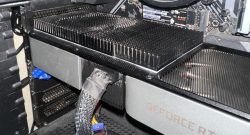
Builders from the community want to help
Many comments under the post revolve around tips on how to solve the problem of the many cables. The most mentioned advice is:
- The most obvious: dissolve the entire wiring and start anew with a clean slate
- Use of cable ties to create more order and to bundle cables better
- Use of fan hubs for power supply. These can be placed on the back of the motherboard. This way, the fans can be better organized, and cable paths are shorter.
- Reduce the number of fans. In particular, many see the 3 additional fans for the graphics card as useless. They have a rather negative impact on airflow in the case. Fans in the front and back as well as optionally in the top generally ensure good airflow that reaches all components in the computer.
- Remove RAM cooling. “FireNinja743” mentioned that he has overclocked his RAM. Whether this necessarily requires active cooling is questionable.
- Forgo RGB elements. Reducing the RGB lights would automatically decrease the amount of cables.
- Replace the power supply with a modular model. You only connect the power cables that are actually needed. The user states that he is using such a power supply. Unfortunately, the advantage doesn’t apply to him since he needs all power cables. Here we recommend you a modular power supply with a brilliant feature that saves you a lot of time and nerves.
- Replace the SATA SSDs with M.2 models, provided his motherboard has the appropriate interface. This would eliminate power and data cables altogether.
Many of the tips can be implemented relatively easily and quickly. For some recommendations, the gamer would need to spend a bit of money to ensure better cable management.
What do you think about this mess of cables? Can you understand the user? Or are your gaming PCs ideally wired?
If you use an old microwave as a PC case, you should pay particular attention to proper wiring:
“The game even runs on a microwave” – Gamer uses kitchen appliance as PC case