

Today the weekly server downtime for Destiny 2 takes place. Therefore, the Guardians have to temporarily put their weapons to rest and cannot undertake any journeys through the Destiny universe for a while. MeinMMO informs you about the exact time and duration.
19:30: In the meantime, the systems have normalized. The clan feature is also available again. So you should be able to start the new week now.
18:55: The patch notes have been released. We link them below in the article. Bungie has ensured with the update that you can no longer pause time in Destiny 2.
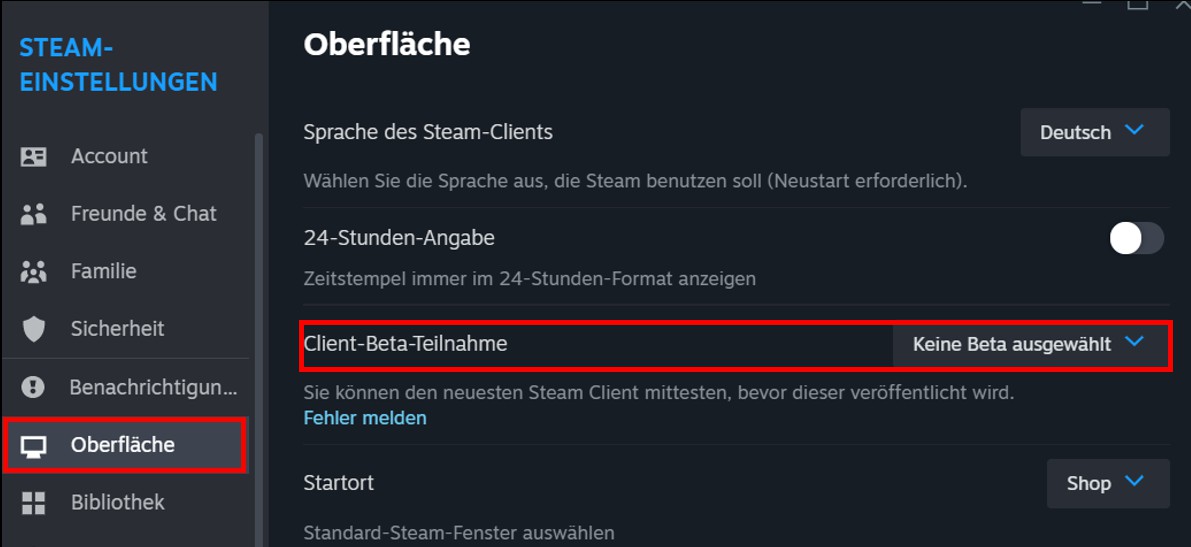
18:50: Bungie reports officially that there are crashes when starting Destiny 2 through the Steam Beta client. If this problem occurs for you, it is recommended to opt out of the Steam Beta by clicking “Steam” > “Settings” > “Interface” > “Client Beta Participation” > “No Beta selected” in the Steam client.
18:30: A login is still possible. However, we are receiving reports from players that they are not getting far. With the error codes PLUM or WEASEL, players are quickly kicked from the game. There are also BattlEye errors. So far, there is no update from Bungie regarding this. We will keep you updated.
18:00: The update is here. On PC, the download is 102.7 MB. The login into the game is already working – but there are still BattlEye errors.
15:20: Bungie has just taken the servers for Destiny 1 and 2 offline. Maintenance can now begin. You will find out how long it is expected to last further down in the article.

What you need to know today: Bungie will clean up the Tower with today’s server downtime, as the free event Festival of the Lost
ends with the weekly reset. The Halloween decorations will be removed, bringing an end to the endless stream of candy.
In addition, necessary bug fixes and balance adjustments are on the way to ensure that the shooter is not overwhelmed by bugs. Today’s Update 7.2.5.3 will therefore likely bring some changes to improve the gaming experience in Destiny 2.
To optimally prepare for the upcoming Update 7.2.5.3 and the server downtime on November 7, 2023, we have compiled all relevant information in this article.
For some players, it is already clear after the crisis at Destiny 2 and Bungie that they will not play this DLC anymore, which means that Cayde-6 will have to save the universe alone:
Maintenance on 07.11. – All times for the server downtime
These times are important today: Bungie informs its players via Twitter/X about the planned downtime. MeinMMO informs you about the exact timing of these downtimes in Germany.
Here is the exact schedule for the maintenance:
- At 14:00, background maintenance starts on all platforms.
- At around 15:15, the servers go offline. Players will be automatically kicked from the game.
- During the downtime, Bungie will release Update 7.2.5.3. It will be gradually rolled out so that players on all platforms can download and install it.
- At 18:00, the shooter is expected to be back online and you can try to log in.
- The maintenance will continue in the background until 20:00.
Additionally, there may be queues during login because Bungie only gradually opens access to the servers to avoid problems from high server load. Therefore, it may take you longer to get back into the game.
Also, keep in mind that third-party applications as well as the official companion app might also not be accessible correctly for a while, so you may not be able to use them.
What will change with Update 7.2.5.3 in Season 22
What will be included in Update 7.2.5.3: Bungie has a publicly accessible to-do list of things that are currently not working properly in the game. This is actively influenced by Destiny 2 players by reporting bugs in the Bungie forum.
The following bugs are currently on this list:
- Veist automatic rifles can sometimes be rotated off-screen while displayed on the inspection screen.
- The osmosis advantage is not activated for some scout rifles.
- Some weapons purchased from Banshee-44 may have a different masterpiece than what is shown in the weapon preview.
- Players can die when executing a finisher if the enemy dies before the finisher animation is completed.
- Large amounts of multikills can lead to BIRD errors.
- The hotswap function in PvP between certain weapons works a bit too well and allows players to get kills in seconds.
- Player name changes cannot be infinitely customized via bungie.net. Multiple “number guardians” are still waiting for the option to change their player name again instead of receiving the message “You have no name changes available”.
This is not a comprehensive list of all known issues, but rather a targeted list of specific sources of error. If further deficiencies occur within the game, it would be helpful if you could report these in our comments section.


Patch Notes for Update 7.2.5.3 in Destiny 2
What is in the patch notes? Bungie publishes the list of all changes for Update 7.2.5.3 in the form of patch notes. A complete overview of all fixed issues and improvements will, however, only be published later today.
Once these are published, we will update our article for you and link to the patch notes, as there may still be changes or corrections to it afterward.
What else is important? Maintenance phases are unfortunately an inevitable part of a live service game like Destiny 2, as they form the basis for a smooth and enjoyable gaming experience.
Although they may temporarily restrict access to the game, they are a necessary step to ensure that bugs do not remain in the game and that you can play as usual without too many disruptions.
Therefore, keep an eye on this article to stay up to date on how the maintenance work is progressing and to be informed of possible delays in advance.
While Bungie works on Destiny 2, the community discusses whether Destiny 3 might be the better solution: Players believe Destiny 3 has always been the answer to the crisis because Destiny 2 is “bloated and contentless”

Your opinion is important to us!
Do you like the article? Then let us know!