


With the upcoming expansion Shadowkeep, Destiny 2 will undergo some changes. One of them is that the game will move from Blizzard’s Battle.net to Steam on PC, requiring Guardians to migrate their accounts. We will outline how the transfer works here for you.

Reason for the account transfer: With the release of the upcoming expansion Shadowkeep, Destiny 2 is moving from Blizzard’s Battle.net to Steam on PC. This is a logical step, as after Bungie parted ways with Activision Blizzard earlier this year, the companies have not much to do with each other anymore.
Now the game is set to move to Steam. However, PC players of Destiny 2 must migrate their accounts, meaning they must transfer their data to the new PC platform.
PC players who have played through Battle.net and must now transfer will receive a one-time, free account transfer to Steam. This will transfer all their data, expansions, silver, Annual Pass, and other paid content to Steam. They will not have to purchase their content, such as Forsaken, again for Steam.

When is the release on Steam? Even if you already connect your Battle.net account with Steam – you are still playing Destiny 2 through Blizzard’s Battle.net. The game will only be available on Steam with the release of Shadowkeep. The Steam release is therefore on October 1, 2019.
This is how the transfer from Battle.net to Steam works
How does the migration work? Log in on Bungie’s website with your existing Battle.net account. You can hardly miss the page where you connect your Battle.net and Steam accounts, as there is a red banner at the top of the Bungie website on every page informing about the switch to Steam.

Click on the corresponding red banner to go to the relevant page and start the migration process. If you click on “Get Started”, you must first agree to receive emails from Bungie.
In the next step, you will see the Battle.net account you logged in with and want to connect to Steam. Once you have accepted the terms of service, you can then link your Battle.net account and your Steam account.
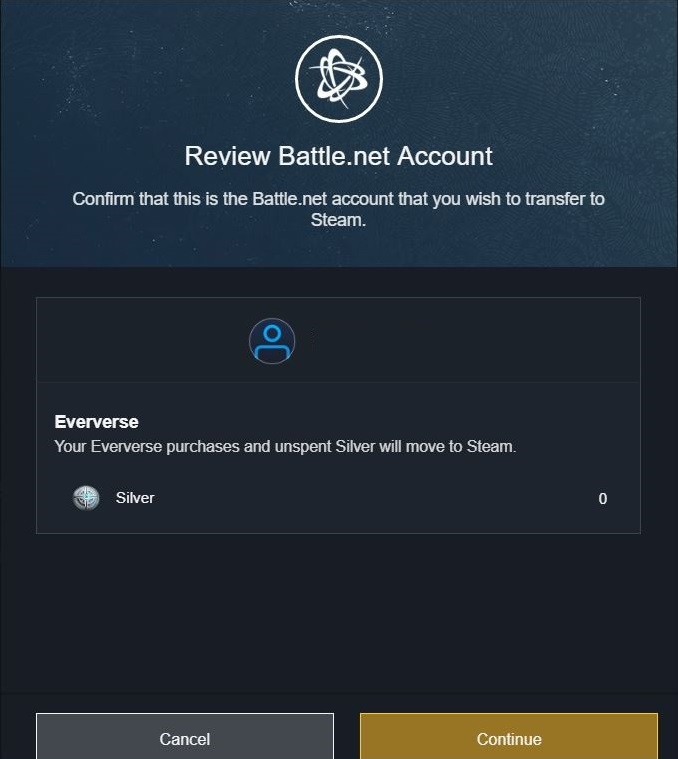
Click on the Steam button to log in with your Steam account.
Your Battle.net content will now be transferred to Steam when Shadowkeep launches. This process cannot be undone.

This is what you should consider during the transfer: Just like with Cross-Save, you will also be guided through the process step by step during the Steam migration. Nevertheless, there are some details you should keep in mind during the transfer:
- Battle.net players will receive a one-time account transfer of all their data to Steam. This includes the player account, Destiny 2, expansions, silver, Annual Pass, and other paid content. If you are already playing Destiny 2 on PC, you do not need to repurchase all the content you already own for Steam.
- Players who want to switch from the consoles PS4 and Xbox One to PC must complete the migration. Activating Cross-Save for Battle.net without also linking the Steam account is not possible.
- Console players who only want to switch to the other console and not to PC do not need to connect their account to Battle.net or Steam.
- You can already pre-order Shadowkeep on PC and carry out the transfer later.
- As of October 1, it will no longer be possible to play Destiny 2 through Battle.net. From that date onward, the game will only run on PC via Steam.
- Once you have linked your Destiny 2 data from your Battle.net account to Steam, you cannot undo this step.
How to activate Cross-Save and transfer your progress of your Guardians across multiple platforms, we have here for you:


Your opinion is important to us!
Do you like the article? Then let us know!