It is a sacrilege for some Destiny veterans. On PS4 and Xbox One, some miscreants played Destiny with mouse and keyboard. They used certain assistive devices for that. For many purists, this is “cheating” and frowned upon. Those who want to play this way have no place on consoles; they should better play on PC, it is often said.
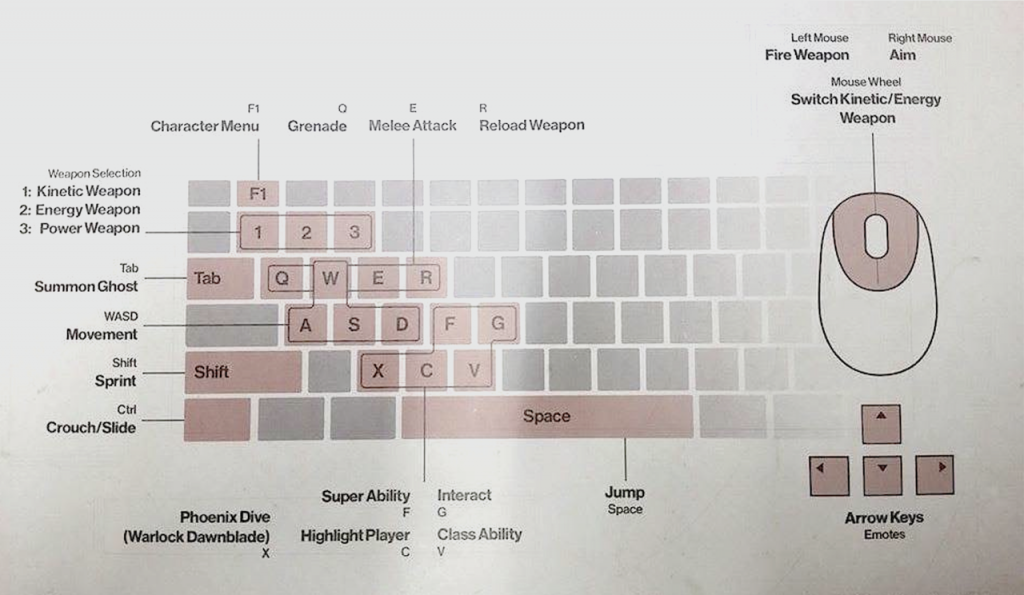
Well, the PC version of Destiny 2 is coming, it does not yet have a release date, but we already know many details. This includes the mapping with mouse and keyboard. Gamespot has published this image showing the key mapping.
Classic keyboard layout for Destiny 2
It is quite classic:
Fire with the left mouse button
Aim with the right mouse button
Movement runs over WASD
Jump with the spacebar
Switch between individual weapons in the new weapon system of Destiny 2 using the number keys 1, 2, and 3 – this can also be done using the middle mouse wheel
Q is the grenade (very important)
Super is on F (even more important)
Classes can be activated with V. These are new in Destiny 2
With E, the Guardian strikes in melee
R traditionally reloads the weapon
Shift is for sprinting
And Control is for crouching
Somewhat unusual: The “Interact” key is G; usually, it is often on E
With the arrow keys, 4 emotes can be used
F1 opens the character menu
The Tab key summons the ghost
Whoever says now: That’s nonsense, no intelligent person plays with WASD, I play ESDF – like a real pro: One will be able to completely rearrange the control in Destiny 2.
More info on Destiny 2 and what changes are coming can be found here: