


In preparation for the PC version of Destiny 2, players can now link their Bungie account with their Blizzard account.

For PC players, Destiny 2 launches in October and will be available through the Blizzard network in the “Blizzard App” software. From now on, you can prepare for the release by linking your Blizzard and Bungie accounts.
This allows you to use your Bungie.net profiles while logged into the Blizzard account. The linking process is completed in just a few steps.
Linking Bungie and Blizzard Accounts
Players have already been able to authenticate their Bungie.net accounts using their PlayStation Network IDs or Xbox Live Gamertags. Many players used this method to log in on the Bungie.net site. This allowed the Bungie service to display their character data and stats on the website and provide an overview of all characters.
From now on, you can also use your Blizzard account as an authentication method.
If you already have a Bungie.net account, you can link your Blizzard account in the same way as adding a console account.
But caution: Make sure that you do not create a new account, but add Blizzard to your existing account.
On Reddit, user Aerogizz writes that he accidentally created a new account and linked it again with his old Bungie account’s Gamertag. This leads to losing access to the “old” account! In Bungie’s FAQ, it states: “Players lose their Bungie.net access if they remove their PSN ID, Xbox Live Gamertag, or Blizzard Battle Tag from their profile.”
To connect existing accounts with Blizzard, go to the Bungie.net website settings and select the “Accounts & Linking” section.

Anyone who has not yet had an account on the Bungie website can register there with their Blizzard account:
- First, visit the Bungie website and click on “Register” in the top right corner. Here is the link to Bungie.net
- Then a pop-up window will open for your account creation. Click on the corresponding network (PlayStation, Xbox, or Blizzard) with which you want to link the account.
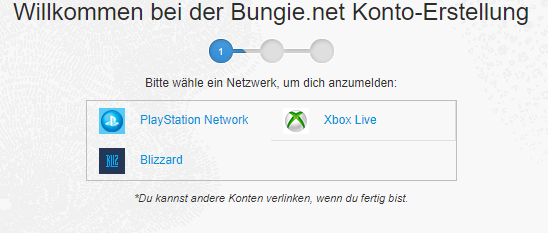
- Now you will be prompted to log in to the selected network. Then confirm the account by clicking “Continue”.
- With your username and email, you will now create your Bungie account.
- If you want, you can also add and link additional accounts.
- Your profile is now created and you can take advantage of your Bungie account benefits.
- It’s best to confirm your email address right away to complete the verification.
- Now you are well prepared for the launch of Destiny 2!
The benefits of this account linking are important for you. Destiny 2 beta codes and other rewards will be redeemed via the Bungie.net website. A linked account is therefore a prerequisite for that. Additionally, you can join clans on the website that will play a important role in Destiny 2.
Destiny 2 Beta and Release for PC – When?
Before the release of Destiny 2, you have the opportunity to test the game during beta phases. However, PC players will have to wait until the end of August to participate in the coveted testing phase. PS4 and Xbox One players can test from July 21 to July 23. Pre-orderers will get early access and can play even sooner.
Destiny 2 will be released on September 6 for PS4 and Xbox One. The PC version will have a later launch and will be available from October 24. Kick in the pants for PC players – Bungie loves and punishes them.
Destiny 2 preload will start soon for PS4 and Xbox One

Your opinion is important to us!
Do you like the article? Then let us know!