

A new companion app is becoming increasingly popular in the community of Call of Duty: Warzone. With the application for PC, you can already see before the game if you have potential cheaters in the lobby.

WARNING: There are reports that using this app in CoD Modern Warfare and Warzone can lead to bans. We have requested a statement from the developers and will update this article for you as soon as we have a response. Downloading and using this app happens at your own risk. A risk of a ban cannot be ruled out at present.
What kind of app is this? With the so-called “Warzone Companion,” you can analyze the players in your lobbies on PC. The tool runs in the background, provides you with the statistics of your teammates, and even shows you who might be a hacker/cheater.
The “Warzone Companion” is part of the “Overwolf” program, which provides you with apps for many PvP games that can improve your gaming experience. There is a guide app for the card game Hearthstone, a skill tracker for MOBA League of Legends, and capturing apps for your gameplay videos.
MeinMMO introduces you to the “Warzone Companion” a bit and explains how the application detects cheaters earlier and why there is also criticism of the analysis tool.

Warzone Companion shows you tons of statistics and cheaters
How does the app work? The program accesses the Warzone database and compiles statistics about your performance. In more than 50 categories, you can review your own statistics.
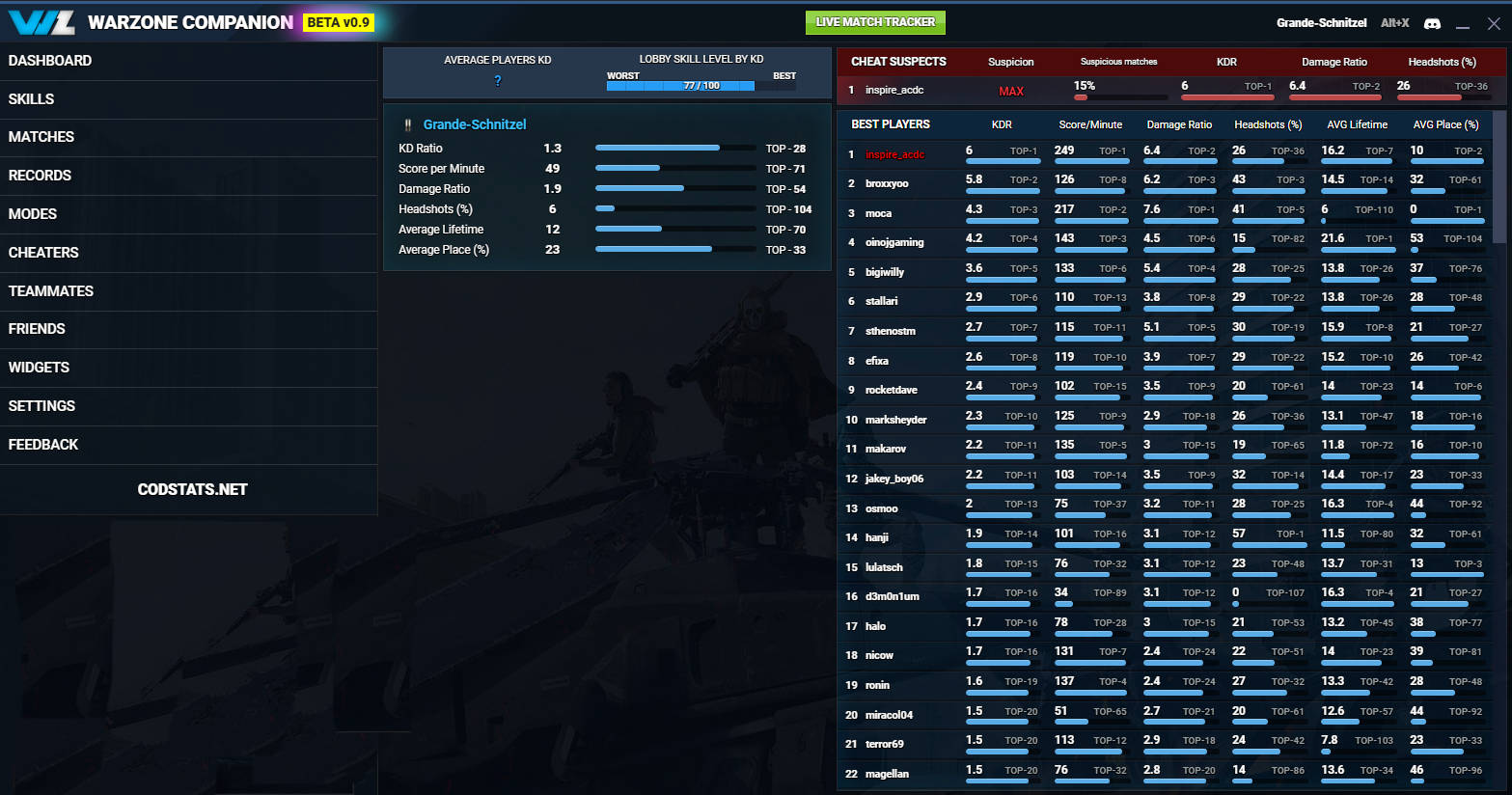
Additionally, the app offers a lobby live tracker. As soon as the preparation phase before a match starts, the Companion collects the performance data of all players in the game and provides you with detailed information about your enemies. For example, you can see the K/D ratios (kill/death rates) of the enemy teams and the entire lobby.
What does this bring me? Through the analysis of performance data, the app can assess which player in the lobby might be a cheater.
If a player has values that seem abnormal or almost inhuman to the program, such as very high headshot percentages, the Companion marks the player and you can switch lobbies if you want to avoid the cheater contact.
How to download the Companion
How do I get the app? You can download the app from the Overwolf homepage. In the upper right corner, you will find the button for “Overwolf Download”. The program can also be set to German, but it is not completely translated.
Once you complete the download, start the program and search for the Warzone tile in the app store. If you don’t find it immediately, then
- Hover your mouse over “Apps”,
- Select “Browse by Game” in the expanded menu on the left, then “View all” to display all games
- and look for the game here.
- Now select the “Warzone Companion” to set up the program.
To link your account, you just need to start the Companion and then go into the game via the Battle.net launcher. The app should then find your account automatically. If that doesn’t work, you can also log in manually.
What key combinations are important? In the game, there are two key combinations that are important to show or hide data.
- Alt + W – Shows or hides your own data at the bottom of the screen
- Alt + X – Shows or hides the performance data of the current or last lobby in the match
Since on PC, the “ping” of a position is typically set to “Alt,” you might want to set a new key for pinging. Otherwise, you will inadvertently indicate a direction with every interaction with the tool.
Application criticized by tournament players
Why is the tool also criticized? Particularly some professional players who regularly participate in tournaments view the new tool critically. Tournaments in Warzone are not played directly against each other. Participants start public games and collect points over several rounds, which depend on kills and placement.
If these tournament participants can assess the average K/D ratio beforehand to know whether the lobby is rather difficult or easy to beat, then it is very easy for them to cheat and gain an advantage. A similar situation applies to regular players. Theoretically, one can search for a game until the average K/D is at a low level.
Overall, however, it is an excellent tool for analyzing one’s own performance and debating statistics with friends. Additionally, you can avoid hackers or cheaters. Grab the best weapons in Warzone and go hunting for some new records for your statistics.

Your opinion is important to us!
Do you like the article? Then let us know!