
In Call of Duty: Warzone 2 the voice chat is an important element for communication among the soldiers. However, if it stops working, a fix must be applied quickly. We will show you how to solve the problem.
Voice chat not working – Here’s the fix: First, you need to determine whether your headset or microphone is connected at all. If you have confirmed this and you still cannot be heard or hear others, the issue lies in the settings.
To fix the issue, follow these steps:
- Open the settings
- Now go to the “Audio” tab
- Scroll down until you reach the section with the “Voice Chat”
- Enable the voice chat if it hasn’t been done yet
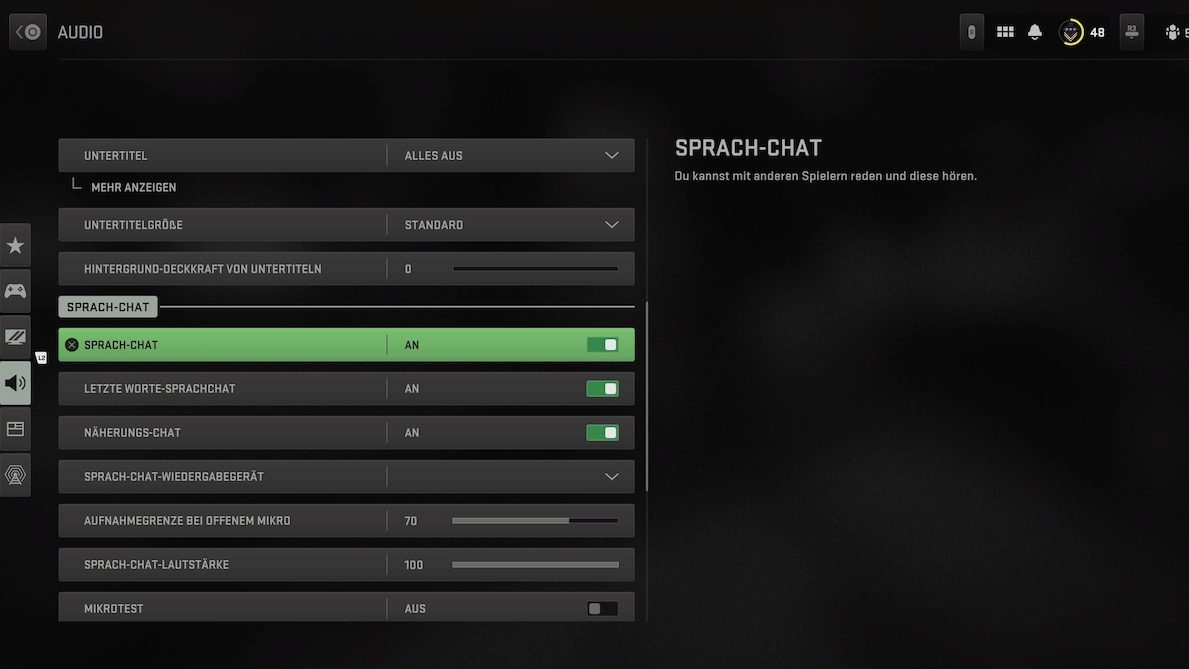
Under the voice chat settings, there are additional options that you should consider if your audio input and output still do not work.
These mainly include:
- Voice chat playback device
- Microphone
The system in Modern Warfare 2 and Warzone 2 automatically selects a connected device. However, it may happen that no active device is activated despite the automated system. Go to the settings mentioned above and select your devices manually. This way, you can ensure that your headset and microphone are also selected.
Proximity chat not working: The proximity chat is a topic in itself. You can also find the setting in the voice chat settings, and it can be activated and deactivated there. The problem, however, is that the system apparently works well primarily for American players. In our tests, it performed poorly or not at all, even though the setting was activated.
Prefer looking for the dead letterboxes? Then we have listed all the locations for you:

Your opinion is important to us!
Do you like the article? Then let us know!