


In Call of Duty Modern Warfare 2 you can not only customize and color your weapons at the gunsmith but also your clan tag. We will show you a trick on how to make it more colorful.
What is a clan tag? The clan tag is a small cosmetic and mainly categorizing info for players in CoD. With it, players can show other players which clan they belong to. This tag sits next to your nickname in square brackets and can be viewed by any player.
However, that is not enough, as fans have found out how to color the clan tag to display their clan designation in colorful colors. We will show you how this trick works.
This is how you can color your clan tag and username
What do I need for coloring? To color your clan tag, you only need a keyboard and a mouse.
How does the trick work? To bring color to your clan tag, you first need to open your barrack in Modern Warfare 2. You can access this by opening your menu window and then switching to the tab of your rank. Once there, you have the option to customize many different things, including your clan tag.
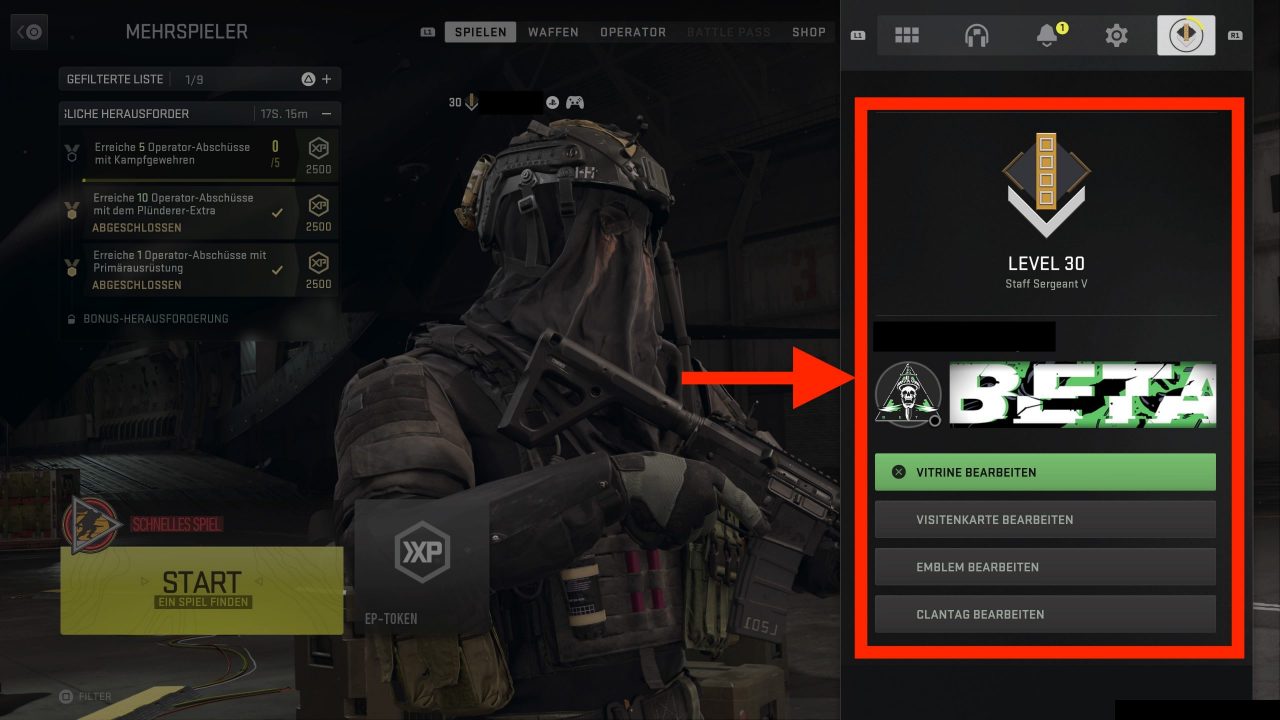
Now you need to navigate to and open the “Edit Clan Tag” option. The editing window will open, and you can enter your clan tag, but now comes the trick. You start your clan tag with an upward arrow “^” followed by a number between 1 and 8. After that, you can complete and save your clan tag.
Note that this will also change the color of your username. If you no longer want the color, you can delete the arrow and the number, and everything will go back to how it was before.
How does it work on the PS5 and Xbox? To also equip your account with cool colors on your consoles, you need to connect a mouse and a keyboard. With the mouse, you then select “Edit Clan Tag” and then type the code listed by us with your keyboard.
What colors are available? There are many different colors, depending on which number you select before the upward arrow. The following colors are selectable:
- ^1 – Orange
- ^2 – Green
- ^3 – Yellow
- ^4 – Dark Blue
- ^5 – Light Blue
- ^6 – Pink
- ^7 – White
- ^8 – Light Blue
These were all the important information about coloring your clan tag. If you have any further questions or comments, feel free to leave us a comment.
We also have a survey about the best Call of Duty, feel free to vote for us!

Your opinion is important to us!
Do you like the article? Then let us know!