MeinMMO shows you in the guide how to disable Crossplay in Call of Duty: Modern Warfare 2 – on PlayStation and Xbox. The option cannot be turned off on PC.
How do I disable Crossplay in MW2 on PC? This is not possible.
How do I disable Crossplay in MW2 on PS5? To disable Crossplay on PS5, you need to follow these instructions.
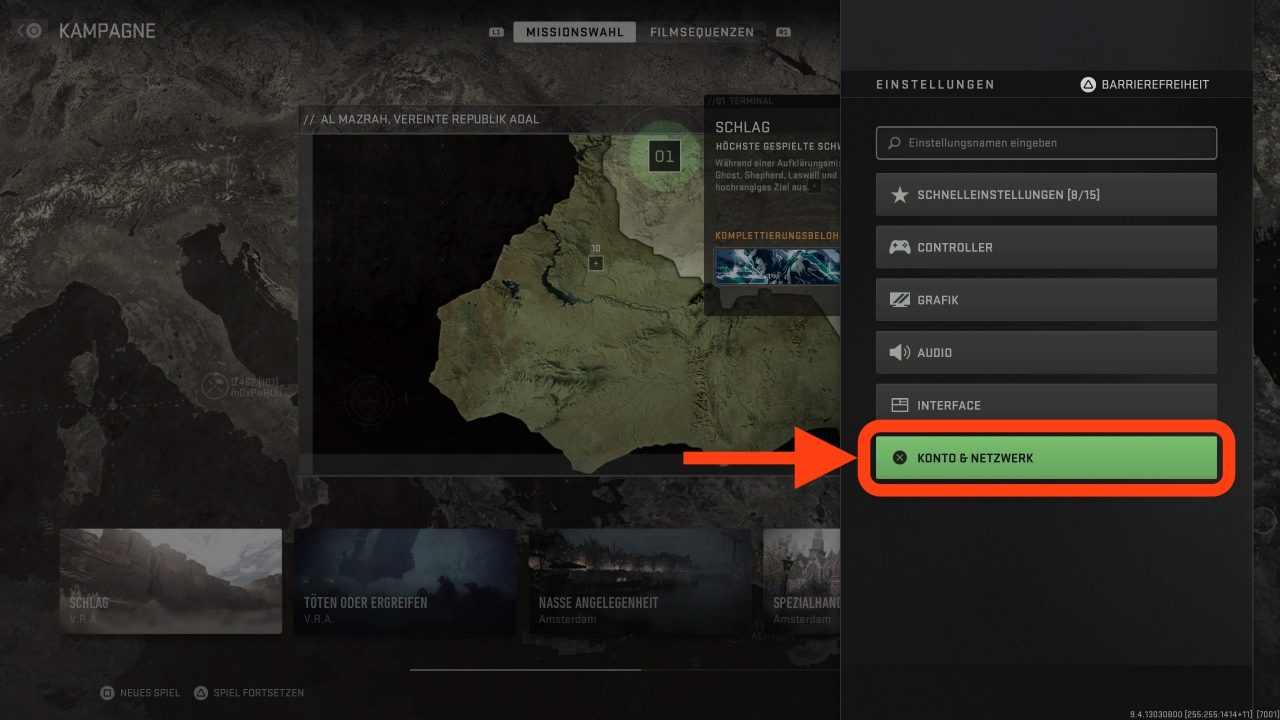
- Go to your in-game settings and select the “Account & Network” section.
- It doesn’t matter what mode you are logged into; the menu layout is the same across all modes.
- A new window will open. In this window, the first setting option is labeled as “Crossplay”.
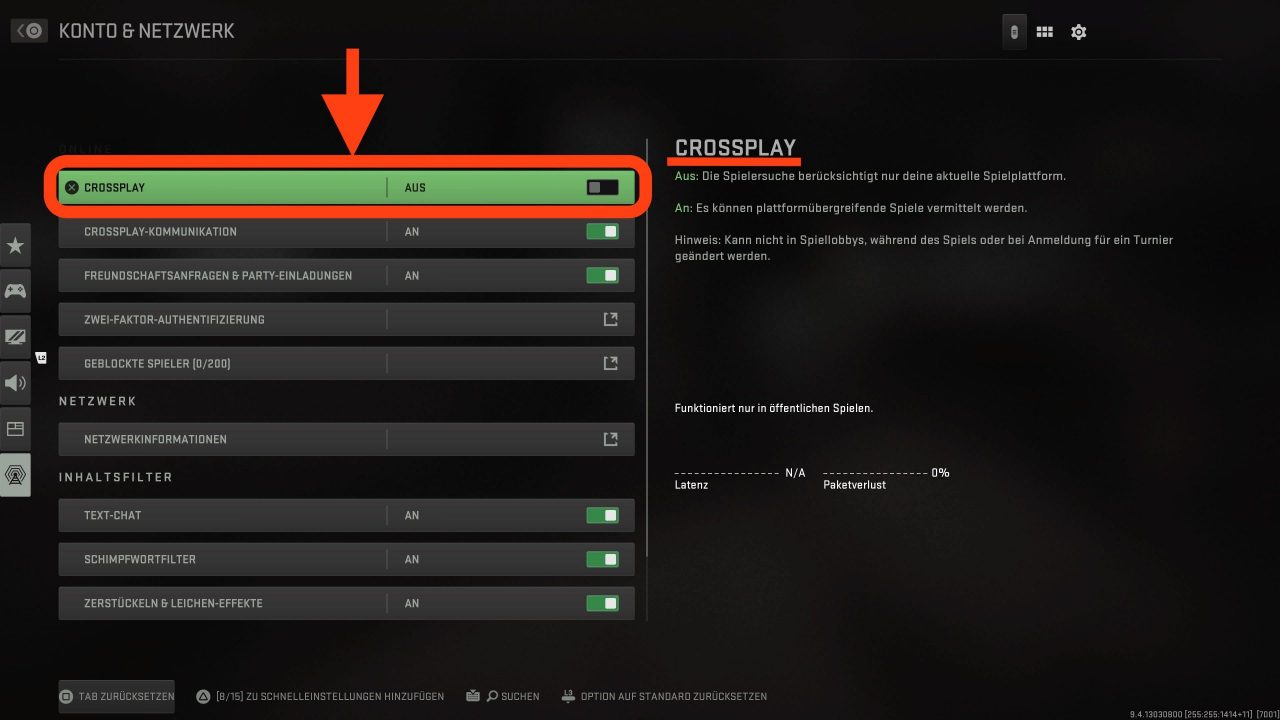
Now you can choose whether this should be enabled. For us, this menu item was already disabled beforehand. If you want to play with friends outside your platform, you need to enable this menu item.
If you also want to communicate with players on other platforms during Crossplay, you need to enable “Crossplay Communication” additionally. This is located one point below.
How do I disable Crossplay in MW2 on Xbox? While you could also disable the Crossplay feature on Xbox during the beta of MW2, it looks different at release.
On Xbox, the Crossplay menu item is missing, but we will show you how to disable Crossplay anyway.
Proceed as follows:
- Go to your console settings
- Then tap on “Online Safety and Family”
- Then tap on “Privacy and Online Safety”
- Now tap on “Xbox Live Privacy”
- Now choose “View Details and Customizations”
- Next comes the menu item “Communication and Multiplayer”
- There is now a field where you can decide if you can play with players outside of Xbox Live
- If you want to disable Crossplay, change this option to “Block”
- To ensure your setting takes effect in your game, you should restart all open titles
The menus of the Xbox One and Xbox Series are slightly different. However, on both consoles, you can disable Crossplay in your privacy settings.
However, there are reports that you cannot play the larger modes Invasion and Ground War if you disable Crossplay on Xbox.
Below we explain to you what problems Crossplay might bring.
Everything important about Crossplay in CoD: MW2
What problems does Crossplay bring? If you use this setting, players from all supported platforms are thrown into a player search. So it could be that you have to compete against players on PC while playing on Xbox or PS5, or vice versa.
Console players enjoy a significant advantage with their controllers, as they are inherently given an aim assist. PC players do not have this advantage, but they are quicker in movement and aim detection with mouse and keyboard.
It is also easier to hack or use cheats on PC. So you might encounter hackers more frequently.
However, if these things don’t bother you, you can enable the settings.
What are the benefits of Crossplay? The biggest advantage of Crossplay is playing with other platforms. You don’t have to wait long in a player search until a match can start in multiplayer. Because of this, the server can access more players and fill your lobbies faster with people from around the world.
As mentioned earlier, this also means you can be matched with friends who are on different platforms. It’s a cool system that is supportive, but it can also lead to problems.
This was everything important you should know about turning off Crossplay. What do you think about MW2 offering such a feature? Will you enable Crossplay? We would love to hear your opinion in the comments!
More about CoD MW2 can be found here: CoD MW2: No statistics – here’s how you can still see your KD and access your barracks