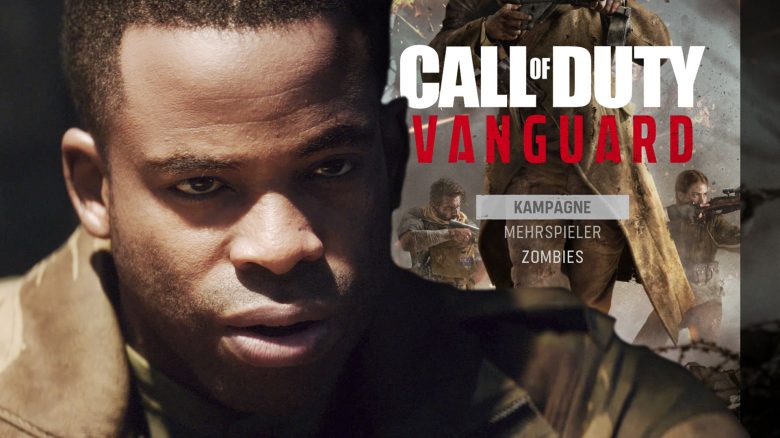
Some players cannot start the campaign in CoD Vanguard or it is locked. We will show you how you might be able to fix the error.
What is it about? If you are among the people whose campaign in Call of Duty Vanguard is locked and does not start, we will show you a few quick tips here that could resolve the issue.
Update from November 8: We have updated the article with two additional solutions. Players have found a trick with language packs that has helped many in the community.
Campaign not working? Use these solutions on PC
Check this first: There are some basic settings and tests that you should ensure before delving into deeper troubleshooting.
- Is your internet connection working?
- If your PC does not have a proper connection to the Vanguard servers, problems can occur anywhere. So first, check if other games and programs that need the internet are functioning correctly.
- Restart your Battle.net software
- One of the easiest solutions is to restart the Battle.net app. Next to your Windows clock in the taskbar, you will find the blue Battle.net icon. Right-click on it and select “Exit” to close the software.
- Restart your PC
- Although it’s almost a meme, restarting the PC has solved many issues. It’s worth trying.
- Use the troubleshooting feature in Battle.net
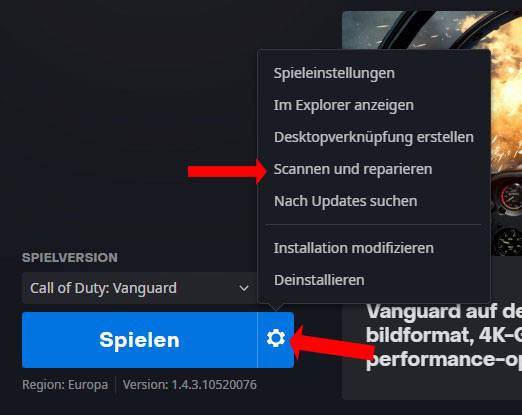
- If none of this helps, you can try the Repair feature in Battle.net. For that, click on the Vanguard icon in the game overview. Next to the blue “Play” button, you will find a gear icon. Click on it and then select “Scan and Repair”.
Community solutions that help
Did none of this help? The topic of the locked campaign is big in the community, and players are discussing it in Blizzard forums.
- “Is the campaign of Call of Duty: Vanguard locked? I cannot play it, and I have all the game content installed. Reinstalling the game does not fix the issue. I can play multiplayer and zombie mode, just not the campaign. […]” writes NKNOW in the Blizzard forums.
Two players also write about how they were able to solve the issue.
Modify installation: In the Battle.net launcher, you can also select the option “Modify Installation” from the gear icon shown at the top of the image. There, under “Game Content,” the entry “Campaign” should also be listed. If that is not the case, then select the modification option next to it and check the box for Campaign.
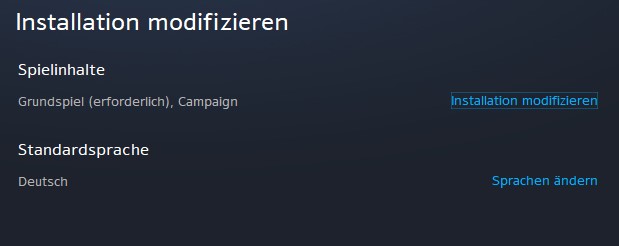
The trick with the language change: As you can see in the screenshot, you can also change the language when modifying the installation. Many players report that changing the language unlocked the campaign. Download a new language pack and either play in the new language or switch back to the old language afterward. According to Blizzard forums, this trick helps some players.
More tips from the community:
- “Yes, I had the same problem. For some reason, you can start the game when it is only 50% downloaded. You have to exit the game and download the rest. That helped me anyway,” writes bob in the Blizzard forums.
- “It works for me now. I deleted the game and reinstalled it. But this time I let the game run in the background in the main menu while Campaign 1 and Campaign 2 were downloading. It took longer, but it worked for me,” explains TuNeMG in the Blizzard forums.
When installing, make sure not to immediately click “Play” as soon as the button appears, but while the game is still downloading. Then the files for the campaign may still be missing. Wait until the download is completely finished before starting the game.
Do you have any more solutions for the campaign issue in Vanguard? Let us know here on MeinMMO in the comments and help the community. You can find more tips for Vanguard here: CoD Vanguard: 5 tips to make you better than your opponents right from the start