

Marathon offers five cosmetic items as Twitch Drops for the Server Slam, which you can secure. We will show you how to do it.

What are these gifts? Bungie is giving away cosmetic items for Marathon, their new extraction shooter, which releases on March 5, 2026. These gifts are distributed as Twitch Drops.
What are Twitch Drops? Twitch regularly offers Twitch Drops in collaboration with various games, which are distributed through Twitch as part of advertising campaigns for the respective game. These Twitch Drops are rewards, often cosmetic items, XP boosters, or similar, which you receive by watching qualified streams of the game for a fixed duration on Twitch.
Secure and redeem Twitch Drops – Here’s how
What do you need to do to receive the Twitch Drops for Marathon?
To receive the Twitch Drops for Marathon, you need to watch streams of Marathon on Twitch for up to 4 hours during the Server Slam. According to Bungie, any channel streaming Marathon in the designated category on Twitch will qualify for the distribution of the Drops.
- The Server Slam of Marathon runs from February 26, 2026, to Monday, March 2, 2026.
Additionally, you need to link your Bungie and Twitch accounts to collect the rewards.
How to link your Bungie and Twitch accounts
To connect your Bungie and Twitch accounts, follow these steps:
- Go to Bungie.net – this is the official website of Bungie, the developer studio behind Marathon.
- Click on “Sign In” at the top right and log in with your Bungie account. If you do not have an account yet, click “Register” and create one.
- Once logged in, click on your profile (usually represented by an icon at the top right) and go to the “Settings” section.
- In the account settings section, go to “Account Linking”. Here you can link your Bungie account with your Twitch account.
- To link both accounts, click on “Link Account” in the Twitch row (found in the “Social Platform Accounts” section) and authorize the linking if you agree with the terms.
How to collect your Twitch Drops
Typically, you need to collect the received Drops on Twitch in the Drops & Rewards section. In the case of Marathon, no activation of a code on an external website is necessary. The collected items should then be delivered to you in-game upon release on March 5, 2026.


All Twitch Drops you can currently receive
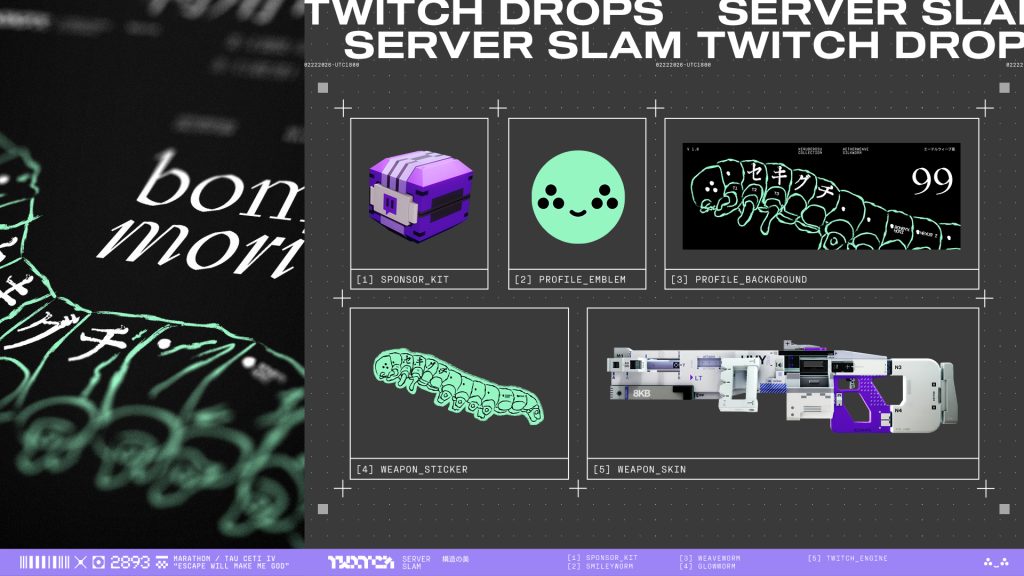
What Drops are available for Marathon? There are a total of 5 Twitch Drops that you can secure:
- Twitch Sponsor Kit, also known as Standard In-Game Loot (watch for 1 hour)
- Profile Badge: SMILEYworm (watch for 1 hour)
- Profile Background: WEAVEworm (watch for 2 hours)
- Weapon Sticker: GLOWworm (watch for 3 hours)
- Weapon Skin (Style): Heavy MG Twitch Drive (watch for 4 hours)
If you want to watch Marathon on Twitch, but also want to test it yourself, you now have the chance during the Server Slam. This is available – like the full game – on Steam, PlayStation 5, and Xbox Series X|S.
If you are unsure whether your gaming PC can handle the extraction shooter, you can read the system requirements on MeinMMO. These are surprisingly low: Marathon shows system requirements: You can even play the shooter if you can’t afford a new PC due to the RAM crisis

Your opinion is important to us!
Do you like the article? Then let us know!