


How does co-op work in Borderlands 3? How do you start the split-screen mode on PS4 and Xbox One? Is there a vertical splitscreen? We have all the info.

Borderlands 3 is a co-op shooter that you can play together. But how does the co-op actually work?
How many players can play co-op? You can play with a total of 4 players. That’s as many co-op players as there are characters.
It is not necessary for each player to play a different character – if you want, you can lead the same vault hunter into battle four times. Which vault hunter suits you can be found here.

Split-Screen for PS4 and Xbox: Here’s How
If you’re playing Borderlands 3 on PlayStation 4 or Xbox One, you can even grab a second player within reach and pull them to the screen. Borderlands 3 actually offers a split-screen mode.
Is there split-screen for PC? No. You can only play on consoles with split screen.
Can I change the split screen to vertical? No, that is not possible.
The screen is automatically divided horizontally and each player can do whatever they want on their half of the screen – just like you would expect from split-screen titles.
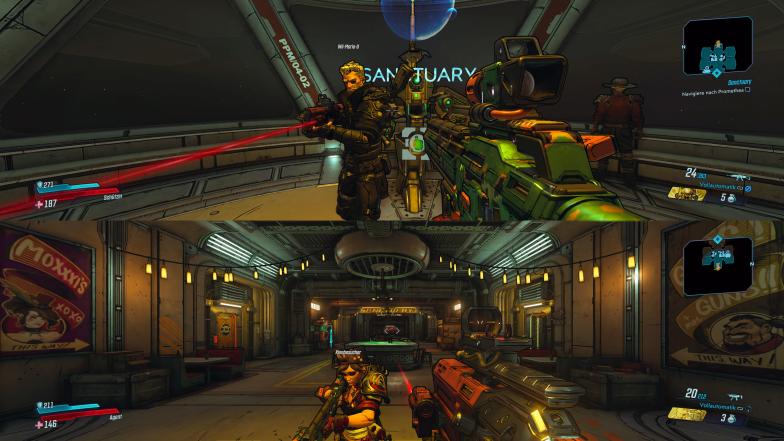
How do I start the split-screen mode? Starting the split screen is easy.
- Select “Play” in the menu.
- Then select “Add Split-Screen”.
- Then you have to confirm the “Split-Screen Join” with Player 2’s controller.
And it can start!
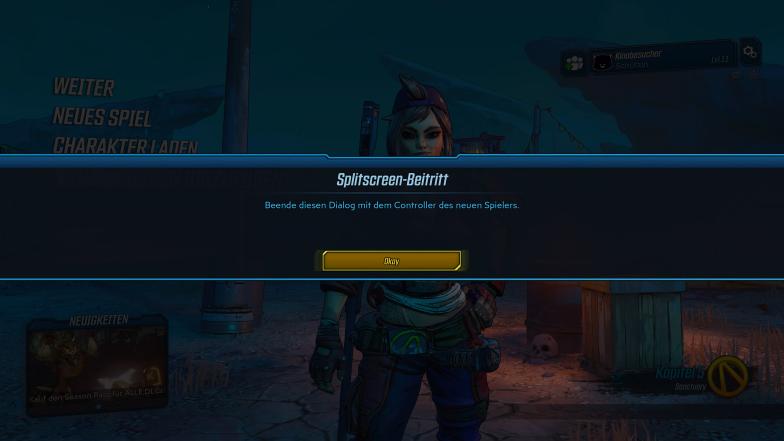
Do I have to buy the game twice for split-screen? No. It is enough if one of you owns Borderlands 3. The second split-screen player can then simply create a character via your game.
Progress in Co-op
How do we level up together in co-op? Everyone receives the same experience points. Just like in single-player, you can only use equipment that corresponds to your level.
The two co-op modes in Borderlands 3
You have the option to choose between two different modes, which also affect your progress.
COOPERATION: The enemies scale to your own level via a level sync and the loot is also individually for you.
With this mode, it is not a problem if your characters have a large level difference. Even vault hunters with a level difference of 20 or more can play together and see an appropriate threat in every enemy. Your progress is according to your levels.
If you don’t want that, you can choose the classic co-op mode of Borderlands 3.
COOPETITION: Level of enemies, loot and experience points are adjusted to the group leader. Loot is the same for everyone, and you can steal it from each other.
If you’re looking for the “original” Borderlands experience, you’ll obviously be fighting with your friends for the coolest weapons left by bosses. But if you prefer a little more peace and loot for yourself, you don’t have to play alone! There’s an option to set the loot to “personal”. In that case, each player gets their own loot, which only they can see and pick up. Arguments will thus belong to the past.

Communicating with Co-op Partners
“Mark Target” for quick communication: If you’re playing over the internet with others and currently don’t have a headset handy (or simply don’t want to use voice chat), you can communicate differently in Borderlands 3.
With the “Mark Target” function, it is possible to clearly mark enemies or certain objects. Other group members will then see a small symbol, so they immediately know what you wanted to draw attention to.
This “ping” system should be used actively to ensure a minimum level of communication. You can also do this through the emote function.

Crossplay between PS4, Xbox One and PC – Is that possible?
Is there crossplay? The bad news is that there will be no cross-play for the foreseeable future. So it is not possible for PS4 players to play with Xbox One players.
Players will need to find companions who play on the same platform as they do.
Are you experiencing Borderlands 3 in co-op mode? Or are you playing solo on your first run to enjoy the story?

So bleibt Ihr bei Borderlands 3 auf dem Laufenden: Wenn Ihr keine News über den neuen Shooter von Gearbox verpassen wollt, folgt doch unserer speziellen Facebook-Seite mit 100% News zu Borderlands 3.

Your opinion is important to us!
Do you like the article? Then let us know!