

With the latest update, Microsoft aims to fix issues for gamers in Windows 10. These include framedrops and strange in-game behavior.
Microsoft had already released a major update in April 2021 to fix performance issues in Windows 10. Nevertheless, some users are still complaining about ongoing problems when they want to play properly (via reddit.com):
- Some users are complaining about frame drops and abnormal rendering errors.
- Others are frustrated with blue screens that they continue to experience while gaming or after the latest update.
This has happened now: With the update from last week (KB5004237), Microsoft had already fixed some bugs, but especially the frame drops seem to still be a problem.
A further update is expected next week to address the last issues that users are still complaining about.
Who is affected? It is unclear how many players are affected by the problems. For instance, Windowslatest.com explains that the issue may not be widespread (via windowslatest.com). However, some Windows versions like Windows 10 Version 21H1 and Version 20H2 are likely affected.
Next week, a Windows update will come to resolve the last issues
When will the update come? According to Microsoft, the update is expected to appear on the upcoming Patch Day, which is Tuesday, July 27, 2021, for us.
If you are currently suffering from performance issues, you should definitely consider installing the update. In general, we recommend that you always install all important updates. This ensures a secure operating system.
Is there an alternative solution? If you are experiencing the mentioned issues, a small setting in Windows can help.
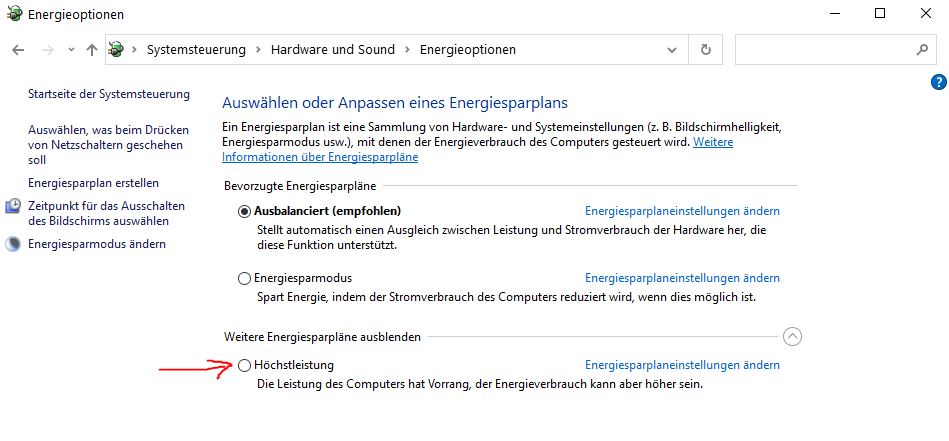
To do this, select “Power Options” in Windows. Typically, the “Balanced” setting is selected and recommended by Windows.
If you are having problems, you can switch your power plan to “High Performance.” This should resolve some issues. “Ultimate Performance” is also an option to improve performance.
How to activate the power-saving plan: First, open the Control Panel. Here, select “Hardware and Sound” and then “Power Options”. Alternatively, you can simply search for “Power Options” in the Windows 10 start menu and go directly to the corresponding menu.
With the latest update, Microsoft adjusted the power options so that your settings are also used in game mode and are not lost.
But there is also good news for gamers playing on Windows 10. One of the best gaming features that was originally thought to be exclusive to Windows 11 is now also coming to Windows 10. This should especially please many users who do not want to switch to the new version yet.
Are you looking for more tips to get more performance from your PC? Here we present 5 things for under 20 euros that can improve your PC’s performance.

Your opinion is important to us!
Do you like the article? Then let us know!