

The icons at the top of your Android phone screen inform you about a lot – much more than we realize in everyday life. MeinMMO explains what the arrows or triangles next to the icons for Wi-Fi, mobile data, and sometimes Bluetooth mean.
What symbols are meant? It refers to the triangles or arrows that appear next to the actual displays for active networks (Wi-Fi or mobile data). They point up, down, or in both directions at the same time.
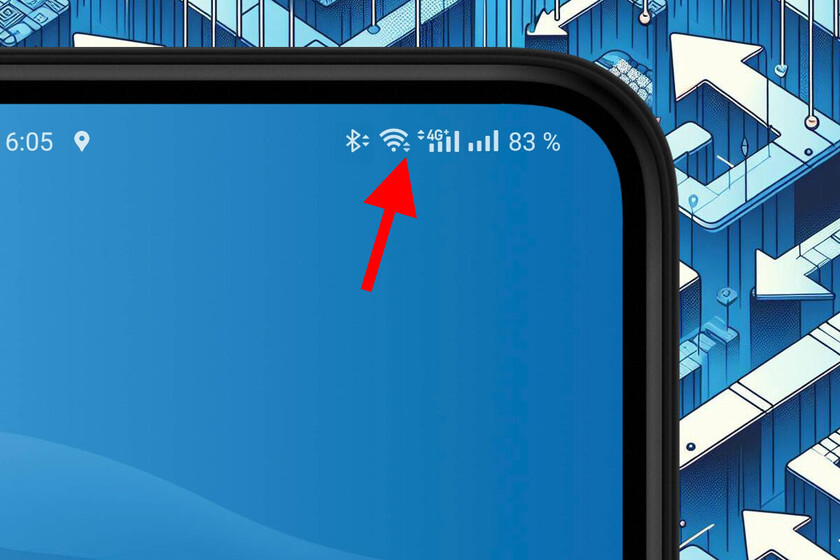
Do the symbols always look the same? No, depending on the provider, you will be able to spot different symbols, just compare with your acquaintances. Every manufacturer is allowed to slightly adjust the appearance according to their respective design philosophy. However, the symbolism should always be similar and recognizable.
In this article, we will uniformly refer to arrows as a synonym.
What does the Wi-Fi/Mobile Data icon show me? There are different versions here as well, but generally, it can be read as follows: The fuller the respective symbol or the more bars/triangles appear, the stronger/stabler the connection to the respective cell tower or Wi-Fi router.
Note for Active Data Exchange
What does my phone do when the icon appears? Whenever an arrow or both light up next to the Wi-Fi icon, your phone is exchanging data.
- If the arrow points down, it is downloading; a download is happening.
- If it points up, it is uploading; an upload is happening.
Both arrows can appear together. Even seemingly simple things like a video stream or downloading a file require active communication between the server and the smartphone. For example, it requires acknowledgment receipts and much more for everything to start correctly and be completed.
Is it dangerous if the arrows often appear without a clear trigger? No, it is not always evident to the user why data is being exchanged (legally and safely) at that moment. Often, we do not actively initiate the transfers ourselves. Many programs synchronize data or update in the background, especially Google services.
So first of all: Stay calm; your phone is a mini PC that handles countless tasks without informing you. However, you can check under Android settings in Connections and Data Usage which apps have used your mobile data bandwidth and to what extent.
Up/Down Arrows with Bluetooth
What do the arrows mean with Bluetooth? With Bluetooth, the regulation is less uniform. Some providers use arrow-like double symbols to indicate that a device is connected, but many do not. Generally, this sub-symbolism is less important and can be ignored by most users.
Because the example of Bluetooth headphones quickly makes it clear why an upload/download display is less relevant here: The connection must remain established permanently and exchange at least minimal amounts of data for the microphone or speakers to be used in real-time.



If you want to read an example where something illegal truly happened and what consequences this can have in the case of a stolen gaming account, we recommend another article on MeinMMO: It is about a particularly audacious hacker who indulged for hundreds of hours in something very specific on a stolen account for months. The actual owner almost felt sorry for the thief.

Your opinion is important to us!
Do you like the article? Then let us know!