

On the consoles PS4 and Xbox One, players have discovered a small trick in Call of Duty: Warzone, the battle royale of CoD: Modern Warfare, which can help you save valuable time during the looting process. We explain what you need to do.

Time is important: In shooters, often fractions of a second decide whether you come out victorious in a duel or fall short against your enemy. This is also the case in Call of Duty: Warzone, the in-house battle royale mode of Call of Duty: Modern Warfare.
The less time you spend, for example, picking up loot, the better you can utilize that time – whether it’s to shoot before a potential enemy does, to hide behind cover, or to reach a strategically advantageous position in time.
In short: Looting takes time, and in the worst case, that time can cost you your virtual life. However, there is a trick that can minimize that time.

What is the trick about? By default, picking up loot in Warzone takes quite some time. You have to hold the corresponding button to pick something up. Only after a noticeable delay do you have the loot by this method.
What many do not know: By changing a setting in the options, you can reduce the time spent on looting.
How the trick works in detail:
- Go to the options of Modern Warfare / Warzone.
- Navigate to the controller tab and scroll down to the weapons.
- Now look for the option “Use/Reload Behavior”.
- You can choose between “Press to Reload” (default), “Press to Use,” and “Contextual”. Set this option to “Contextual”.
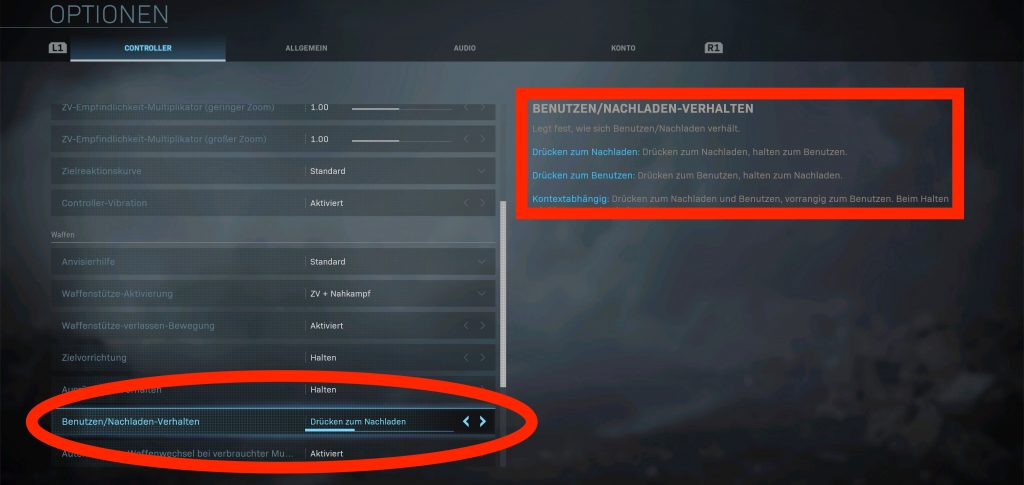
This is what changes: This changes the standard option, where you have to press the button to reload and hold the button to use.
Now pressing will use or reload – but using takes precedence. So when you stand next to an item, actively look at it, and press the reload button, the item will be picked up and the weapon will not be reloaded. However, with this setting, you can still reload with a button press as usual.
The adjustment to the new setting is quite quick. By the latest after a few rounds, this setting should feel completely natural.
How much faster is picking up loot now? Although we did not time it, the time spent looting is noticeably reduced with this trick.
In this video, the YouTuber Scahty also shows a before-and-after comparison of both options:
Here you can find more tips and tricks for CoD Warzone:
- CoD Warzone: How spectacularly you can bring down helicopters – even without a weapon
- CoD Warzone: Clever method brings huge advantage in the Gulag
- CoD Warzone: Why stones in the Gulag are more important than many think
- The best landing zones in CoD: Warzone and what you can find there
- CoD Warzone: With this trick, your team can see every enemy on the map
- 10 tips that give you the decisive advantage in CoD Warzone
- CoD Warzone: Dirty tactic allows kills before the match really starts
By the way, Warzone may continue in the new CoD 2020: CoD Black Ops 2020: New details leaked about campaign, zombies, and multiplayer

Your opinion is important to us!
Do you like the article? Then let us know!